
Xiaomi MMS issue
Solved/Closed
Hello,
.
To my great misfortune, due to a material end of life, I had to change my phone and being on a tight budget, I got a Xiaomi Redmi 14C.
.
As a "non-pathological but simplistic" mobile phone user, I am encountering many problems with this new phone, but I would really like to know if it is possible to solve this one please.
.
So first of all, unlike my old phone which automatically activated AND deactivated mobile data when sending or receiving SMS, this one keeps mobile data activated constantly after I click on the alert message from the Settings when I receive a MMS and data is not activated.
.
I do not wish to leave mobile data activated permanently because there are apps/features in the background that gladly consume data and I only have 50Mo.
During the phone startup, it took me some time to configure it before finally accessing the home screen where I immediately disabled mobile data, but it had already taken 10Mo due to the crummy pre-installed apps...
In short
I "deleted" (rather erased from the screen because I doubt they are really deleted) all those apps and I rummaged through the phone to disable auto use of mobile data for more than 100 apps/features as well as background usage.
.
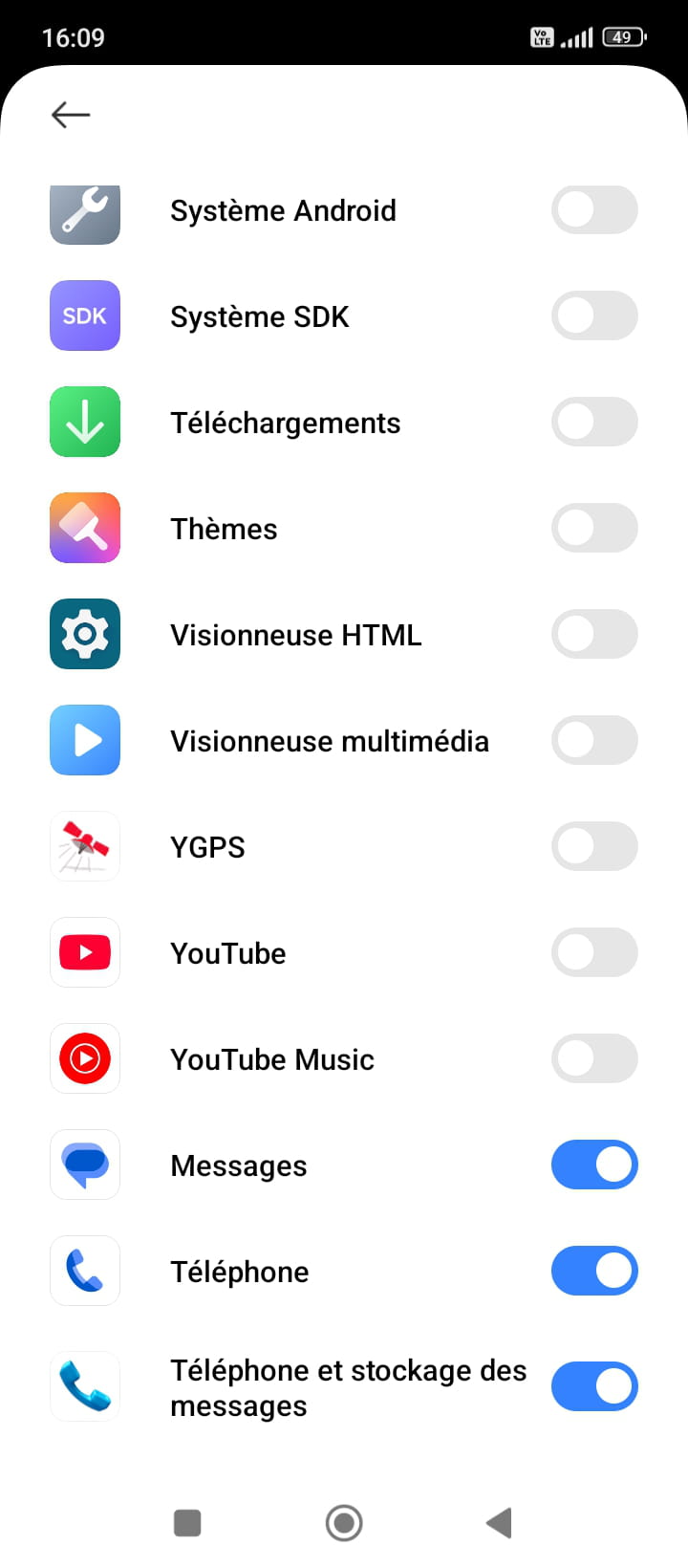
Regarding MMS, after several alert messages from Settings, I noticed that I have to grant access to mobile data for 3 apps: "Messages, Phone, and Message storage".
If these 3 things do not have mobile data allowed in their settings, I can neither send nor receive MMS.
.
So I have to manually activate mobile data in order to turn it off every time I receive or send a MMS.
The problem is that sometimes I manage to download and send a few images, and after that, they stop sending/stopping downloading.
I have a timer under the image and by long-clicking on it, it says "sending in progress".
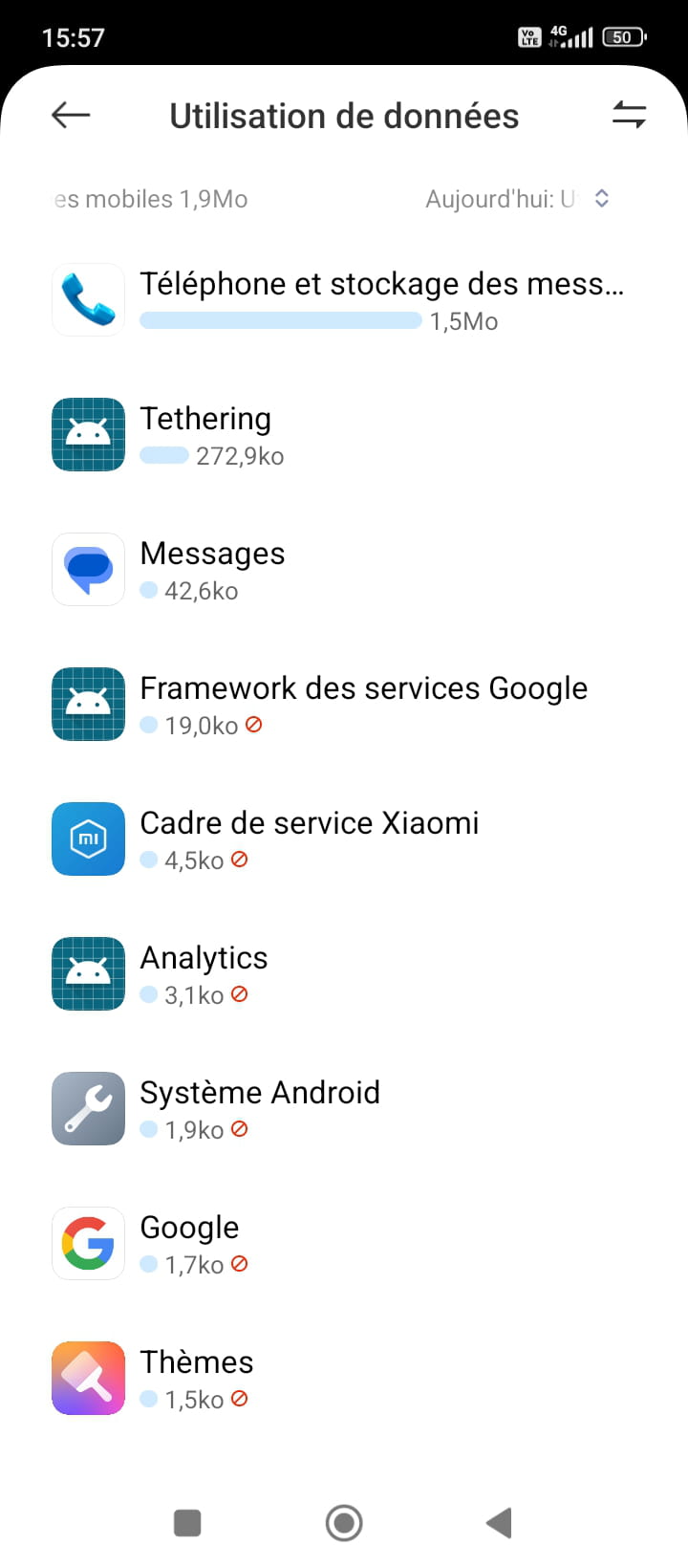
I leave mobile data on for 5 minutes and then I turn it off and give up because there are things that consume data (tethering, system app, etc., and others for which I have prohibited the use of mobile data).
.
Sometimes when retrying the next day, I manage to download/send the images, but I have the impression that there is a "quota" like 2 images sent/2 received and that’s it...
.
Yet I have an unlimited SMS/MMS plan.
I have already tried recreating the free MMS APN and restarting the phone without success...
With this phone, MMS is hit or miss...
.
I have no words to describe my disgust with this phone, but I have to make do...
Are there any solutions so that I can receive/send MMS without problems by activating mobile data only when necessary WITHOUT permanent activation due to massive background consumption?
.
Thank you for your help.
5 answers
-
Contributor
Good evening,
You are a bad disciple...the new religion is: you shall consume.
-
Hello,
MMS data is not counted against the Free data "plan", the question is about the applications that run in the background as soon as mobile data is enabled and will never be completely null, even if they become insignificant (notably the few KB shown in the screenshot).
There are only three types of solutions.
-Disable data on Free's online site
-Modify the APNs when possible
But we then depend on the transmission protocol used by the phone model, which is not always possible.
https://forums.commentcamarche.net/forum/affich-28515421-peut-on-recevoir-des-mms-de-free-sans-donnees-mobiles
-Change plans: without even having to search among more or less reliable MVNOs, for example B&You, Red, SFR, or Sosh would offer a plan with 1GB of unlimited MMS for €1.99, which solves the problem.
Even though the conditions of the different plans are always obscure, doesn’t Free's plan include the free option "Booster 1 Go" for 1GB in 4G?
As I am a capitalist, I have a 10GB Red SFR plan that I don't use for €5.98, but in this slightly higher price range, there are many 10-30GB plans that we won't use either under €5. -
@brucine
Thank you for your response
.
Yes I knew that MMS were not counted against the data, but since you have to turn on mobile data to receive an MMS, all the apps running in the background benefit from it...
.
And my problem is that sometimes I receive/can send an MMS without any issue (it downloads/sends within 10 seconds after activating mobile data) and sometimes it doesn't work (it just keeps spinning both for downloading and sending) and I don't understand why..
.
I end up turning off mobile data because while the MMS downloads are not going through, it consumes data..
Trying again a little later works or doesn't... Trying again the next day usually works.
.
What I don't understand is that during a conversation with someone where we exchange SMS and MMS, I turn mobile data on and off as she sends me an MMS or I send her one.
Everything goes fine for the first images, and then it stops working...
Like there’s a "quota" that only allows me to download/send a maximum of 4 MMS per day with this damn phone, I don't know...
.
It's really annoying!
I have unlimited MMS, I have checked Auto-download MMS, I have the correct APN, and the images do not exceed the allowed size...
So I don't understand why on any given day, some MMS go through and others lag, and I have to try again later to turn mobile data back on to see if they go through...
.
The point when you're chatting with someone is to receive information in real time!
Well, I only get half of it with this piece of junk phone... Great..
I'm going to keep it for several years unless it becomes "obsolete" (my functional and regretted Wiko lasted 10 years)
In any case, Xiaomi never again, the basic functions are not reliable, you cannot receive ALL MMS for an inexplicable reason...
.
I read your link which indicates how to disable mobile data to receive only MMS with mobile data always enabled, but I still prefer to keep mobile data on.
It's still convenient for me occasionally to access the internet to check schedules or public transport routes in case of issues since I use them every day
-
@SDWilliams
I don't see what the phone has to do with this; if it didn't allow for normal MMS management, it would be known.
If, as I said, we disable everything that isn't useful and limit as much as possible the permissions of the rest, data consumption will be very low but probably still too much for you (for reference, mine with mobile data activated and barely using only phone and SMS outside has consumed 30 MB until this evening), your manipulations are unmanageable.
It seems to me, as I said, that we need to check if the Free plan doesn't have the famous free "Booster" option that I mentioned; otherwise, the solution is of course to switch to a competitor with a plan of the same price offering 1 GB of data, which is more than enough for the cause.
-
-
Contributor
Here is a plan for €2... Unlimited calls + SMS/MMS and 1GB of Data.
It doesn't always exist... you can only buy the SIM card.
-
Hello,
.
Thank you for your suggestions.
I do have the free booster option with Free, but it's €10 upon subscription.
.
Of course, the unexpected data consumption outside of receiving MMS is annoying for me, and having to upgrade or boost my plan to avoid going over limits would be an added hassle, but I believe the underlying problem has no solution.
.
Why do I receive some MMS instantly and not others?
Why do I receive or send some MMS in a few seconds while others are stuck "waiting for download/sending in progress" for several minutes?
Why can I only send/receive certain MMS by trying again later or the next day instead of immediately?
.
That’s the main issue, especially since on this phone I no longer have the option for delivery receipts for MMS.
For example, I send an image, and there’s a timer underneath. When I go to Details, it says Sent at a certain time, and when I long-press the image, a circle spins endlessly with Sending in progress or Delete.
.
The problem is that with this phone, receiving or sending MMS in real-time is not guaranteed!
With my old Wiko, there were no problems > automatic activation/deactivation of DM for sending/receiving MMS, delivery receipts letting me know if the message was received by the recipient, very rare download lag if the person sent me a photo from a poorly covered area, but that's all.
Instant download/sending of MMS with the Wiko.
.
With Xiaomi, some MMS are in real-time, while others will arrive later.
Why?
Can we fix this issue, or is the phone just rubbish in general, and I should just forget about MMS?
If it’s personal, oh well, but if it’s professional, I don’t want to look like an idiot > "Hello, I’m sorry, I can’t receive your image; I’ll have to try again later" ...
-
Hello,
What do you want us to say?
Phones, whatever they are, are not designed for this type of acrobatics.
As mentioned in <2>, the delivery of MMS can depend on the MMS protocol and the applications used, which can differ for each brand or model without necessarily implying quality or lack thereof (Wiko is not really known for producing high-quality devices), and in any case, this is internet by definition, with latencies that may exist on the servers.
Maybe try changing the messaging app used on the phone; is it specific to Xiaomi, Google by default?
Otherwise, there is no solution other than those we have discussed; Jeannets tells us that the equivalent Red SFR plan no longer exists, other brands apparently do, if the Free option is actually not free but costs €10, then the problem shifts to that of a SIM card with the competition; it seems to me that it is only €1 for example at B&You. -
@brucine
Alright, thank you
Yes, it's the Google Messages app, everything is managed by Google on this phone
Upon powering it on, since I had to enter my account, it took the liberty of adding email addresses picked from my computer's messaging app into My Contacts, and it took the liberty of adding birthday dates that I had on my old phone into the calendar (apparently on Wiko it was also Google that managed the calendar, anyway)
.
All of this particularly annoyed me especially since for the birthday dates it added dates that I had deleted ages ago!! (And yes, I had indeed clicked "Delete ALL events" for the concerned dates)
.
When I buy a phone, it is supposed to be empty and it is up to me to input the data I want in it, but big brother takes care of everything behind your back..
The least we can say is that absolutely nothing is erased anywhere!
We have control over absolutely nothing ...
Anyway
.
So I'm going to have to deal with the random reception of MMS which for me is not related to the operator since for 15 years of subscription with 2 previous phones I had no issues regarding MMS
It has really been since I got this Xiaomi ...
I do not want to change my plan or operator because I benefit from a bundled offer with a discount that will be void if the offer is split.
.
Thank you for your help both and have a nice day :-)
-
@SDWilliams
On the data resurrected on a new phone, it's not about magic but about synchronization with the Google account which, according to its settings, is not mandatory (and which also necessarily consumes data unless on Wi-Fi at home).
No one has blamed the operator, only the fact that their plan does not include 1 GB of data.
Now, no one can solve the circle's squaring, disable mobile data while keeping the Internet (with only 50 MB of data?) or choose not to switch to a plan that would solve the problem because the current one offers specific cross advantages.
On the phone, using, as I believe specified in the link in <2>, a modified specific MMS APN does not solve the issue?
I do not know the specific cross offer in question, but there is no guarantee that it is more advantageous than an Internet contract and a mobile plan that we would subscribe to elsewhere; competition is fierce. It's up to you to see what the amounts at stake are, but regardless of whether the famous Free Booster option is €10 once and for all, it’s not insurmountable either. -
@brucine
On contacts, on some older phones they can be stored either on the SIM card or in the phone's memory; in the first case, if we haven't transferred them to the memory, we will of course resurrect them with the old SIM card on the new phone.
Most new phones only store them in memory. -
@brucine
Yes indeed, that damn sync!
It's because of that that it went picking up data here and there to put it into the new phone.
.
Yet when starting up the phone, after asking me to log in to Google, it asked me "Do you want to sync your devices" and I said NO!
And then later when I was rummaging through the countless settings, I saw that sync was enabled so I disabled it!
.
The problem with new phones is that mobile data, wifi, and sync are enabled by default when you turn them on, and by the time you do the setup maneuvers to finally get to the home screen, well it creates a whole mess behind your back...
.
As for the contacts, I also no longer have the same options as on the old phone.
Before, I had stored my contacts on the phone and on the SIM card and I had the option to "display only the contacts from the phone" (or from the SIM card, or from Gmail).
.
I couldn't keep the same SIM card for the new phone because the one I had was a Micro and now it's only Nano... Anyway.
I first went to Fnac to look for a mobile but the prices were higher than at Free and I asked the salesperson if there were still phones with MicroSim, but no, now it's only Nano.
.
The salesperson told me "Your operator can cut it for you for free or otherwise you can go to a mobile repair shop, they can do it too, it will cost you 5-10 euros."
.
Well, when I asked about the cutting at the Free store, the salesperson said "Oh no, you have to get a new one," charged at 10 euros.
A little revenge on his part as he kept pushing a Samsung on me even though I specified several times that I wanted the Xiaomi within budget and I had looked online before going to the store.
.
So with the new SIM card, I took the time after setting up the phone to save the contacts (which I had previously noted by hand) on the phone and on the SIM card.
And well with the Xiaomi... no option to display only the contacts saved on the phone so they're displayed in duplicates...
I ended up deleting the contacts I had saved on the new SIM card because the character limit for names is reduced, so it gives truncated names and it's ugly...
Similarly, for sorting names, I prefer alphabetical order with the last name first and the first name after...
Instead, it puts a comma between the last name and the first name... Go figure the joke.
.
I will try this APN thing in the link hoping it doesn't bug everything, but I'm still particularly annoyed.
.
I don't want to permanently turn off mobile data while still enjoying MMS or the internet, I know they need to be enabled for that.
What I want, because it doesn't always work currently for mysterious and unexplained reasons I'd like to understand, is that when I turn on mobile data to download or send an MMS, it actually downloads damn it!!
.
Because when the loading (for what reason?) lags, well in the meantime, parasitic apps drain data, and so I can’t keep mobile data enabled all day until the MMS finally decides to download!
.
It's not about increasing the data to counter the overconsumption that I need, what I need is that when I activate mobile data, the MMS download or send! Period.
Sending and receiving SMS/MMS is still the basic function of a smartphone, right?
.
I've been with Free for 15 years, I've had a Samsung Trend Lite I don't remember what, a Wiko Pulp, I've never had a problem with MMS.
With the Xiaomi and Google Messages for MMS:
You receive an MMS on Monday, you turn on your mobile data, either the MMS downloads instantly or the circle just spins aimlessly, nothing, you wait 5 minutes and then give up.
You turn your mobile data on again in the afternoon, either the MMS finally downloads or it spins again aimlessly.
You turn your mobile data on Tuesday, finally the MMS you received on Monday has downloaded...
You're not going to tell me that's normal operation!
MMS are supposed to download/send IMMEDIATELY as soon as mobile data is activated!
-
-
Contributor
Hello,
Indeed, many phenomena do not seem quite normal...
But in the reflections, there is only the accused's phone... While the smartphone is just a small link in the entire transmission chain...
The policy adopted by the provider is very important... And the relay pylons as well... If mobile telephony exists, it's thanks to these structures that cover the entire country... mainly... the smartphone comes second.
The reflection needs to be broader (bird's eye/satellite view)
As for delayed SMS messages, it sometimes happens to me in certain regions, in the absence of network...
-
Yes, indeed, we only know the tip of the chain but not the root...
That being said, I have never had a problem with MMS before, so implicitly the new smartphone is to blame since it’s since its use that there have been bugs..
.
I also had a very rare occasion where an MMS didn't go through because it was a vacation photo sent by a friend in the mountains, so there was almost no network.
But when you don't receive an MMS from someone who lives in the same city as you right away, something is off!
.
What I don't understand is the random side of it.
It's not like I don’t receive any MMS at all because the phone doesn’t allow it, or that I receive all of them when it's working properly.
From the same person during the same conversation, I manage to download some MMS and not others, while it’s supposedly not a network issue since DMs are enabled, nor a size issue, etc...
.
In short, this prepares me for the worst that is to come, because at the beginning of the year it was a phone change and at the end of the year it will be a computer change since mine is not compatible with Windows 11 and is also starting to show signs of weakness approaching the fateful 10 years...
.
I remember the "start-up time" with that one:
You turn on the PC, the first half hour is spent unchecking an incalculable number of boxes (looking for the hidden ones) > No, you don't want to send stats/reports to I don’t know who, No, you don’t want Cortana, No, you don’t want Edge to be your browser, No, you don’t want your keystroke data to be used for I don’t know who...
Then the next half hour you spend uninstalling all the pre-installed crap > Booking, TripAdvisor, Candy Crush, etc., and you have to restart each time.
I remember the tug-of-war with that damn Norton that came back every time...
Anyway
.
For me, a powerful and functional computer is: you turn it on, you land on the desktop, there's This PC, My Documents, Control Panel, and the Recycle Bin.
That's it… the basics… period!
.
We're going to try to temper our rage and collaborate with the "performant" equipment that is imposed on us in the name of "progress"...
-
-
Moderator
Hello .
Duplicate continues here https://forums.commentcamarche.net/forum/affich-38225297-surconsommation-data-appli-google-messages.


