WiFi icons, airplane mode, mobile hotspot missing??
Solved
brupala Posted messages 111196 Registration date Status Member Last intervention -
Hello,
On a an older parent’s PC, the WiFi, airplane mode, and mobile hotspot icons have disappeared from the lower right corner? Please see the picture of what is visible on my PC but not on my grandpa's, thanks.
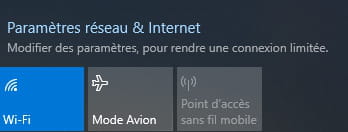
His box is down, so the operator lent him a 4G key, but...impossible to find the shortcut to connect via WiFi?
I tried plugging the 4G key into the box, same issue :(
It’s worth noting that sometimes...only the "Airplane Mode" icon is visible on his PC??
I’m not at all "tech-savvy" when it comes to office work, so could you please explain to me simply how I can make those icons appear so that my ancestor can finally connect to the world!!
Thank you.
Have a great day everyone :)
5 answers
-
Hello,
right-click on the taskbar => Taskbar settings =>
Click on "select which icons to display" => Check if network is present and checked
If OK, in the search bar of the taskbar, type "Wifi" then click on "Wifi settings" => Check that it is indeed enabled
-
Hi,
are you talking about a 4G USB key or a standalone (rechargeable) pocket router, what is the exact model?
Are you sure the PC has a Wi-Fi card, how is it connected to the box?
To see if it has a Wi-Fi card, check the device manager.
If it's a USB key, you should have the driver to install in a memory partition (removable disk) of the key itself.
And there you go, there you have it ....
But goodness, the line spacing is so annoying!! -
Hello MisteryBean and Brupala,
Thank you for your responses!
In turn, I will share the details with you, thank you.MisteryBean,
In "Select the icons to display in the taskbar," the Network is checked as Enabled == mention Network 15 No Internet access.
In the lower right corner of the screen, the following now appear:
* Network 15 No Internet,
* Broadband connection
When I click on Network 15, I see "Ethernet Network 15 Limited."
If I click on broadband connection, the mention "Set up a new connection" appears. I don’t know what to do...
Brupala,
On the box provided by the operator, it mentions 4G key, it’s a small device from ALCATEL.The pc is directly connected to the box via an Ethernet cable.
In the device manager, I see:
* mobile devices,
* graphics card (1),
* network cards (1 Realtek PCIE... and 8 different WAN Miniports),
* keyboard, software components, audio controllers, bus, storage, IDE, disk drives, etc..
I don’t see any WIFI word in this manager???
Please let me know what you think.
Is it possible that this pc (bought a few years ago at a low price) does not have a Wifi card??
-
Most desktop PCs (tower) do not come with a WiFi card installed by default.
Aside from the brand Alcatel (which no longer exists, it's Nokia now), can you not see the specific model?
If it's this kind of router, you'll need to invest in a WiFi/USB adapter to connect to the router via WiFi with your PC.
-
-
Hello Brupala,
Yes, that's exactly that white Alcatel model.
Thank you very much for the recommendation of the wifi/usb adapter as well as all the links!!!
I don't know anything about this at all.
With the adapter connected to the PC and the Alcatel router turned on next to it, it should work. Awesome!!
Thank you so much really.. :)
I'm going to buy one really quickly and save Grandpa!!!
Thank you Brupala.
Have a great rest of the day. -
Hello Brupala,
With the adapter, Grandpa can "surf" again, it's great :) :)Thank you !!!!!!!!!!!!!!!!!!!!!