
The print spooler keeps stopping.
jpmarce
Posted messages
47
Status
Member
-
Sylvain -
Sylvain -
Hello,
I have performed all the recommended actions to resolve an issue with the spooler that keeps stopping: clearing the PRINTER folder from the spool, running FixPrints (operation completed), starting SFC /SCANNOW which completed a successful repair,
Here’s what I get when I try to print a document in Notepad for example, a message asking me to install a printer even though I have several listed:

and if I try to open the printer properties, a message says that the local print spooler service is not running:

Curiously, the problem appeared after changing a toner in an HP printer
Thank you for your help. I cannot see the screenshots inserted above...
Configuration: Windows / Chrome 95.0.4638.54
I have performed all the recommended actions to resolve an issue with the spooler that keeps stopping: clearing the PRINTER folder from the spool, running FixPrints (operation completed), starting SFC /SCANNOW which completed a successful repair,
Here’s what I get when I try to print a document in Notepad for example, a message asking me to install a printer even though I have several listed:
and if I try to open the printer properties, a message says that the local print spooler service is not running:
Curiously, the problem appeared after changing a toner in an HP printer
Thank you for your help. I cannot see the screenshots inserted above...
Configuration: Windows / Chrome 95.0.4638.54
13 answers
-
pistouri Posted messages 19010 Registration date Status Contributor Last intervention Ambassador 8 732
Hello,
Bis repetita.
It could be that the latest Windows Update is messing up once again.
After installing KB5005611 for Windows 10, problems have arisen with certain network printers.
This issue was supposed to be resolved with KB5006670.
However, after installing KB5006670, some people are experiencing the issue again where network printers do not work.
Workarounds.
Win32spl.dll (version 19041.1237)
Copy Win32spl.dll into System32.
Download the file ==► old version of Win32spl.dll
Double-click to extract
Or use 7-Zip
Then go to This PC -►Local Disk (C)-►Windows-►System32
Copy and paste --►Win32spl.dll
Confirm the replacement of the Win32spl.dll file
Try printing, you may need to restart your PC.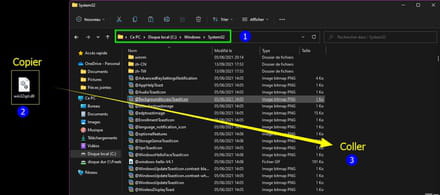
Update.
Uninstall the update KB5006670
In the search box on the taskbar type --► cmd
Right-click on --►Command Prompt
Then --►Run as administrator
Copy/paste --► wusa /uninstall /kb:5006670
Then -►Press the Enter key
Close the command prompt window or type exit
Restart the PC
Try printing.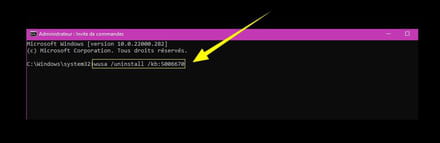
Or How to uninstall an update
From the Windows 10 settings
A+
--
scalpel



