Unable to open LibreOffice
Solved
fabnanou19850606 Posted messages 91 Registration date Status Member Last intervention -
Hello,
I reset my Packard Bell EasyNote TE69KB laptop. I reinstalled the basic software (browser, printer). I also wanted to install LibreOffice (version 26.2.4). But at the first opening, here are the 3 messages I got:
Is there something to do? Download and install a more recent version? Download and install OpenOffice instead?
This is not the first time I have issues with LO (I had problems on the other PC with auto-updates).
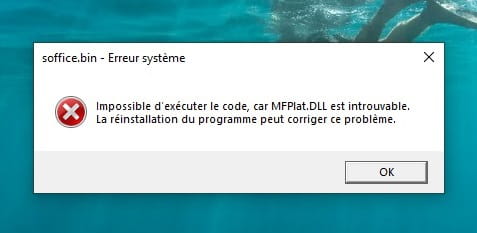
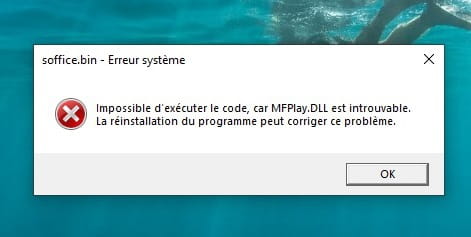
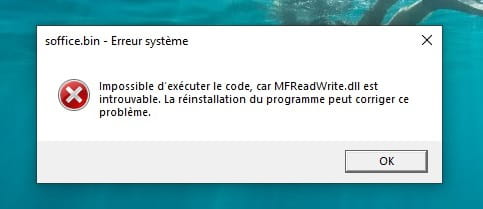
problems with missing codes and .dll files
Is the problem my PC? LO works well on the other PC.
3 answers
-
I uninstalled version 26.2 and as I said, I installed the previous version 25.7. And now, there are no issues opening it.
Problem solved!!!
-
Hello,
Great news, I managed TO INSTALL correctly LO 26.2.5.2 on my Packard Bell THANKS TO Google AI. At LO launch, I had 3 messages in a row (missing .dll files)
Me: I can't install LibreOffice it tells me .dll files are missing.
AI: This error message usually means your Windows system is not up to date or that the components required by LibreOffice (the Microsoft Visual C++ redistributables) are missing or corrupted.
Here’s how to solve this problem quickly step by step.
1. Install the missing Microsoft components
LibreOffice needs specific system files to function.
-
Download the official Visual C++ Redistributable package directly from Microsoft’s site.
Choose the 64-bit architecture (X64) version if your Windows is recent, or X86 if you’re using an older 32-bit system.
Install the downloaded file and then restart your computer.
2. Update Windows
The missing .dll files (such as
api-ms-win-crt-runtime-l1-1-0.dll) are often included in Windows updates.-
Open Windows Settings (Windows + I).
-
Go to Update & Security (or Windows Update).
-
Click Check for updates.
-
Install all available updates and restart.
3. Clean and reinstall LibreOffice
If the previous steps aren’t enough, the installation file may be corrupted.
-
Delete the current installation file.
-
Empty your computer’s recycle bin.
-
Download LibreOffice again only from the official site (
libreoffice.org). -
Right-click the downloaded file and choose Run as administrator.
To help you better, could you tell me:
What is the exact name of the .dll file that appears in the error message?
Me: sending photos of the 3 messages
These error messages (
MFPlat.DLL,MFPlay.DLLandMFReadWrite.dll) indicate that your computer is using a "N" or "KN" version of Windows (specific European editions that do not include multimedia features by default).Indeed, I had restored my PC PB with a lean N version!
Since version 26.2, LibreOffice requires these Microsoft multimedia files to start.
To fix the problem, you should not download these files one by one from third-party sites. You simply need to enable the official Microsoft Media Feature Pack directly in your Windows settings.
Here is the quick procedure:
Step 1: Install the Media Feature Pack
-
Open the Settings of your computer (via Start menu or the
Windows + Ikeys). -
Go to theApplications section :
-
-
On Windows 10: Click on Apps, then on Apps & features, and finally on Optional features (if like me you can’t find Optional features, search in the bar)
-
-
-
On Windows 11: Click on Apps in the left menu, then on Optional features on the right.
-
Click the Add a feature button (or Show features on Windows 11).
In the search bar, type:
Media Feature Pack.Check the box next to the pack, click Next then Install.
-
Once the installation is complete, restart your computer.
After the reboot, Windows will automatically re-integrate all missing
.dllfiles, and LibreOffice will open without any error. -
-
If the messages mention missing DLLs or system errors, the problem may not necessarily be with LibreOffice itself, but rather with Windows or a component that has not been reinstalled after resetting the PC.
In your place, I would start by downloading the installer again from the official site and doing a clean installation. Also, make sure that all Windows updates are installed.
OpenOffice can be a troubleshooting solution, but LibreOffice is generally better maintained and more up to date. If you can post the exact details of the error messages, it will be easier to identify the cause.