
Bookmark Icons
jeanfrancoismilan
-
pistouri Posted messages 19008 Registration date Status Contributor Last intervention -
pistouri Posted messages 19008 Registration date Status Contributor Last intervention -
Hello,
To organize my bookmarks bar, I created folders to group my bookmarks by category.
I have the icon corresponding to a folder, but I would like to set a specific icon, as it forces me to use text to know which bookmarks folder it is, otherwise all the icons of my different folders are identical.
Is it possible? I could not find how.
Configuration: Windows / Firefox 86.0
To organize my bookmarks bar, I created folders to group my bookmarks by category.
I have the icon corresponding to a folder, but I would like to set a specific icon, as it forces me to use text to know which bookmarks folder it is, otherwise all the icons of my different folders are identical.
Is it possible? I could not find how.
Configuration: Windows / Firefox 86.0
2 answers
-
Hello,
In my opinion... No.
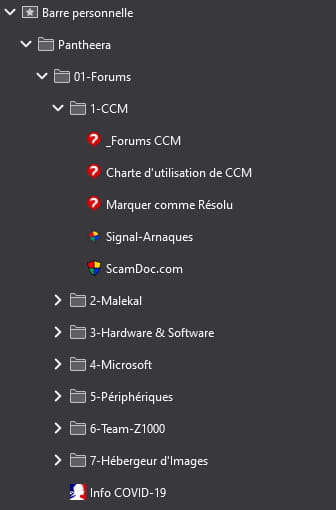
Here are my first bookmarks and website(s) I use. By right-clicking, I am unable to change the folder icons.
--
ASUS ROG G752 VSK | QuadCore Intel i7 7700HQ | 32 GB-DDR4 | 2 SSD M.2 500 GB | 2 HDD Seagate 2TB | GeForce GTX 1070M 8 GB | 17.3" screen (120 Hz) | DirectX 12 | Windows 10 (x64) -
pistouri Posted messages 19008 Registration date Status Contributor Last intervention Ambassadeur 8 723
Hello,
In my opinion... it could be possible.
I have the icon corresponding to a folder, but I would like to put a specific icon, otherwise all the icons for my different folders are identical.
I'm not talking about ==►Folders in my bookmarks list are gray
But folders present on the personal toolbar.
If you want, we can add color to the folders, which will differentiate them (regardless of the folder name).
Example with a folder ''user'' and a folder ''impôt''
Before:
After:
This involves creating a userChrome folder.
I will make you a picture tutorial, as it's not simple.
I will give you the color codes for each of the folders. (Green, Purple, blue, banana is yellow.....)
It remains to be seen if this interests you, as to date there is no Firefox extension capable of doing it.
See you!
--
pistouri


