Yellow bookmark folder color in Firefox 89
Solved
mpuissance4
Posted messages
14750
Registration date
Status
Contributor
Last intervention
-
pistouri Posted messages 19010 Registration date Status Contributor Last intervention -
pistouri Posted messages 19010 Registration date Status Contributor Last intervention -
Hello everyone
My bookmarks have changed color, instead of the yellow icons, everything is white. I've tried several solutions, nothing works
https://forums.mozfr.org/viewtopic.php?t=135482
https://forums.commentcamarche.net/forum/affich-34897834-dossiers-devenus-gris
https://www.youtube.com/watch?v=Hjp-_gInK9U&ab_channel=littleboy62&ucbcb=1
Does anyone have a new solution to make it work, please? Thank you in advance
Sincerely
MP4
--
Time heals all wounds, even if it doesn't spare us a few scars.*^_^*.
My bookmarks have changed color, instead of the yellow icons, everything is white. I've tried several solutions, nothing works
https://forums.mozfr.org/viewtopic.php?t=135482
https://forums.commentcamarche.net/forum/affich-34897834-dossiers-devenus-gris
https://www.youtube.com/watch?v=Hjp-_gInK9U&ab_channel=littleboy62&ucbcb=1
Does anyone have a new solution to make it work, please? Thank you in advance
Sincerely
MP4
--
Time heals all wounds, even if it doesn't spare us a few scars.*^_^*.
3 answers
-
pistouri Posted messages 19010 Registration date Status Contributor Last intervention Ambassador 8 732
Hello,
-1- Don't forget to enable the loading of userChrome.css
In the address bar of Firefox, erase everything and copy/paste -► about:config
Click on -►Accept the risk and continue
In the field Search for a preference name, copy/paste:
toolkit.legacyUserProfileCustomizations.stylesheets
If the value is set to ''false'', double-click to change it to ''true''
-2- The first line of the userChrome.css file is mandatory:
@namespace url("http://www.mozilla.org/keymaster/gatekeeper/there.is.only.xul");
3- UserChrome code to try to change the folder colors of Firefox Bookmarks to yellow.
Copy/paste the lines below into the userChrome file:/* change the color of Bookmarks/History folders (ok #30e60b) */
.bookmark-item[container], treechildren::-moz-tree-image(container) {
fill: Green !important;
}
/*
Colored folders for Bookmarks Menus, Bookmarks Sidebar, Bookmarks Toolbar, Library window, Add/Edit Bookmarks dialog
Substitutes a Firefox 57-style folder icon for the new wireframe folder icon- //* Standard folder -- on Toolbar and Menus */#PlacesToolbarItems toolbarbutton[container="true"]:not([query="true"]) .toolbarbutton-icon,:-moz-any(#PlacesToolbarItems,#PlacesChevronPopup,#BMB_bookmarksPopup,#bookmarksMenu,#OtherBookmarksPopup) menu[container="true"]:not([query="true"]) > .menu-iconic-left > .menu-iconic-icon,/* Standard folder -- in Sidebar, Library, Add/Edit Bookmark dialog */:-moz-any(#bookmarks-view, #editBMPanel_folderTree, #placesList, #placeContent) treechildren::-moz-tree-image(container), #editBMPanel_folderMenuList > .menulist-label-box > .menulist-icon,#editBMPanel_folderMenuList menupopup menuitem, #editBMPanel_folderMenuList { fill: #e8bb00 !important; /* slightly muted gold */ /* Specify icon for Firefox 89 Proton (base 64 conversion from old SVG with gold color) */ list-style-image: url("data:image/svg+xml;base64,PHN2ZyB3aWR0aD0iMTYiIGhlaWdodD0iMTYiIHZpZXdCb3g9IjAgMCAxNiAxNiIgZmlsbD0iI2U4YmIwMCIgZmlsbC1vcGFjaXR5PSJjb250ZXh0LWZpbGwtb3BhY2l0eSIgeG1sbnM9Imh0dHA6Ly93d3cudzMub3JnLzIwMDAvc3ZnIj4KICA8cGF0aCBkPSJNMTQuNSAzSDYuOTE0YS41LjUgMCAwIDEtLjM1NC0uMTQ2TDUuMTQ2IDEuNDM5QTEuNDkxIDEuNDkxIDAgMCAwIDQuMDg2IDFIMS41QTEuNSAxLjUgMCAwIDAgMCAyLjV2MTFBMS41IDEuNSAwIDAgMCAxLjUgMTVoMTNhMS41IDEuNSAwIDAgMCAxLjUtMS41di05QTEuNSAxLjUgMCAwIDAgMTQuNSAzem0uNSAxMC41YS41LjUgMCAwIDEtLjUuNWgtMTNhLjUuNSAwIDAgMS0uNS0uNVY2aDE0ek0xIDVWMi41YS41LjUgMCAwIDEgLjUtLjVoMi41ODZhLjUuNSAwIDAgMSAuMzU0LjE0NmwxLjQxNCAxLjQxNUExLjQ5MSAxLjQ5MSAwIDAgMCA2LjkxNCA0SDE0LjVhLjUuNSAwIDAgMSAuNS41VjV6Ii8+CiAgPHBhdGggZD0iTTE1IDEzLjVhLjUuNSAwIDAgMS0uNS41aC0xM2EuNS41IDAgMCAxLS41LS41VjZoMTR6IiBmaWxsLW9wYWNpdHk9Ii4yIi8+CiAgPHBhdGggZD0iTTEgNVYyLjVhLjUuNSAwIDAgMSAuNS0uNWgyLjU4NmEuNS41IDAgMCAxIC4zNTQuMTQ2bDEuNDE0IDEuNDE1QTEuNDkxIDEuNDkxIDAgMCAwIDYuOTE0IDRIMTQuNWEuNS41IDAgMCAxIC41LjVWNXoiIGZpbGwtb3BhY2l0eT0iLjEiLz4KICA8cGF0aCBkPSJNMTUgMTMuNWEuNS41IDAgMCAxLS41LjVoLTEzYS41LjUgMCAwIDEtLjUtLjVWMTNoMTR6IiBmaWxsLW9wYWNpdHk9Ii4wNSIvPgo8L3N2Zz4=") !important;}
Close userChrome.
Close Firefox.
Restart Firefox.
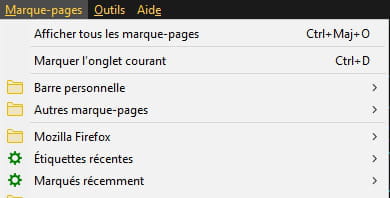
Info:
Reduce the space between Bookmarks.
Erase everything in the address bar (URL)
Copy/paste -► about:config
Then hit the Enter key or right-click and paste and open.
In the field Search for a preference name type -► proton
Double-click on the line --► browser.proton.contextmenus.enabled
This will change the value to -► false
Close Firefox.
Restart Firefox.
Default proton configuration
browser.proton.contextmenus.enabled --► true
browser.proton.doorhangers.enabled --►true
browser.proton.enabled --►true
browser.proton.modals.enabled --►true
browser.proton.places-tooltip.enabled --►false
browser.proton.toolbar.version --► 3
Source
A+
--
pistouri-
Good evening @pistouri
I don't understand your first line ("Don't forget to enable userChrome.css loading"), which seems to be the most important
How do you do that please?- Hello Franck06,
Open Firefox.
Clear everything in the address bar and type or copy/paste --► about:config
Click on --►Accept the risk and continue
In the search box for preference names, copy/paste:
toolkit.legacyUserProfileCustomizations.stylesheets
The value should be set to --►true
Double-click if the value is set to false.
true means enabled.
This will allow the .CSS code from the userchrome file to work
CCM practical sheet ==► How to create a userChrome.css file?
Ps :
Carefully read the message #1
Blue color code
Code to copy-paste into the userChrome file to have folders in a bluish color:
/* change the color of Bookmarks/History folders (ok #0B30E6) */
.bookmark-item[container], treechildren::-moz-tree-image(container) {
fill: blue !important;
}

For a different color, remove the word '' blue'' on the third line and replace it, for example, with red (red color)
The colors must be in English
For example:
fill: red !important;
This gives in the .CSS code
/* change the color of Bookmarks/History folders (ok #0B30E6) */
.bookmark-item[container], treechildren::-moz-tree-image(container) {
fill: red !important;
}
Names of colors in English, a preview:
yellow, green, blue, red, purple,
fuchsia, orange, olive, maroon, lime, navy
aqua, teal, black, silver, gray
mauve, raisin, iris, wine, peacock, emerald, pink, apple
This also works with a hexadecimal code.
Replace the word ''blue'' with #2EB234
The folders will be green.
==► CSS Color Picker

@+