Can't print but I can scan
Solved
Sakura01
-
Sakura_01 Posted messages 118 Registration date Status Member Last intervention -
Sakura_01 Posted messages 118 Registration date Status Member Last intervention -
Hello,
My new PC (Dell) refuses to recognize my printer so that I can print (documents/photos).
It appears in the devices but is nowhere to be found when I search for it while I'm on a doc or a photo. I can absolutely do nothing, I keep looking for it, but no.
I can't set it as default either.
On the other hand, I can scan without any problem; it is well recognized... Test done and everything is okay.
The default printer is Microsoft print to PDF... If I delete it, I'm afraid it might do more harm than good to the PC? It's something installed by default on the PC...
Is this a driver problem? If I find the installation CD, could that help? I'm not sure if the CD is compatible with Windows 10, we'll see.
Thanks in advance :)
Configuration: Windows / Firefox 85.0
My new PC (Dell) refuses to recognize my printer so that I can print (documents/photos).
It appears in the devices but is nowhere to be found when I search for it while I'm on a doc or a photo. I can absolutely do nothing, I keep looking for it, but no.
I can't set it as default either.
On the other hand, I can scan without any problem; it is well recognized... Test done and everything is okay.
The default printer is Microsoft print to PDF... If I delete it, I'm afraid it might do more harm than good to the PC? It's something installed by default on the PC...
Is this a driver problem? If I find the installation CD, could that help? I'm not sure if the CD is compatible with Windows 10, we'll see.
Thanks in advance :)
Configuration: Windows / Firefox 85.0
12 answers
-
Hello,
Maybe yes, maybe no.
Uhh, which model of computer and which model of printer are you talking about?
(Crystal ball doesn't tell me anything about this subject ;-) )
--
Auto message
Without regular feedback from you... you can always refer to Article 22 ;-)
Mini Regarding the volunteers who help you: Respond, Respect, Politeness,... -
Hello,
Oops, sorry for the oversight! :)
My desktop PC is a Dell, model Inspiron 3881.
The printer is a bit old, it's a Canon, model Pixma MG5150 (listed on the PC as the 5100).
I don't remember doing anything with my previous PC. Well, from one PC to another. -
Let's say she's not very young, maybe we should help her a bit with Windows 10.
Download and install her driver:
(from the manufacturer, also provided for Windows 10)
https://www.canon.fr/support/consumer_products/products/fax__multifunctionals/inkjet/pixma_mg_series/pixma_mg5150.html?type=drivers&language=&os=windows+10+%2864-bit)
We'll see...
--
Automated message
Without regular feedback from you... you can always refer to article 22 ;-)
Mini Reminder to the volunteers who help you: Response, Respect, Politeness,... -
Hello,
Go to the Windows settings:
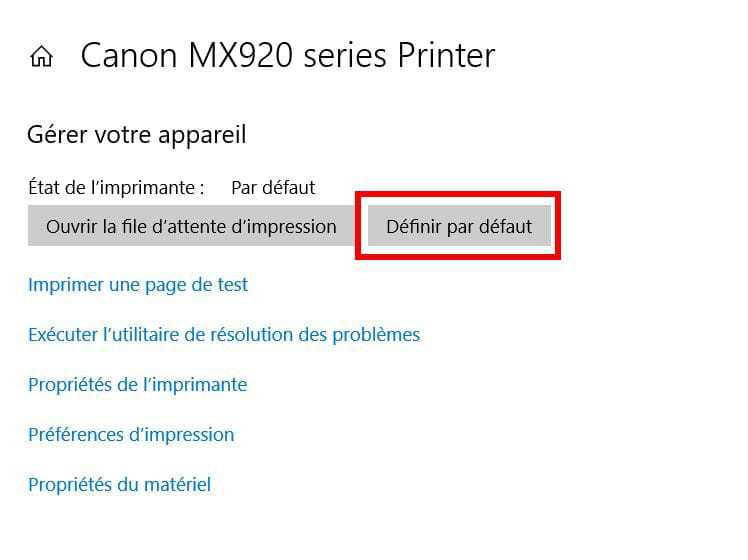
Settings > Devices > Printers & scanners
In the list that appears, your Canon printer should show up if the installation has been done correctly.
Click on it and choose Manage
In the next screen click on Set as default:
Do not delete Microsoft Print to PDF: It is a virtual printer whose role is to create PDF files.
Every time you print, you need to make sure that the printer is indeed the Canon and possibly change it.
--
What is well conceived is clearly stated,
And the words to say it come easily.
(Boileau) -
Thank you, I will try for the driver.
My previous PC isn't that old (less than 6 years I think) and I was also on Windows 10 ;) without any manipulations to do.
Pierr10, as I wrote: I can't do anything, I can't set it as default.
So no, I can't do the operation you're suggesting ^^ I can click on Manage yes, but I have almost nothing... I don't remember what it says, but that's just it, not everything is displayed. -
Why uninstall everything? Why not just download the driver?
By the way, should I be doing these steps with the printer plugged in and turned on or not?
I see on Canon's website that there are two drivers; should I download both or favor one? Sorry, this is all new to me ^^
I have "MG5100 series MP Driver v. 1.02" and "XPS Printer Driver MG5100 series v. 5.56"
Thank you.-
You uninstall the driver. You remove everything that is problematic to perform a clean reinstall.
You are obviously not required to uninstall software like Quick Menu or My Image Garden.
You perform the uninstalls with the printer turned off, whether it is plugged in or not, it doesn't matter.
Take the XPS driver which offers more options. If that doesn't work, you will try the other one.- Pierr10 she has never been recognized so maybe nothing regarding the driver.
Sakura01 you take the "MG5100 series MP Driver v. 1.02"
https://www.canon.fr/support/consumer_products/products/fax__multifunctionals/inkjet/pixma_mg_series/pixma_mg5150.html?type=drivers&language=fr&os=windows+10+%2864-bit%29#disclaimer
You launch it and read, it should tell you whether to connect the printer and at which step.
(note: not very recent, from 2015 so early win 10 and with the versions that "advance" it may not be the best, but it will still help win 10 recognize the printer which may be updated later. Otherwise sometimes you can even try the driver for win 8) - Yes, but probably not specific to the printer, a generic one that might work for any scanner device.
Might as well keep it simple, install this driver and see
It's quick to do, we’ll have clarity.
-
-
Thank you for your replies :)
For the moment, I don't know if I should take care of that or wait since the computer seems to be having some minor issues (C drive is filling up for no reason) ^^ it’s best to get that resolved before I deal with the printer.
Just to clarify, should I install it without uninstalling everything then? ^^ -
Hello,
I'm back. I tried to download this driver. During the installation, it tells me that I need to connect the printer and turn it on. It searches for a moment and then I get a message saying that it can't recognize the printer :(
I can't do anything... I've tried twice, in a different USB port.
Should I uninstall and reinstall as Pierr10 advised?
I'm really frustrated :( -
As Pierr10 said
But first ... regarding this > https://forums.commentcamarche.net/forum/affich-37110060-serait-ce-un-probleme-de-virus-cache and probably other topics as I understand ...
Your PC is new and not up to date.
It's normal for Windows to get bigger, it is retrieving data and doing these updates.
One or two normal updates take up little space like on your other PCs, it doesn't raise suspicions.
Here, your PC is going to do a lot of small updates, and probably a big one to upgrade to the latest version.
A version upgrade will be quite large to download.
Moreover, once it does that, it will create a folder (windows.old) which is like a system image just in case you need to roll back to the previous version.
This folder can be quite large (depending on what you have), but it deletes itself after 10 days.
If you have fun clearing Windows folders, you're removing resources for the updates, leaving some bits behind, and the PC will redownload them, etc... and you will lose space for nothing.
By the way, you're worried about uninstalling a printer driver but not afraid of deleting files in Windows, it should be the other way around in terms of concern. ;-)
Your internet might be slow, or your PC doesn't stay on long enough or...
Go to Settings > Update & Security to see what updates are offered or initiate a search and do them.
Leave the PC on long enough for it to complete them.
You should end up with version 20H2
(which it seems to be trying to do.)
Otherwise, you can also use this update assistant >
https://download.microsoft.com/download/2/b/b/2bba292a-21c3-42a6-8123-98265faff0b6/Windows10Upgrade9252.exe
Size should stabilize, and a few days later free up space
(windows.old will be deleted)
(update and stop tinkering, it may have an impact on your printer, try before and after, you’ll see)
Auto message
Without regular feedback from you... you can always refer to article 22 ;-)
Mini In regard to the volunteers who help you: Respond, Respect, Politeness,... -
Hello,
I’m replying quickly. Yes indeed, I find it less scary (and that’s a strong word) to fiddle around in this direction, but I guess I’m weird... ^^
It’s the "device" of the printer that I’m going to delete, right? Because the driver I installed yesterday, I uninstalled it (through the Control Panel) quite quickly last night.
So now I just need to delete the "device" of my printer, I don’t see what else there is? But if I do an update first, I’ll delete it afterward depending on how it goes.
When I tested my printer last Saturday, I hadn’t touched anything on my PC yet :)
So I’m doing the update, indeed I just looked and it says “up to date” but below it offers a last version which is indeed 20H2.
Will this version 20H2 install automatically or will I have to do some manipulations/validations?
I just checked, the version of the living room PC is 18363, but I don’t see the date related to this version... it’s certainly not 20H2. The printer works fine as I tested it quickly last night, recognized immediately (also a new PC, from January, as mentioned in my other post).
Message modification => It’s not lagging especially and my PC is on for about 12 hours a day, so I think it’s on “long enough” ^^
Thanks, see you later.-
"Will this version 20H2 install itself, or will I need to do some manipulations/validations?"
Nothing to do once it's started, just wait (downloading then installation phase) ... it can take a while
(installation, possible restarts and black screen, just let it do its thing, be patient)
Uninstallation, yes what remains, so the default printer device poorly installed by Windows, since it doesn't work.
As mentioned, you can try to reinstall it before (updates) and if nothing improves, try afterwards.
"The version of the living room PC is 18363, but I don’t see the date related to this version... it’s not 20H2"
I don’t know where you’re looking, the easiest way is to right-click on the Windows icon in the start menu > system and then scroll down a bit and you'll have simple info (date, version)
18363 = 1909 so two behind.
Normally, it’s always the very latest version, which is better not to jump on right away as soon as it’s released and rather wait until it’s offered by update (preferable, if there are issues, so they have time to make corrections)
But now the last stable version is on the other PC, that's two behind, so it needs to be done, it would be better.
(for the other side ... it’s not the Dell site that will give you drivers or info for your printer. It's either Windows as illustrated here because it may be more "advanced" https://support.microsoft.com/fr-fr/windows/installer-une-imprimante-dans-windows-10-cc0724cf-793e-3542-d1ff-727e4978638b#:~:text=S%C3%A9lectionnez%20le%20bouton%20D%C3%A9marrer%2C%20puis,%3E%20P%C3%A9riph%C3%A9riques%20%3E%20Imprimantes%20et%20scanneurs.&text=S%C3%A9lectionnez%20Ajouter%20une%20imprimante%20ou,puis%20s%C3%A9lectionnez%20Ajouter%20un%20p%C3%A9riph%C3%A9rique. video https://www.youtube.com/watch?reload=9&v=VBIuZ1PT2xI
or
the manufacturer's printer driver)
-
-
Here is the update, it took place during the meal, it didn't take that long.
I will have the option, if I wish, to do an optional update on some drivers, and I see there's one for my printer.
For the version, I looked it up by typing system in the Search, I clicked on System Information. Your method is indeed better :)
I'll come back later. Thanks for the links :) -
That's what I did, I told myself I didn't have much to lose. And :) it works!
Printer recognized well, set as default automatically. Tested a few prints, all good and scanner works too.
It was that simple!
A thousand thanks for this help and for being there, both of you ;) now let's just keep our fingers crossed that the SSD stabilizes in used space.
(ps: not being signed up when the topic was created, I'm not sure I can mark it as resolved)-
Glad to hear it
You're welcome ;-)
(yes in terms of space, as mentioned it should "stabilize" and regain on its own in a few days as explained. It's not uncommon to have two or three updates following a version change, so don't worry at first)- Sure, I'll try to remember that :)
Do you know how I can delete the (empty) "Coffre Fort" folder from McAfee? I properly uninstalled that antivirus the other day using MCPR, but this folder remains and I can't delete it the usual way. I need permission, I imagine I have to switch to Admin mode but I don't see how to do that (Admin and Safe Mode are different, I think). - Moreover, don't mix too much with your other topic which has some advice, explanations, that are far-fetched. ;-)
Stay calm about what has been said for your stories space, caps ...
-