File Save As problem that gets stuck
Solved
cotp
Posted messages
87
Status
Member
-
MisteryBean Posted messages 8951 Registration date Status Moderator Last intervention -
MisteryBean Posted messages 8951 Registration date Status Moderator Last intervention -
Hello
I have a problem when I try to save a file. The "Save As" window appears but freezes for 40 seconds before the folder shows up correctly
I have the same issue with Chrome and Firefox, which makes me think it's probably not a browser plugin issue.
I thought it might be my internal drive. I changed the drive and it’s doing the same thing.
Also, my Windows Explorer is much slower.
Any idea on a possible solution?
I read on the forum to restart in safe mode, I’m okay with that but then what?
What should I check first? Do I need to "repair" Windows?
Thanks in advance for your help
Cotp
Configuration: Windows / Chrome 87.0.4280.88
I have a problem when I try to save a file. The "Save As" window appears but freezes for 40 seconds before the folder shows up correctly
I have the same issue with Chrome and Firefox, which makes me think it's probably not a browser plugin issue.
I thought it might be my internal drive. I changed the drive and it’s doing the same thing.
Also, my Windows Explorer is much slower.
Any idea on a possible solution?
I read on the forum to restart in safe mode, I’m okay with that but then what?
What should I check first? Do I need to "repair" Windows?
Thanks in advance for your help
Cotp
Configuration: Windows / Chrome 87.0.4280.88
13 answers
-
Good evening @MisteryBean
Sorry for the delay in my response.
After quite a bit of various research, I tried resetting Explorer but I still had that famous freeze problem.
Eventually, I don't know how I intuitively thought it might come from my Quick Access.
I deleted all the references to NAS drives that were currently disconnected.
And there you go, it’s working again, phew!!
So, my problem is solved, and I hope this response can help other internet users in the same situation someday!
Cotp -
Hello,
Let's see if the issue is not with the index. Try this:
--> Press Windows + R
--> Type control and hit enter
--> In the top right corner, under View by, select Small icons
--> Click on Indexing Options
--> Click on Advanced
--> Click on Rebuild
--> Click OK to start the indexing
--> Do not touch anything during the indexing process.
--> Once finished, see how it goes
--
Security contributor. -
-
By the way, I clicked on Rebuild, but in indexing options, I only had the C drive included in the index.
However, my files are located on another drive (not included in the index).
Well, it's started now, I'll let you know if it solved the problem ;) -
RE_
I thought it might be coming from my internal drive. I changed the drive and it's doing the same thing.
However, my files are on another drive letter (not included in the index).
Is the HDD partitioned or do you have two drives?
When you changed it, did you clone it or did you do a clean installation of Windows 10?
--
Security Contributor. -
Sorry, I wasn't very clear, I admit it.
SSD, letter C Windows 10 64 bits (that one hasn't changed), it's the one included in the file index.
3.5 disk (the one I changed because it was old) (where my data files are placed).
Actually, it's more like 20 seconds (which feels like 40) with "working in progress" displayed, then the folder appears, and if I click save as right after, there are no problems. -
OK, what does the reconstruction give? When you want to "save as," is it under C: or the other letter?
--
Security contributor. -
I'm a third of the way through the index
it's under the other letter that I want to save...
I'll try saving to C to see. -
OK, but wait for him to finish the indexing. It's important to avoid touching the computer while it's running because it significantly slows down the indexing.
-
ok I'll avoid that then, I'll let you know when it's done
Here's what I see for 20 seconds before the file appears
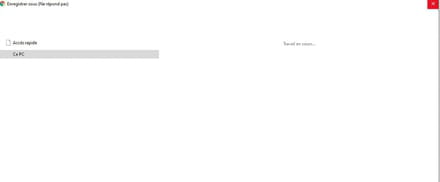
If I save as again right away it works but if I do it a 3rd time it starts again -
Well, I'm halfway there, the rest tomorrow... honestly, I'm stuck (apart from reinstalling Windows :(
it's lagging, it's lagging, sniff
Otherwise, just so you know, it shows Memory Usage 56%
Physical Memory 8.96Gb/15.95Gb (Chrome 700Mb, Dropbox 140Mb, Explorer 86Mb...)
Page File 13.47Gb/17.61Gb
CPU 10% -
RE_
Normally, indexing takes about an hour when there are a lot of files; it’s not normal for it to take this long.
Test your hard drives and provide the results (color and status) or post a screenshot: https://forums.cnetfrance.fr/tutoriels-logiciels-et-applis/487485-tester-son-disque-dur-ou-ssd-avec-crystaldiskinfo
A new drive doesn't mean it's in good condition.
-------------
------------------------------
We can run a diagnostic on the PC:
Read the entire procedure carefully before posting the reports
--> Download the FRST version of Farbar, compatible with your system, and save the file to your Desktop.
--> For a 32-bit system
--> For a 64-bit system
How to tell which version, 32-bit or 64-bit, is running on my system?
--> Wait for your browser to prompt you to download and save, without clicking anywhere, especially not on the page sponsors.
--> Close all applications, including your browser.
--> Double-click on FRST.exe and click Yes to accept the Disclaimer.
--> Under Vista, Windows 7 / 8, and 10, you need to launch the file by right-clicking -> Run as administrator.
--> Wait until it says The tool is ready to work.
--> On the main menu, click on Analyze and wait during the analysis.
--> At the end of the scan, the FRST.txt and Addition.txt reports are created. Post these reports in your next response.
--> The reports are saved in the same location as the tool and under C:\FRST\Logs
--> The SmartScreen filter may trigger an alert. Click on Actions or More info then on Run anyway.
---------------------------------------------------------------------------------------------
The FRST.txt and Addition.txt reports are expected.
All reports must be hosted on https://security-x.fr/up/ and you should provide the links obtained in your response.
-
Hi,
OK, thanks for the feedback.
It was indeed an indexing issue, but not the one I was thinking of. ;)
--
Security contributor.