Computer stuck on W10 logo after bootable USB installation
Solved
Hello,
I downloaded a bootable USB key with Windows 10 in 32-bit to install it on a computer.
My key only runs in Legacy mode; when I try to run it in UEFI, it says no bootable device. So, I installed Windows 10 in Legacy mode, but now when I turn on my computer, it gets stuck on the Windows 10 logo. I have to force shutdown and restart for Windows 10 to load and reach the desktop.
What should I do?
Thanks for your help!
I downloaded a bootable USB key with Windows 10 in 32-bit to install it on a computer.
My key only runs in Legacy mode; when I try to run it in UEFI, it says no bootable device. So, I installed Windows 10 in Legacy mode, but now when I turn on my computer, it gets stuck on the Windows 10 logo. I have to force shutdown and restart for Windows 10 to load and reach the desktop.
What should I do?
Thanks for your help!
10 answers
-
ContributorDo you still have the key made for installation?
If so, from the key, follow this:
The files on the key are used for repair.


Or
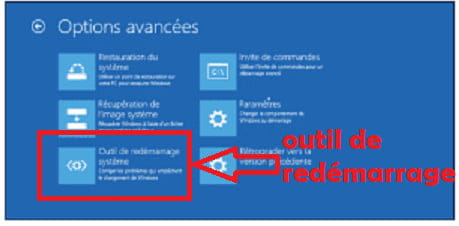
If you no longer have the key, you can go to the advanced options like this:
https://lecrabeinfo.net/acceder-aux-options-de-demarrage-avancees-de-windows-10.html#si-vous-avez-acces-windows-10
Same for the rest.
In this case, it is an internal partition of Windows that serves as a backup.
(I prefer from the key, because normally we are more sure that the backup is not flat ;-) ) -
ContributorNo news, good news
You're welcome, it was a pleasure :-)
(Generally speaking, think about marking your topics as resolved when that's the case. Gear icon first message. Thank you)
-
ContributorHello,
"How to do it? "
We need to start everything over from the beginning.
What model of PC?
The label on the back or underneath indicates it.
(if OK for 64 bits and UEFI, we set it to 64 bits and UEFI)
We will redo the key with the correct Windows and ensure it boots properly in UEFI.
I strongly doubt that you went to get the official software to make your installation key.
(yes, no need to search the net, everything is provided by Microsoft on their site ;-)
-
-
-
ContributorI'm not exactly sure, but:
> Restoration and installation from a USB key, both in 32-bit and unable to find one or two drivers.
> The manufacturer's website, on the contrary, provides more driver support in 64-bit instead of the original 32-bit.
> Memory test for the soldered eMMC is impossible because no testing software recognizes it.
> BIOS is not really understood because you made modifications, and that must be where you lost the touchpad.
After you went back, a password was now required, so you couldn't really change it anymore.
> You gave up after this BIOS password issue, without trying to remove it.
Is that right?
What is the situation today?
(Has it been working better, do you have access to the BIOS and no password, even driver alerts...)
What do you plan to do?
(Trying in 64-bit) -
-
-
ContributorI mixed your two topics, oops
So right now you're not at your best because in legacy mode, but everything is working except for the startup?
(no more driver and touchpad issues)
If that's the case, after backing up all your documents elsewhere, you can try a reset from Windows.
All settings > update and security > recovery tab > reset
Follow the procedure, you will have different options to keep your documents or not
(the software, on the other hand, should be removed in every possible option)
---
Or boot into the troubleshooting options, but it's more complicated.-
-
Contributor@rose2512no it doesn't work
Try:
All settings > update and security > update tab > run a search for updates and if there are any, install them.
(a problematic update may interfere with the startup and others may be causing it to be skipped) -
-
-
-
-
Contributor"System Restore" in the advanced options.
If you have a point that dates back before the problem.
(also make a backup, as anything done on the PC between the chosen date and today will be lost)
or
Reinstall Windows 10 without data loss
(this reinstalls on top while keeping documents and software. But a backup beforehand is welcome just in case)
https://www.malekal.com/reparer-windows10-sans-perte-donnees/
But I fear you may not have enough space on your PC.
You can launch the ISO directly from Windows. Everything is in the tutorial.
-
-
-
Contributor@rose2512OK but using which procedure?
Restoration or reinstallation without loss. -
-
-
ContributorOriginally, why did you consider reinstalling?
It's going in circles; I don't know if we should reinstall in UEFI.
By the way, why did we stick with 32 bits?
It should have been 64 bits originally according to various announcements
(your model Acer A01-131-C0A6)
We'll see...
Yes, nothing makes sense looking at your previous topic.
You mentioned 32 bits and said it was the original.
But where did you get this from?
The various announcements indicate a 64-bit Windows on this model.
So it would be logical that the manufacturer provides more drivers for 64
It's also logical regarding the driver issues that occurred.
I think you had some misconceptions about this 32 bits and that led you astray.
Similarly, you switched to legacy before we explained and found the solution to boot your USB in UEFI.
You’re trying to go faster by taking shortcuts that have the opposite effect, and we end up with problems and still back at square one.
I propose that you:
> Back up your data
> Reinstall Windows 10 in 64 bits
> In UEFI mode
A single straightforward path, and we'll deal with difficulties along the way. (we don't circumvent)
It's up to you.
-
-
Contributor@rose2512In 32 since you put a 32 and the other indication is that your processor supports 64.
But originally for me the PC was in 64.
Type your model on Google and you will see that it was sold in 64. -
-
I will download in 32 and 64 bits, that way I'll have both, it will be easier.
So for the key:
1) I download the ISO from the official Windows website.
2) I click that it’s for a support.
3) I let the download complete.
4) Once the download is complete, I go into the BIOS menu.
5) I set it back to UEFI.
6) I put my USB key first in the list.
7) I save, then at startup a Windows window will open asking me to install now or to repair.
8) I click on install now and then I let it run. -
Contributor
-
-
Contributor1 > Download the ISO /
(no matter which PC you use to do it)
An ISO is a disk image, but don't click on it as it is.
It's a resource that we'll use to create a USB installation drive. We need to mount this image.
ISO W 10 x 64 (link valid for 24 hours)
https://software-download.microsoft.com/sg/Win10_1809Oct_v2_French_x64.iso?t=ae3dab7f-2884-455e-8d43-1c3517f19c36&e=1556129970&h=6dd725109cb52da1dca44d611e1f480c
2 > Create the installation USB /
Download the Rufus software:
https://www.commentcamarche.net/telecharger/utilitaires/19615-rufus/
> Basically, we point to the USB drive we are going to use (8GB or more)
Be careful, empty your USB drive first because everything will be erased.
> We point to the ISO file you just downloaded
> Set the partition type. (GPT as shown in the image)
> Start the creation and wait for the end message.
3 > Boot your PC to repair from your installation USB /
Set to UEFI (and nothing other than UEFI) and disable secure boot
Confirm by exiting (F10 and confirmation)
Turn off the PC
Plug in the USB drive
Restart
The PC should boot directly from the USB drive, starting the installation.
If there are issues
We'll look into it together.
4 > Install Windows /
Here’s an overview for W 10 (not really up to date but it's just an overview)
http://www.windows8facile.fr/installer-windows-10/
License key should not be requested, since you already had Windows activated, the installer should find it without asking for anything. (or skip the step without entering anything)
You will start with a “custom” installation
You will follow the procedure and arrive at a table that will list the locations and ask you "where to install Windows".
You will tell me what is there or show an image.
(to be more certain about the choice)
At this point, there are different possibilities:
> Delete all partitions except the manufacturer’s recovery partition
Refresh
Install on the newly created large volume.
or
(if your recovery partition no longer works, then choose the following option by wiping everything on the hard drive)
> You can also wipe the entire disk before installing
Press Shift and F10
(the command prompt opens)
Enter the following commands one by one, validating with enter:
diskpart
list disk
sel disk X (where X is to be replaced with the number corresponding to your hard drive to be wiped)
clean
exit
Result -
In clear terms, we wipe the disk and you will then return to the installation table.
You will have only one volume which you choose to install on.
In this case, you lose the manufacturer’s recovery partition.
After that, recovery can only be done from Windows or the installation USB.
Windows will be free of any pre-installed software by the manufacturer (often unnecessary) and the boot partitions will be rebuilt.
5 > Once installed, some points will need to be checked /
If activation is okay
And
If drivers are okay, and if not, use this
https://www.commentcamarche.net/faq/48455-mettre-a-jour-ses-pilotes-gratuitement-avec-driverscloud
We will check together when you get there.
----------------------------
WARNING: if there are any issues, we'll work together to find a solution.
--Automated message
Without regular feedback, I will no longer follow your discussion.
Minimum requirements regarding the volunteers helping you: Politeness, Respect...-
-
-
Contributor@rose2512Fat or NTFS it goes straight according to ...
Secure Boot is generally found in the Security or Boot tab of the BIOS. -
Contributor@gugu01Photo would be good if there's a problem.
In the security menu:
Supervisor password is: set
user password: clear
set supervisor password: enter
set user password: enter
password on boot: disabled
secure boot mode: standard < < might need to play around with the modes if disabling it in Boot doesn't suffice.
Current TPM (TCM) state: installed
Change TPM (TCM) state: enabled
Clear TPM (TCM): clear
In the boot menu:
Boot mode: UEFI < < it should be in UEFI
Secure boot: disabled < < it should be disabled
Boot priority order:
1. USB HDD
2. USB CDROM
3. USB FDD
4. EMMC: HBG4e 32g
5. Windows boot manager
6. Windows boot ipv4
7. Windows boot ipv6
Exit saving changes.
Key plugged in from the start, and it will launch after confirming the changes.
Or
restart the PC after changes with the key still plugged in. -
-
-
Contributor1>
Check if Windows is properly activated
All settings > updates and security > activation tab
It will be indicated
2>
If you are indeed on 64 bits
Right-click on the Windows icon in the start menu > system > it will be indicated, system type line.
3>
If there are no driver issues
Right-click on the Windows icon in the start menu > device manager
No line should be "unknown" or have an exclamation mark or question mark.
List any lines that have a problem.
--Automatic message
No regular reply, I will no longer follow your discussion.
Minimum required towards the volunteers who assist you: Politeness, Respect...-
-
1) Yes, Windows 10 Home is activated
2) 64-bit operating system, processor x64
3) There is a ! on PCI data acquisition and signal processing controller -
Contributor@rose2512Use this (you know)
https://www.commentcamarche.net/faq/48455-mettre-a-jour-ses-pilotes-gratuitement-avec-driverscloud
And if it doesn't find anything, we will identify the two lines and I will search.
In Update and Security, you can also start the update search, Windows might find them too.
And restart from time to time if they need to finish installing and require a restart. -
ContributorOr try installing these two drivers
https://global-download.acer.com/GDFiles/Driver/TXE/TXE_Intel_2.0.0.1094_W10x64_A.zip?acerid=635995822393780955&Step1=NOTEBOOK&Step2=ASPIRE+ONE+CLOUDBOOK&Step3=ASPIRE+ONE+1-131&OS=10M1&LC=fr&BC=ACER&SC=PA_5
and
https://global-download.acer.com/GDFiles/Driver/Chipset/Chipset_Intel_10.1.1.7_W10x64_A.zip?acerid=635839408721463209&Step1=NOTEBOOK&Step2=ASPIRE+ONE+CLOUDBOOK&Step3=ASPIRE+ONE+1-131&OS=10M1&LC=fr&BC=ACER&SC=PA_5 -
-
-
Contributor"<i>So, I did the update and security, and since then there's no more ! </i>"
It confirms that drivers exist for 64 bits and there's no issue with their installation. (compared to last time)
"<i>Are there any other checks to do?</i>"
Good news ...
No, just enjoy your PC
By the way, is it working well?
Bad news
We just updated to Windows 10 version 1809 and Windows changes version every 6 months.
Since your PC has little space and gets stuck when there are these major updates, the next one is due next month.
If there's an issue, like the update trying to install in a loop without succeeding, you'll have to reinstall just like we did with Windows 10 in 64 bits and UEFI.
Download the ISO and recreate a USB stick the day you need it, because Microsoft always provides the latest updated version.
Good news,
you now know how to do it quickly and cleanly.
---------------------------
Everything seems OK, unless you noticed an issue or have any questions?
-
Yes, everything is fine for now
Thank you very much for your help and the time you dedicated to it!