Desktop display W10 files that fill the screen
Solved
luluberlu2
Posted messages
291
Status
Member
-
pistouri Posted messages 19008 Registration date Status Contributor Last intervention -
pistouri Posted messages 19008 Registration date Status Contributor Last intervention -
Hello,
Big problem this morning when I opened my desktop PC, my desktop is completely changed. I no longer have the usual icons on the desktop. There are files filling the screen, and my taskbar is displayed at the top of the page. I don't want to lose these files which are important; I would like to get my normal desktop back.
Thank you for your help.
Big problem this morning when I opened my desktop PC, my desktop is completely changed. I no longer have the usual icons on the desktop. There are files filling the screen, and my taskbar is displayed at the top of the page. I don't want to lose these files which are important; I would like to get my normal desktop back.
Thank you for your help.
4 answers
-
pistouri Posted messages 19008 Registration date Status Contributor Last intervention Ambassadeur 8 723
Hello,
You must be in "Tablet mode".
1- Check it and disable tablet mode.
Click on the notification icon next to the time.
Click on → Tablet Mode (to remove the highlight).
To avoid any accidental manipulation (a wrong click in the wrong place).
You can set the Tablet Mode option:
Click on the notification icon next to the time
Click on → All settings
Go to the section → System
Select → Tablet Mode
-When I sign in → Use Desktop Mode
-When this device automatically switches Tablet Mode on or off → Don't ask me and don't change mode
2- In video
3- Tutorial Microsoft
A+
-
pistouri Posted messages 19008 Registration date Status Contributor Last intervention Ambassadeur 8 723
Hello,
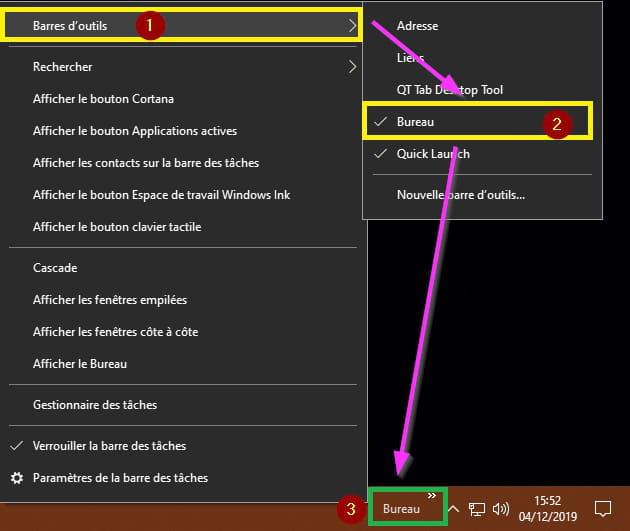
Thank you for this great feedback on the solution that helped you by creating a new toolbar → Desktop
You just need to mark the topic as resolved.
Have a nice day.
--
pistouri -
Hello.
For the taskbar:
Right-click on the taskbar (in a spot without an icon or open program) and select "Taskbar settings". Then, "Taskbar", "Taskbar position", "Bottom".
--
People who fight can lose. People who do not fight have already lost. (Bertolt BRECHT) -
Hello francoin,
Before, I had on my desktop: a wallpaper _+This PC, Recycle Bin - my documents - Google - Outlook - Facebook. Now I have folders that I usually find in my documents
Thank you-
Thank you for your research. I just found it. At the bottom, I right-clicked on the taskbar, clicked on Toolbars, and then clicked on Desktop. The desktop appeared at the bottom, I clicked on >> and everything I had on my desktop is there. I just need to remove my files from the desktop by keeping them elsewhere and dragging all the items that were on my desktop. Thanks anyway, it might help others.
-