Black and white DVD instead of color
Mel06
-
Polo -
Polo -
Hello,
I plugged my DVD player into a new TV and it plays movies in black and white instead of color.
I tried to find buttons on the remote to switch to color, but I couldn't find anything like that and my TV only has a tiny instruction sheet that doesn't mention anything about it.
I'm not very familiar with this. I tried looking up other questions people asked, but I don't understand how to change it to color.
Thank you for your help!
Configuration: Android / Chrome 66.0.3359.126
I plugged my DVD player into a new TV and it plays movies in black and white instead of color.
I tried to find buttons on the remote to switch to color, but I couldn't find anything like that and my TV only has a tiny instruction sheet that doesn't mention anything about it.
I'm not very familiar with this. I tried looking up other questions people asked, but I don't understand how to change it to color.
Thank you for your help!
Configuration: Android / Chrome 66.0.3359.126
3 answers
-
Good evening,
To help you, you need to give us the complete references of your two devices.
--
I call a spade a spade *
*in French in the text -
I have the same problem with my Philips TV
The connection is as indicated
And it’s in black and white, I have 2 players
Both are in black and white
It works on another TV -
Hello,
to speed things up, I'm bringing the manuals ^^.
First, here’s the manual for the LG TV 32LJ500B, which is more complete here:
https://www.lg.com/ca_fr/soutien/produit/lg-32LJ500B
direct link:
http://gscs-b2c.lge.com/downloadFile?fileId=Q3KUw2iXRCfgM3W9Tt5dQA
Next, the Panasonic DVD-S29 player:
https://www.google.com/url?sa=t&rct=j&q=&esrc=s&source=web&cd=1&cad=rja&uact=8&ved=0ahUKEwjBxKTn8IPbAhWGqaQKHaY5DgoQFggnMAA&url=https%3A%2F%2Fpanasonic.ca%2FPCS%2FOperatingInstructions%2FDVDS26-29-OI-Fr.pdf&usg=AOvVaw3-wWg_L8ikBih9PsEaRaso
The DVD-S29 player does not seem to have SCART sockets, nor does the TV.
Question for Mel06: "with the older TV, it displayed movies in color", how many cables did you use to connect the devices? 3 or 5?
Best regards-
-
Re,
with 3 cables you were using composite video and this connection should still be possible with your devices.
First, connect to the LG TV as an input, like in the image from the manual:
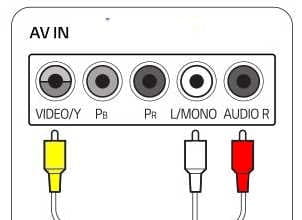
Then, connect to the DVD player as an output like this:
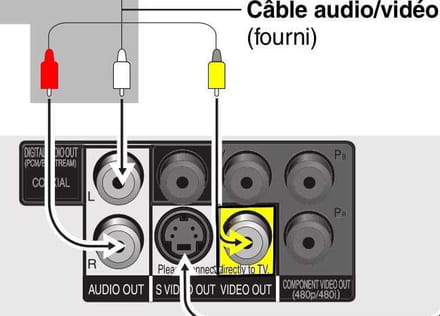
For audio it’s easy, but for video (colored in yellow) it’s "VIDEO OUT"... don't connect to "Component".
All you have to do is try it and let me know the results...
-