Active mode or Messenger mode
Solved
Tomryder44
-
patricialegrand -
patricialegrand -
Hello,
I've noticed for a few days now that on Messenger I can't see for certain people whether they are "active" or "online for X minutes," but instead I only see "Messenger." Is this a bug or have these people disabled something?
Thanks in advance for your response!
I've noticed for a few days now that on Messenger I can't see for certain people whether they are "active" or "online for X minutes," but instead I only see "Messenger." Is this a bug or have these people disabled something?
Thanks in advance for your response!
Liens connexes:
- Online on Messenger when I'm not.
- Why does my sent message remain unread on Facebook?
- Instagram: unable to log into my account!
- Does the green dot on Messenger mean that we are online on Messenger?
- How to stop seeing a contact on Messenger without blocking them?
- Messenger: what does the gray circle with a white check mark mean?
9 réponses
See the solution to the problem here, it's related to a change on the Facebook side: https://forums.commentcamarche.net/forum/affich-35333351-pourquoi-l-info-actif-depuis-x-minutes-n-apparait-plus#62
Bug without a doubt. I talked to 2 friends who are experiencing this too. They haven't done anything. Then it comes back when talking. And either it goes away and doesn't come back again. And one since then takes time to display. I have to leave the app and come back but I see it again.
It's been lasting since Wednesday of last week at 8 PM for me. Especially with one contact I can't ask about this. And it came back once during the conversation. But not after that.
You can see that I and others have opened several threads on this. We think it's more of a bug. Because no one knows the option. Especially when we ask people, they swear they haven't done anything.
It happens more among active people without a green dot. But it also affects those with a green dot anyway. But two friends I saw again were active with a green dot.
I imagine it's either a bug or a lot of people decided to go "offline," but since several people are talking about it, I suppose it's more likely a bug.
We should probably ask the person or the people concerned if they have changed anything or not.
As for me, asking a specific person would end up in an argument.
We should probably ask the person or the people concerned if they have changed anything or not.
As for me, asking a specific person would end up in an argument.
=> I am collecting information
ON THE SMARTPHONE:
Settings; System; Information; About phone
Android version?
Manufacturer?
Model?
Is Android up to date?
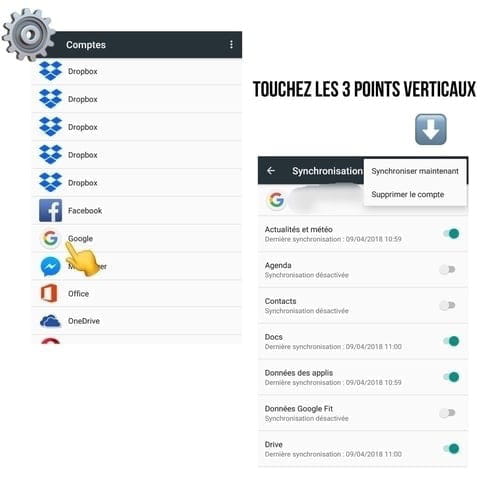
Settings; Accounts
Have you removed Google (Gmail), Facebook, and Messenger from Android?
What do you have? Which apps are displayed?
Has a computer cleanup been done? A run of Cleaner?
Settings; Applications; Storage
1. Clear cache
2. Delete data (can be done without risk for everything that is online, that's the case here)
Have you done it (Messenger and Facebook)?
Recent update of the Messenger app?
Recent update of the Facebook app?
Settings; Backup & reset
Is backing up my data enabled?
Do you have a night mode (app to significantly reduce brightness)?
If you use a different iOS or Android?
That of an acquaintance if you have "only" this smartphone ;)
=> Log in with your credentials
Thank you for keeping me updated => “Still in a dead end” “It’s resolved thanks to / I found it was necessary”
because I often have several steps and always have a trick up my sleeve!!!
So it's an S8 android.
I removed Google, Gmail, and Messenger but not Facebook
No computer troubleshooting, I don't know how to do it.
Recent update of the phone. Messenger and Facebook. The bug started the night before an update. It was working at 8 PM. And then nothing at 9 PM. And the next day, an update of Messenger.
Yes, night mode
Backup I don't know.
I tried with my old phone. It doesn't work without the update. It doesn't work with the update either. And the same with a friend's phone.
I replied as best as I could.
I removed Google, Gmail, and Messenger but not Facebook
No computer troubleshooting, I don't know how to do it.
Recent update of the phone. Messenger and Facebook. The bug started the night before an update. It was working at 8 PM. And then nothing at 9 PM. And the next day, an update of Messenger.
Yes, night mode
Backup I don't know.
I tried with my old phone. It doesn't work without the update. It doesn't work with the update either. And the same with a friend's phone.
I replied as best as I could.
Oula, I would have never managed all that lol. On Google Play. I couldn't do anything. I went everywhere, no option with the new one. I had to authenticate it. I had it linked on my phone, but I didn't get any message, nothing. So I didn’t understand. And just on one site, they were talking about a frequent bug when changing it. And I didn’t understand the instructions; I didn’t have the proposed options.
Message N14
Then Message N4, please perform 1) and then 2)
https://forums.commentcamarche.net/forum/affich-35329373-mon-telephone-est-bloque-par-protection-google
Is Messenger working again?
Thank you for keeping me updated => “Still stuck” “It's resolved thanks to/I've found it was necessary to”
because I often have multiple steps and always a trick up my sleeve!!!
Then Message N4, please perform 1) and then 2)
https://forums.commentcamarche.net/forum/affich-35329373-mon-telephone-est-bloque-par-protection-google
Is Messenger working again?
Thank you for keeping me updated => “Still stuck” “It's resolved thanks to/I've found it was necessary to”
because I often have multiple steps and always a trick up my sleeve!!!
Well, I had deleted the Google account there. And I struggled and put the thing back. And I had once deleted the account. Deleted Messenger normally. Not the little one. And once I logged back in, I downloaded the normal Messenger. And surprise, the little one showed the time of his last connection. But in the end, during the night, I realized that it was the time when he had read my message. It happened the same with my second account. Now it says "active 6 hours ago" regarding my secondary account. While I've been logged in for 1 hour talking to everyone. Just 6 hours ago, in fact, I sent a message between my two accounts and I made it "seen" since then I haven't touched it. And I did that twice. And similarly, if I log out or turn off the phone, the info goes away and comes back only if I send a message and make it seen. But in the end, it doesn't work since it's the last time he went to the conversation that I saw. Not his last connection time. #
Alright, let's start by doing point 1) correctly, meaning without the "cache clearing" app "only".
=> I use it for memory optimization; if you are not interested, you can uninstall it. It was for clearing most of the cache and because it's simple for this action ;)
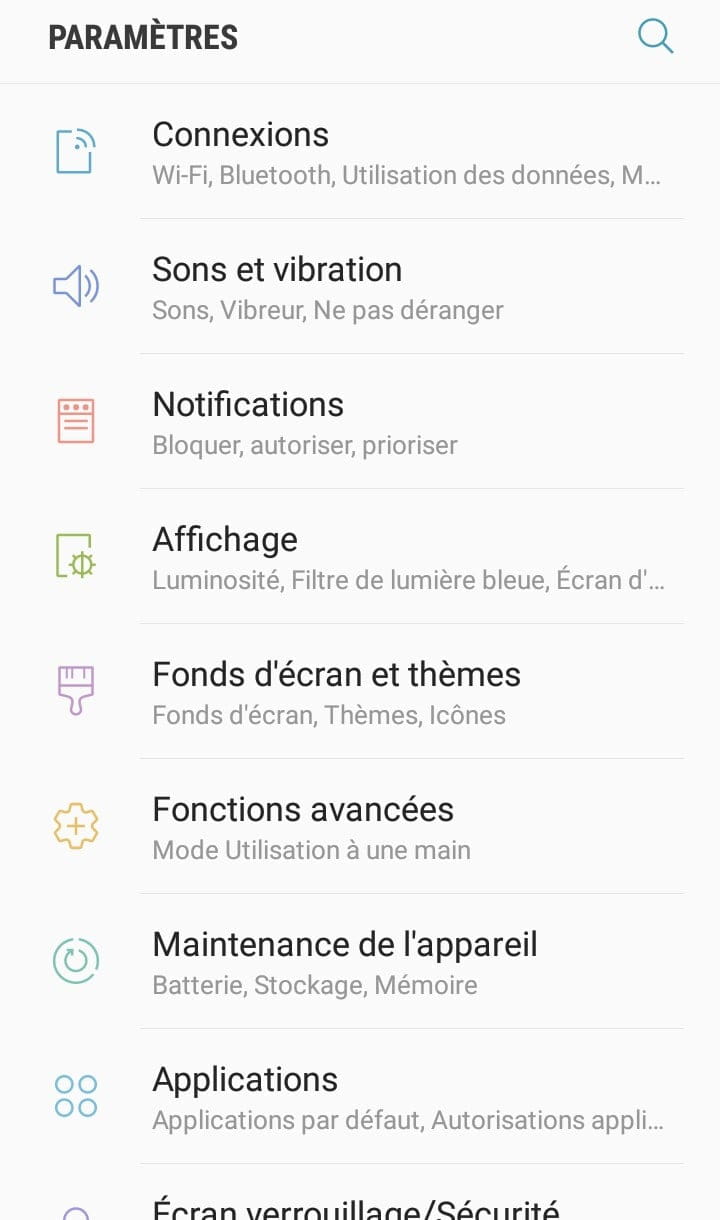
So yesterday I did "maintenance" on a Samsung (Android 7), so hopefully you have something similar:
Before:
=> For a deep dusting, you need to touch storage like in the illustration but also memory
=> Activate the security; it’s very important if it offers it to you.
(On this model, therefore, there is no need to install a Cleaner or Antivirus already present)
=> Make this manipulation from time to time, just like for the computer; it's computing for the smartphone!
After:
Thank you for keeping me updated => "Still in a bind" "It's resolved thanks to/ I found it was necessary"
because I often have several steps and always have a trick up my sleeve!!!
=> I use it for memory optimization; if you are not interested, you can uninstall it. It was for clearing most of the cache and because it's simple for this action ;)
So yesterday I did "maintenance" on a Samsung (Android 7), so hopefully you have something similar:
Before:
=> For a deep dusting, you need to touch storage like in the illustration but also memory
=> Activate the security; it’s very important if it offers it to you.
(On this model, therefore, there is no need to install a Cleaner or Antivirus already present)
=> Make this manipulation from time to time, just like for the computer; it's computing for the smartphone!
After:
Thank you for keeping me updated => "Still in a bind" "It's resolved thanks to/ I found it was necessary"
because I often have several steps and always have a trick up my sleeve!!!
So you knew how to do it ^^
1 bis)
For the 2 smartphones (to test on the previous model)
- Software update
- About the device
=> Is it listed as up to date?
=> Give me the manufacturer's model and the version of Android ;)
Thank you for keeping me posted => “Still in a deadlock” “It’s resolved thanks to/ I found it was necessary”
as I often have several steps and always a trick up my sleeve!!!
1 bis)
For the 2 smartphones (to test on the previous model)
- Software update
- About the device
=> Is it listed as up to date?
=> Give me the manufacturer's model and the version of Android ;)
Thank you for keeping me posted => “Still in a deadlock” “It’s resolved thanks to/ I found it was necessary”
as I often have several steps and always a trick up my sleeve!!!
Well, that's impressive! This is exactly the model I planned to buy, either used or new, the LG G4 (removable battery). I'm hesitating with an ARCHOS (my favorite brand), which has 64GB of internal memory ;)
It's not an IT maintenance issue! Because the Samsung S8 runs Android 7; it's the S9 that runs Android 8 ;)
The LG G4 runs Android 5 or 6 => perfect for testing.
So, for 1), it’s done (computer dusting and the operating system is up to date), is that the case for the LG as well?
This needs to be done each time on both, and you have the "chance" to have 2 accessible without asking someone you know.
So, for 2)
For the problematic application (Messenger & Facebook if Messenger is linked to it)
Gear
Applications
(Note: For applications where everything is on an independent server, "clearing data" can be done with eyes closed. This is indeed the case here. If it's a Google Play Game... risk of losing everything if no backup precautions are taken)
Thank you for keeping me updated => "Still stuck" "It's resolved thanks to/I've found it was needed"
because I often have multiple steps and always a trick up my sleeve!!!
It's not an IT maintenance issue! Because the Samsung S8 runs Android 7; it's the S9 that runs Android 8 ;)
The LG G4 runs Android 5 or 6 => perfect for testing.
So, for 1), it’s done (computer dusting and the operating system is up to date), is that the case for the LG as well?
This needs to be done each time on both, and you have the "chance" to have 2 accessible without asking someone you know.
So, for 2)
For the problematic application (Messenger & Facebook if Messenger is linked to it)
Gear
Applications
(Note: For applications where everything is on an independent server, "clearing data" can be done with eyes closed. This is indeed the case here. If it's a Google Play Game... risk of losing everything if no backup precautions are taken)
Thank you for keeping me updated => "Still stuck" "It's resolved thanks to/I've found it was needed"
because I often have multiple steps and always a trick up my sleeve!!!
I also think so ;) what I wrote first.
Simply perform the test with a "Facebook friend"
I gathered everything with the questions ;) that's what can possibly create malfunctions.
Anyway, if you use Google Chrome by checking the computer version is it the same on the smartphone?
What I was suggesting at the beginning ;)
N13.......
You didn't respond to what was happening with the browser......
Illustrations (how to avoid the Messenger app on Android)
https://forums.commentcamarche.net/forum/affich-35302644-camera-portable-marche-ps-sur-facebook-messenger
=> Information if you want to go further. (The different ways to contact Facebook)
Simply perform the test with a "Facebook friend"
I gathered everything with the questions ;) that's what can possibly create malfunctions.
Anyway, if you use Google Chrome by checking the computer version is it the same on the smartphone?
What I was suggesting at the beginning ;)
N13.......
You didn't respond to what was happening with the browser......
Illustrations (how to avoid the Messenger app on Android)
https://forums.commentcamarche.net/forum/affich-35302644-camera-portable-marche-ps-sur-facebook-messenger
=> Information if you want to go further. (The different ways to contact Facebook)
Friendship just doesn't work. Some people have an active green dot, but it goes away after 2 days and then it comes back, etc. I don’t have any friends who keep the green dot. So there you go. But I don't want to think about it anymore.
I don't know, I don’t understand the question. But now I'm stopping. User hoped it’s over. I'm dealing with it. Goodbye and thanks.
Yes same.
I removed the green dot myself. And my friend sees my last connection time when I sent a message. If I send something at midnight, she sees me active at 9 a.m. even though I was online the whole time.
And I have two accounts, and when I do it with both accounts, it shows me nothing at all. I don’t see active or active a while ago even if I send myself a message. In the end, I see active 3 minutes ago. I go back 2 minutes later and nothing.
So it shows that even this thing is random.
I removed the green dot myself. And my friend sees my last connection time when I sent a message. If I send something at midnight, she sees me active at 9 a.m. even though I was online the whole time.
And I have two accounts, and when I do it with both accounts, it shows me nothing at all. I don’t see active or active a while ago even if I send myself a message. In the end, I see active 3 minutes ago. I go back 2 minutes later and nothing.
So it shows that even this thing is random.


Thanks for the info, I didn’t know, at the same time, I’m not hiding lol
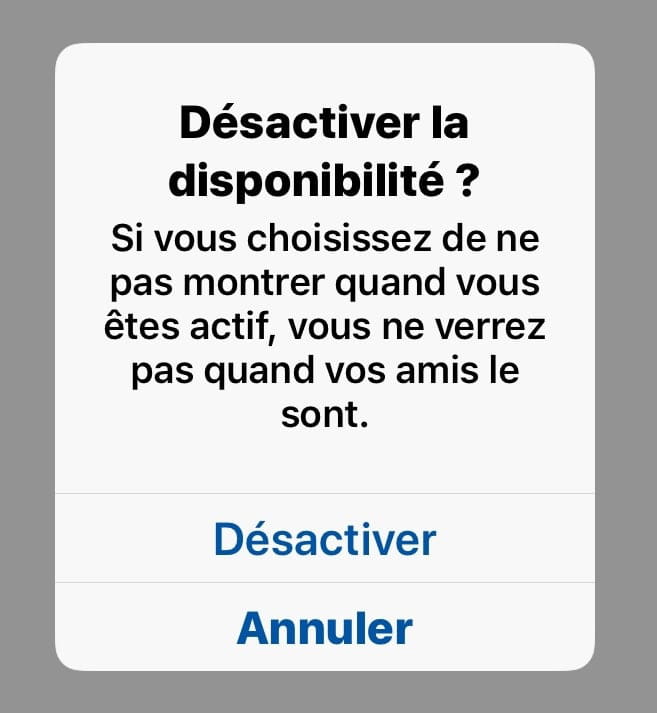
=> Never use the disable function
Here too, we know I’m not sleeping at 3 a.m. ;)
So indeed a bug, did you do 1) to 6)?
=> URL of message N13