
Unable to create a new folder
Solved
gugur44
Posted messages
36
Status
Member
-
Loukesse -
Loukesse -
Good evening
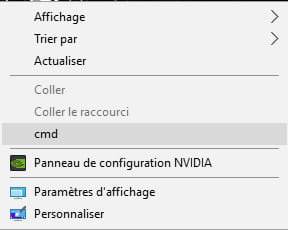
I would like to create a new folder on my Windows 10 desktop, but when I right-click my mouse and try to click on new folder, cmd appears instead, making it impossible to create one. Thank you in advance.
I would like to create a new folder on my Windows 10 desktop, but when I right-click my mouse and try to click on new folder, cmd appears instead, making it impossible to create one. Thank you in advance.
14 answers
-
Hello,
This is a registry error that has mistakenly removed the use of certain elements in the context menu (very unfortunate all this).
We will need to perform some somewhat technical manipulations:
press the WINDOWS + R keys, then type regedit to access the registry.
Go to this path by opening the corresponding folders:
HKEY_CLASSES_ROOT\Directory\Background\shellex\ContextMenuHandlers\New
And create a new key (right-click --> new --> string value).
Then right-click on this new key --> modify
and insert the value below.
{D969A300-E7FF-11d0-A93B-00A0C90F2719}
Click OK, close the registry, restart the PC and see what happens.-
-
You're welcome,
Okay, we're going to perform a scan of the PC then, maybe that will help us fix the registry errors.
Do you have CCleaner?
If yes, that's what we will use.
If not, well, we'll download it ;)
It's a tool that does a deep clean, removes unnecessary and cumbersome files that slow down PC performance and fixes registry errors.
Here is the download link:
https://www.ccleaner.com/ccleaner/download/standard
Save the file to download it.
Then run it to install.
Then launch CCleaner.
Attention:
If you keep a browsing history (websites you visit), passwords entered on websites, auto-fill for forms (for example, when you go on Facebook and your email address fills in automatically), bookmarks, let us know before you start the scan and clean, we can back them up if you’re not sure how to do it! -
The same problem occurred for me (September 2019, Windows 10) after updating the BIOS following the instructions from HP support; I had a message at startup of the computer incorrectly indicating a forced shutdown due to overheating. HP stated that the alert could be ignored (and for good reason...), and removed with this update. Following the recommended download and installation, the alert had indeed disappeared, but I could no longer create files. It is worth noting that the icons in the taskbar had also disappeared. Thanks to your advice, everything is back to normal.
-
-


 I am therefore asking for your help.