Thumbnail Preview for Images/Photos in Windows 11
Pitomba
-
jpel60000 Posted messages 304 Status Member -
jpel60000 Posted messages 304 Status Member -
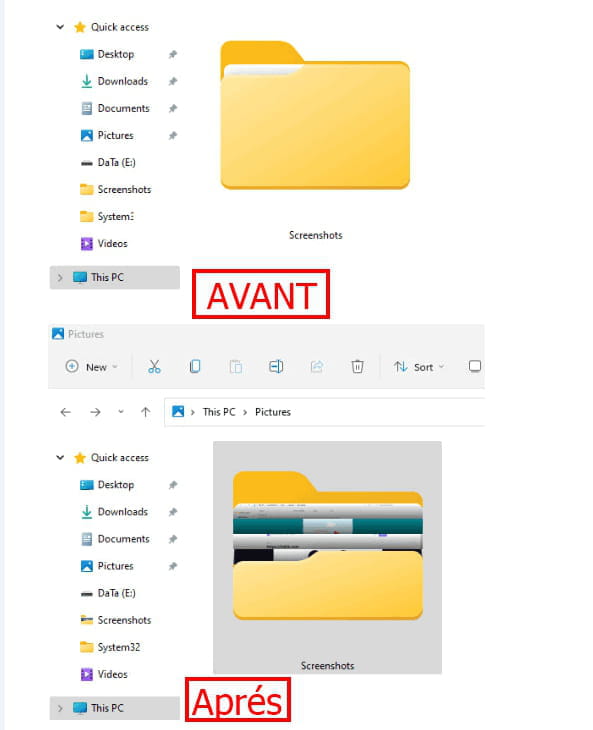
Here’s the nightmare. Windows 11 had the bright idea of removing the thumbnail preview for images/photos. The photo icon is a "folder" and does not display the photo, and the "preview pane" on the right does not display the photo either. Whether in "Large icon" or small, it's the same.
In other words, you have to open a photo to view it, unless you know which photo you’re looking for by the archive name. Does anyone have a lead on how to restore it to the way it was before? HELP!!
In other words, you have to open a photo to view it, unless you know which photo you’re looking for by the archive name. Does anyone have a lead on how to restore it to the way it was before? HELP!!
11 answers
-
Hello everyone
Same issue, new computer and therefore Windows 11 (I hate it)
Problem with the photos, they are icons and therefore impossible to visualize. A few can be viewed but in small numbers, others not at all. I followed your advice and nothing was working, everything was already checked and unchecked
There are also small check marks or crosses under the icons -
Hello,
There is a small executable to download and run to display previews of image and video files; we still need to know if it is compatible with Windows 11!
--
“Take your chance, seize your happiness and go towards your risk. By watching you, they will get used to it.” René Char -
Indeed, some of the photos are previewed, while others are not at all - everything in the office is not previewed in mosaic or as a "large photo" - they appear as "standard icon" ... If I put the same photos in the "Image" or "Documents" folder, they are previewed...
-
Hello,
I had the same issue with my Google Pixel 4a, a nightmare for sorting photos, whether with W10 or W11 for me it was the big problem with this device.
I just upgraded my phone to Android 12 and I found my thumbnails and photo previews in the explorer (on W10 and W11), a miracle for someone who was considering changing phones... -
pistouri Posted messages 19010 Registration date Status Contributor Last intervention Ambassador 8 732
Hello,
Folder Thumbnails
Microsoft has removed folder thumbnails and all thumbnails in the Windows 11 Explorer or on the Desktop.
Source
Workaround with WindowsThumbnailGenerator:
Thumbnails for Videos, Images
Display a thumbnail for videos, images.....
Workaround with ==► Media Preview
A+
--
pistouri -
I have the same issue, can you help me? It's really annoying and I've tried in the properties but it doesn't work.
-
pistouri Posted messages 19010 Registration date Status Contributor Last intervention Ambassador 8 732
Hello,
Whether it's the Explorer's folders or folders on the Desktop, it is not possible to display the thumbnails.
Another example here

Yes indeed, it's a shortcoming.
A little update is needed :)
@+...
--
pistouri -
pistouri Posted messages 19010 Registration date Status Contributor Last intervention Ambassador 8 732
Hello,
Bis repetita
==► Windows 11 Folder Thumbnail Preview
Is there any plan to add this feature? As a graphic designer and photographer, having thumbnail previews is an essential feature - I know that for people who primarily use Word, Excel, PDFs, etc., the graphics are in a particular folder. I now have hundreds of generic folders with no way of knowing what images are in them; other than randomly clicking on each one... it’s paralyzing. I really don’t understand the idea of completely removing a feature that has been in place for nearly 25 years and not giving the user the option to enable it.
It's hard to imagine how someone sensible could get rid of such useful features. Someone was probably thinking with their ass instead of their head.
Many file managers, only with xyplorer, you can get thumbnail previews, but that’s a paid application
Workaround with WindowsThumbnailGenerator
Thank you for taking the time to try to find a workaround; unfortunately, these steps only create thumbnails for the files, not the thumbnail preview on the folder icon. However, I found this application on GitHub ( https://github.com/hahagu/WindowsThumbnailGenerator/releases ) that helps to add folder thumbnail previews - it’s not perfect but it helps.
@ Have a nice weekend.
--
pistouri-
Hi
Here is the solution for Windows 11
Win + I
File Explorer
Folder Options
View
uncheck: display file icons on thumbnails
uncheck: always show icons, never thumbnails
It worked for me.
Good luck- Hello,
Idea, imagination.
Some contributors have imagination.
==► View folder contents as thumbnails
Ability to preview folder contents.
Rename the original icon library (imageres.dll.mun) to imageres1.dll.mun to paste it into the Windows 10 one, as system permissions prevent you from deleting it.
C:\Windows\SystemResources\imageres.dll.mun
Lol, I literally came here to say that I would really like the opposite of the OP (using Windows 10 and I would like to switch to Windows 11 icons), because I loved the lack of thumbnails. Although this should be an option. Enable or disable thumbnail preview. Plus, I’m sure thumbnails will be added in the future. Just a very distant future, given how “quickly” they do anything with Windows 11.
Obviously, none of your vfx or gfx work as thumbnails allows for working in AE, PS, and Premiere without having to open the bridge much better than not having them. Thumbnails are therefore very useful if you are working on vfx or gfx design like artists with hundreds, sometimes thousands of folders full or projects. Being able to know what’s inside without opening them is very helpful. Should definitely be a setting like it was in folder options for those who need it and for those who don’t want it in the same way.
Source
@+ - Hello,
Are folder previews coming back or are we stuck with this?

None of us know what Microsoft might do in the future. However, since the removal of previews seems to be an intentional design choice, I wouldn't expect them to come back unless there is a lot of user feedback asking for the opposite. I'm sure you'll find discussions in the Feedback Hub about this that you can vote on.
Short answer; nobody knows
Source
@...
-
-
-
Hello Pt1t,
Thank you for this early feedback (Insider).
Available soon on the stable version, if I understood correctly.
It's a horizontal band for the folder thumbnail preview, but it's better than nothing for now.
One might think Microsoft consulted the Hub.
Maybe Microsoft will work on this point in future versions or updates to improve folder thumbnails.
Thanks for the capture that "jumps out at you" :-)
See you!
-
-
Hello. I don't quite understand your request. Are you talking about the file explorer?
If so, if you select "view" then "tiles", the thumbnails are perfectly visible.
--
I only make the effort to try to help those who make the effort to express themselves in correct French. -
Press Win + E on your keyboard to open File Explorer
2. Go to the Options tab to the right of the View tab
3. Select Options > Change folder and search options
4. Go to the View tab
5. Uncheck the option to hide extensions for known file types