Remove a page number
Solved
Cathozie Posted messages 104 Registration date Status Member Last intervention -
Hello,
In my table of contents, I've created my styles and everything is working well, except for one of the styles (Section Title), where I would like the page number not to appear since it is identical to that of the previous style (Section Number).
I searched and found a slew of answers with elements that do not appear in my Word (2024). For example, "it" suggests unchecking the "include page number" box after displaying a dialog box to mark the entry (Alt Shift O), but this field doesn't exist and I'm stuck. Of course, it's not a big deal, but having the same page number twice one below the other isn't very ideal... even though I'll probably be the only one to notice it ;-).
Thank you for any solution on this matter.
16 answers
-
Hello
If I understand correctly, the Title is not the same style as the Number?
If that's the case, I provide the solution here (First solution):
You can also, if the Titles have a hierarchical level of 1, and the others 2, 3, etc., use this method:
m@rina
-
Good evening,
You should mainly mention what each of the styles used is, along with the level of hierarchy if they are not standard Word styles.
m@rina
-
Hello,
I feel like your style levels are poorly designed. Why create styles when Word provides title styles that are meant for that.
I think you need to review your organization.
Can you give me an excerpt from your document that contains just a few titles and a small amount of text (that you can anonymize if necessary).
Furthermore, the desired result is not logical.
If you don't want page numbers, it's on the main title:
PART number. (that's the level 1 style name)
Part Title A (That's the level 2 style name) ............................... 13
Sub-chapter (that's the level 3 style name).... .........................15
Sub-chapter (that's the level 3 style name).... .........................18
Part Title B (That's the level 2 style name) ............................... 20
m@rina
-
Good evening,
So, first verdict: your styles are bad.
If I recommend using Word styles, it’s because they work without any questions. Heading styles must have a hierarchical level. That’s what ensures that the table of contents works without issues.
If I look at "PARTIE numéro" = PARTIE I
this style has a hierarchical level of 1 => OKThe problem here is that your title SOPHIE is also in the "PARTIE numéro" style, so these two titles will be treated the same way.
If I then look at the 1 (by itself), it’s in the "Chapitre" style. It also has a hierarchical level of 1...
Then DÉCEMBRE 1991 is in the Ss-chapitre style, and it has no hierarchical level.
Same for the rest.
================
As for your texts:
- PARTIE I must be of hierarchical level 1 => OK
- SOPHIE must be of hierarchical level 2 => not OK
- Single numbers (1, 2, etc.) should not exist: they should be linked to your "Ss-chapitre" style and should be of hierarchical level 3 => not OK
Note: you can have a styled paragraph over 2 lines. You need to add the number to your "Ss-chapitre" style, and in your text, make a line break after the number. The numbering will handle itself and you’ll find the numbers in the TOC.As a result, your table of contents is shaky. And everything is jumbled.
I modified the document by applying the heading styles, and indicating that I do not want to number Title 1.
Now, your numbers are misaligned and the leader dots are missing because you messed with the TOC styles. I’ve put the leader dots back, you need to change the tabulations.
https://transfert.free.fr/86AvaOF
Obviously, you will just need to change the appearance of these styles.
m@rina
-
Hello Catherine,
in the TOC, the \n 1-2 allows you not to number the pages of level 1 and 2 titles.
However, "I applied a TM style that highlights these two levels differently." => I did not understand.
Regarding the zombie styles, it's not always easy to remove them. The Heading style is a style provided by Word, but there is only one. So, there may have been copies.
The styles provided by Word cannot be deleted. However, we can choose not to display them or customize their display. I explain everything here in detail.
http://faqword.com/index.php/word/interface/ou-sont-les-stylesAdditionally, you can use the following macro to remove all unused styles in the document (except for styles provided by Word, of course):
and sometimes, despite the macro, some resist!! ;)
m@rina
-
I don't understand your logic:
Why apply style TM4 to levels 1 and 2?TM1 should be applied to level 1
TM2 for level 2
etc.
-
Hello m@rina and thank you for your response,
Here is the TOC of my TM:
{ TOC \h \z \t "Chapter Title;1;Part Title;2;PART number;1;Sub-chapter;3" }
This gives me:
PART number...............................................................13
Part Title 13
Sub-chapter................................................................15
I looked at your pages and for tonight, I'm going to let it go, but what I would like (I'll try tomorrow) is for the Part Title line not to have a number or trailing dots. For now, there are no trailing dots and that's very good, but I didn’t understand why.
I’ll get back to you tomorrow after testing.
Have a good evening and thanks again.
--
Cath :-)
-
So I realize that the first style in the TOC didn't belong there.
So here is the reality of the TOC:
{ TOC \h \z \t "PART number;1;Part Title;2;Sub-chapter;3" }
Which gives me:
PART number. (this is the name of the level 1 style). .................................13
Part Title (this is the name of the level 2 style) 13
Sub-chapter (this is the name of the level 3 style).... .........................15
-
In the TOC, I tried to enter the switch \n 2-2, but it doesn't work, it only leaves me the PART I, PART II... (style PART number) and the chapter numbers which are not even included in the TOC style.
{ TOC \h \z \t \n 2-2 "PART number;1;Part Title;2;Sub-chapter;3" }
This gives:
PART I...............................................................13
1........................................................................15
2........................................................................15
3........................................................................15
...
-
Hello,
Title 1, Title 2... it doesn’t speak to me, so I name my styles so that they appear to me without having to remember... It's age :-).
You are absolutely right, it’s the PART number style that should be without page number, and in that case, there should be dots on the Partie Title line and not on the PART number line.
Here is an excerpt from the novel with TM:
https://fromsmash.com/Table-des-matieres-et-extrait
-
https://fromsmash.com/Table-of-contents-and-excerpt
-
Good evening m@rina and a huge thank you for this work on my style hierarchy.
I didn't understand why I had to remove the levels from the styles I didn't want to see every time I made a TM change.
They kept reappearing every time.
I'll look into the issue more closely tomorrow, and in the meantime, wish you a good evening.
--
Catherine :-) -
Hello m@rina,
There you go! I have completed the alignment... of my TOC with the Title 1 styles... and I have removed all the "hacked" styles.
I ultimately decided to remove the page numbering from Title 1 and Title 2, which doesn't really make much sense. However, even after correcting my TOC with the information from your example, I still had continuation points on the first level (Title 1), but not on the second level like in your example, regardless of the TOC style inserted (whether the proposed ones or the custom one). I corrected it by ending the TOC with \n 1-2 and applied a TM style that highlights these two levels differently.
Regarding the TM1, TM2 styles... is it normal that they don't remain when updating the TOC, or is there some manipulation to keep them with each update of the TOC?
One last thing, if you don’t mind. When I use the custom style, in the options, if "Styles" is checked, I no longer have my unwanted styles since I deleted them, but there are still two header styles that I didn't create: Header #1 which has level 1 and Header #2 (2) which has level 2 and, every time I retest, they reappear, even though I have removed the levels. By unchecking "Styles" and keeping "Hierarchical levels," it works, so that's what I did, but I would like to understand.
That's it! Thank you so much for your patience and valuable help.
Have a great day.
--
Catherine :-)
-
Good evening m@rina,
As for displaying styles or not, I know about it and it’s true that it’s quite convenient.
Regarding "I applied a TM style that highlights these two levels differently," in order for Title 1 and Title 2 to stand out well in the TDM, I positioned myself over it and applied the TM4 style, making slight modifications for indentation and spacing to my liking, as well as a font size suitable for the result I wanted. Here’s what it looks like:
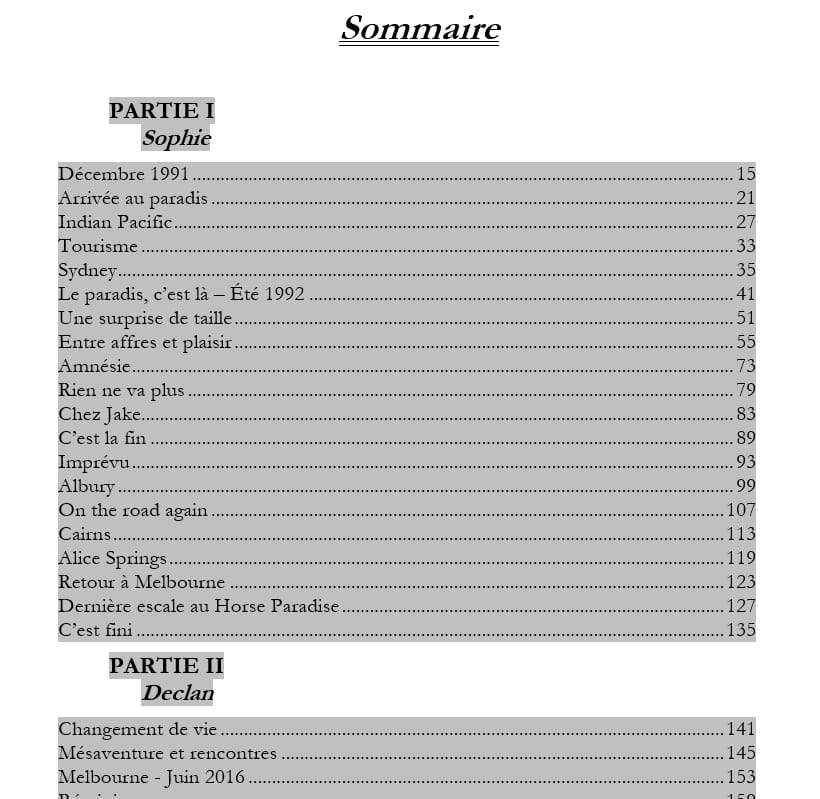
I will test the macro when I get a chance.
Thanks again.
--
Catherine :-)
-
Indeed! I applied the first TM style that had the format I liked without thinking about it. I just corrected it and it's perfect!
I guess that's the problem with being self-taught :-).
Thanks again for your advice and help.
I think I can mark this thread as resolved, thanks to you.
Have a nice day
--
Catherine :-)
-
Thank you so much!
Your site is really a treasure. It's in my favorites now.
My use of Word is for writing and publishing novels and short stories, so I use tables and text boxes very little (if at all), except sometimes for small tutorials on using software with screenshots.
On the other hand, TDM and styles, even though I haven't been using them very well until now, are part of my daily life. That says a lot about how much your help has allowed me to progress in this area.
Thanks again :-)
--
Catherine :-)