
Unable to type the at sign on my keyboard
Solved
Aliboron Martin Posted messages 3655 Registration date Status Contributeur Last intervention -
Hello,
I have a wired azerty keyboard from Logitech with an iMac.
Since I changed keyboards, it's impossible to type the at sign; I've tried Alt Gr + the key where the at sign is, but it doesn't work and it's really annoying because typing one's email address, for example, is complicated.
If anyone has a solution to offer, I’m all ears.
Have a good day.
Séverine
7 réponses

Good evening,
Generally, you need to press Alt Gr + the at sign key (@) (well, on Windows; I’m not too sure about Mac...).
Otherwise, press Alt + 64 (on the numeric keypad…).
Hello
Thank you for your response but none of these solutions work
I don't understand
But thank you again
CMD + <
https://www.windows8facile.fr/arobase-clavier-apple-mac/
https://astucesapple.fr/ou-est-la-touche-arobase-sur-mac/
As a last resort, it is possible to copy it from a text and then paste it.

I’ve tried everything, but nothing works.
I’ve activated the dictation mode, and when I dictate the word ‘at’ it gives me the direct sign.
But it’s still a pain not to be able to figure it out, especially not understanding why it doesn’t work.
I changed my keyboard because of that, and still nothing has changed.
That said, have a good weekend.
If it were poorly connected, I wouldn't be able to type with it, and that's not the case.
The keyboard is brand new as of today, and the old one was doing the same thing.
I'm going to try them on another computer to see.
Have a good evening.
Hello,
Is it a Mac or Windows keyboard?
In the first case, see it there including the comments
https://les-raccourcis-clavier.ouest-france.fr/arobase/
In the second case, specify, see for example there:
https://www.journaldulapin.com/2020/06/01/macos-clavier/
Hello,
I'm not a Mac expert, as I only use it in a virtual machine once every ten years.
What is the action of AltGr-@, none, a different character?
I don't know formally.
It seems that you need to confirm the type of keyboard on Mac.
https://www.macg.co/materiel/2020/03/si-votre-clavier-tape-des-la-place-des-112703
Various key combinations are suggested, I don't know how valid they are:
Alt-£-@ (Do you need fairy fingers??)
Here’s a dark story that I didn’t quite understand with the key <>:
https://forum.macbidouille.com/index.php?showtopic=161588
AltGr-0
Alt-0 which corresponds on the Mac keyboard to Option-0 (in principle, the Mac Option key is called Alt on a Windows keyboard).
Remapping a key on the keyboard on Mac directly or with a specific utility, I don't understand anything about it?
In fact, the keyboard works normally.
I tried it on a Windows computer and it works fine, so it’s the incompatibility with a Mac computer that prevents me from typing the @ symbol and the euro sign.
It seems that I will have to use an Apple keyboard for everything to work properly.
Thank you all for your help.
Good luck for the coming week.

What exactly is the model of the Logitech keyboard in question? A priori, I only see one with those keys on their site, the K740 model, but it also has a numeric keypad which yours seems to lack...
It is often said that on Logitech keyboards the combination Shift 2 allows you to get the at symbol. Have you tried it? For example, see this discussion (rather old though)...
You didn't mention what you observe with the keyboard viewer when you activate the Shift or Option keys (separately or together)...
If you ask to "Show the keyboard viewer" you will easily find out which key (or key combination) will allow you to type the at symbol.

Hello at home!
Bernard
Here, we see the "empty" keyboard. But you need to explore, for example by pressing the Option ⌥ key and possibly also the Shift ⇧ key.
Since your keyboard has US keys, it's probably a bit special. I would say the Option Grave Accent combination has its chances...
Hello at your place!
Bernard


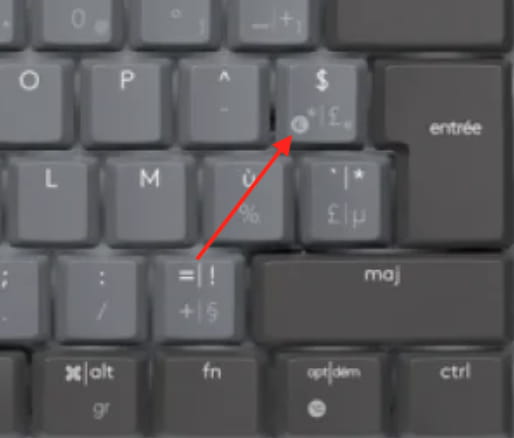
The problem is that based on her keyboard viewer capture, she has a US keyboard (no L-shaped enter key) for which she did not specify the exact model. It is not recognized as an ISO keyboard by macOS, and without further details, I think we can only know from the keyboard viewer what keys and key combinations to use...