
Hide file extensions
sportman58 Posted messages 9 Status Member -
Hello,
Since I got my iMac M1, I've been trying to hide file extensions (jpeg, avi, mkv ...), but to no avail. I can do it manually by using "Get Info" and checking the "Hide extension" box, but it's tedious, as I have to do it file by file, and it's impossible to do for all the files on the hard drive.
However, in the Finder settings, there's an option to "hide extensions," but it only works for files that have already been hidden with "Get Info." For the others, nothing changes!
Does anyone have a solution?
Thank you for your response
Best regards
9 answers
-
Hello,
Finder Menu > Preferences (or Settings > Advanced Options tab > check Show all file extensions.
To hide them, uncheck.
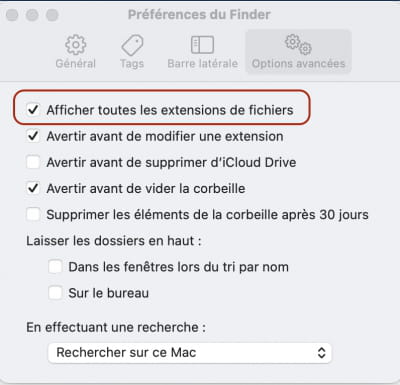
MBP + macOS Ventura
OpenOffice, LibreOffice -
Hello trotte-menu
As I mentioned in my message, unchecking this box has no effect on file extensions.
It only works on files for which I have manually hidden the extensions, using "get info". With all the others, nothing changes!
Could this be a problem with my Mac?
-
I see no other alternative but to do, in the opposite direction, what you have already done to hide the file extension file by file; an operation whose usefulness I don't really see.
MBP + macOS Ventura
OpenOffice, LibreOffice -
Hello,
Here’s what Apple says about hiding/showing file extensions:
https://support.apple.com/fr-fr/guide/mac-help/mchlp2304/macThe important sentence is this one:
"If you select 'Show all file extensions', all extensions are displayed, even for files for which the 'Hide extension' option has been selected.
If you deselect 'Show all file extensions', file extensions are displayed or hidden based on their individual 'Hide extension' settings."So apparently, hiding extensions is individual: file by file.
That said, there is a very knowledgeable person named macomaniac who explains the reasons behind this in this discussion:
He even offers a solution where you will need to edit the Finder preferences file.
Keep us updated with your tests
Ritchi
-
Hello
Indeed, the solution of going through the Finder menu doesn’t work on my iMac, even after waiting a long time as macomaniac suggested.
I put the com.apple.finder folder in the trash, no change!
The com.apple.finder.plist file is in the trash too, still no change!
On the other hand, all the values have returned to default, what a <font size="3">mess!</font>
<font size="3">So, should I leave my files in the trash, put them back, or empty the trash?</font>
<font size="3">Best regards, Hello</font>
-
On the other hand, all the values have reverted to default, what a mess!
So, should I leave my files in the trash, put them back, or empty the recycle bin?
Sincerely
-
Hello, where do your files come from?
directly retrieved from the Mac or from a transfer on a USB stick or external hard drive? -
Good evening
All my files originally come from my old PC, transferred by hard drive or USB stick. But the problem remains the same if I create a new file from my iMac!Best regards
-
Thank you for your response, Ritchi. So, I'm putting everything back in order, thanks anyway, have a good evening.
Best regards

