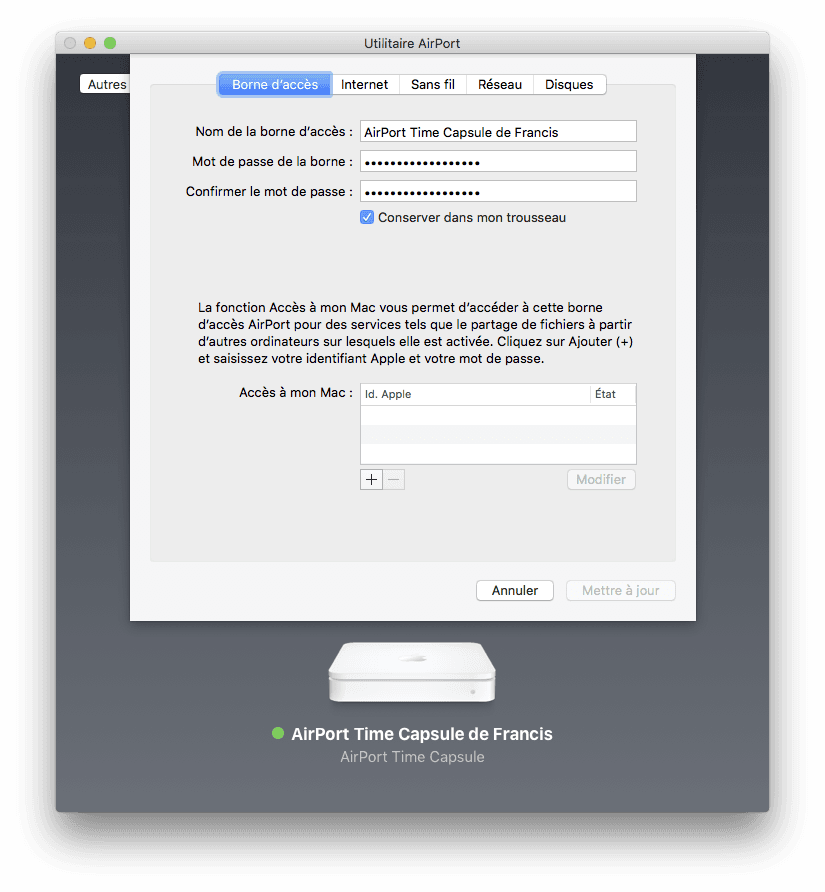
Time Capsule and network extension.
boye78
Posted messages
95
Status
Member
-
boye78 Posted messages 95 Status Member -
boye78 Posted messages 95 Status Member -
Hello,
I would like to know if it is possible to connect my Time Capsule (room 2) via Wi-Fi to my BOX (room 1) in order to connect my PC (room 2) via Ethernet, which does not have a Wi-Fi card.
Thank you very much for your help.
Configuration: Mac OS X (10.11.5) / Safari 9.1.1
I would like to know if it is possible to connect my Time Capsule (room 2) via Wi-Fi to my BOX (room 1) in order to connect my PC (room 2) via Ethernet, which does not have a Wi-Fi card.
Thank you very much for your help.
Configuration: Mac OS X (10.11.5) / Safari 9.1.1
11 answers
-
Good evening,
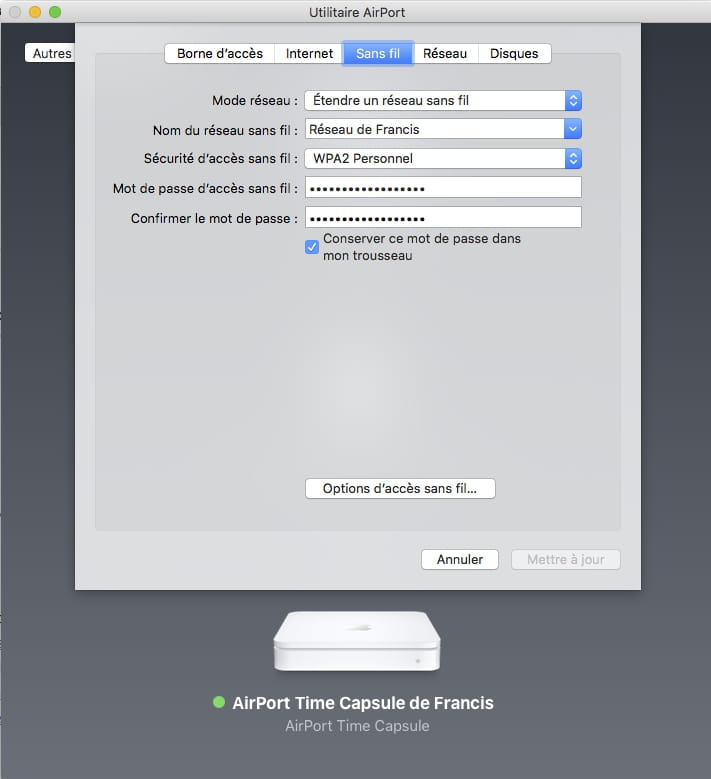
It works for me when the Time Capsule is set up like this
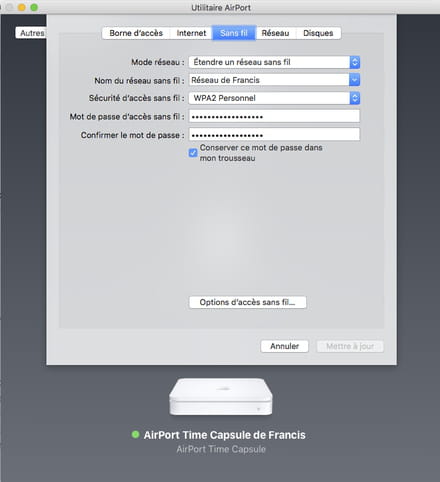
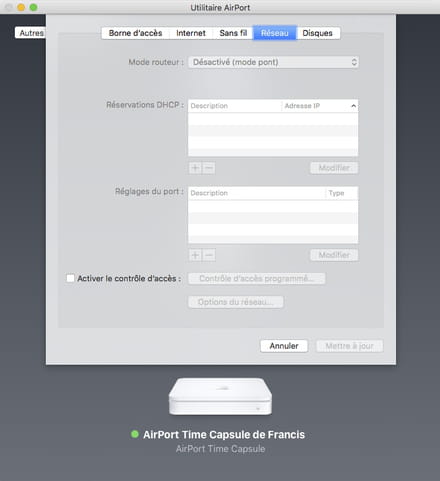
I am using the Wi-Fi from an Airport Express base station, as my box doesn't have Wi-Fi, but the principle is the same.
So, it needs to be tested...
--
Have a nice day :-) - Francis
“Working group: A group of people unable to do anything by themselves who collectively decide that nothing can be done!” WCh -
Thank you very much! :)
--
Posted from CCM Live forum for iPhone/iPad -
I can't do it.
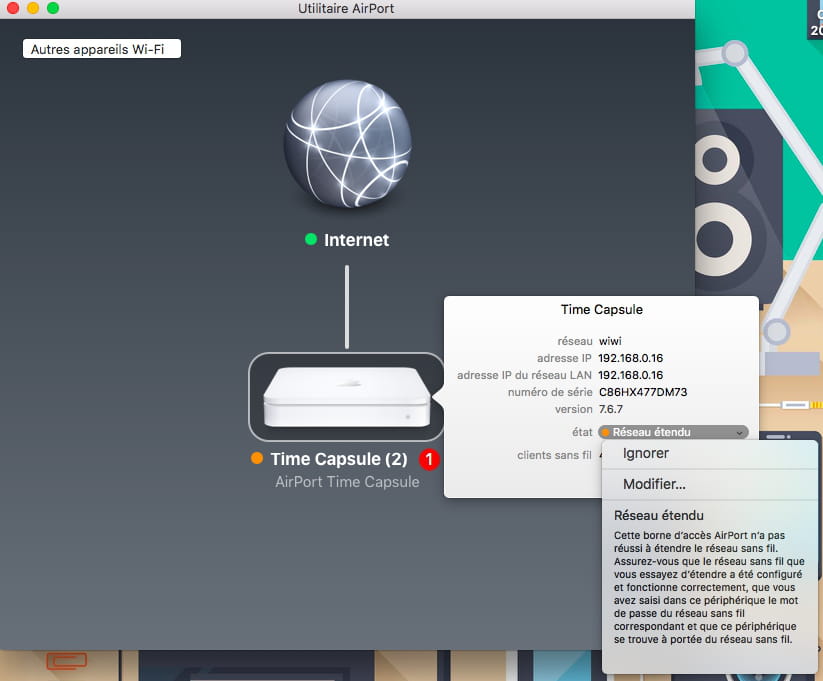
I have a message telling me: "this airport access point failed to extend the wireless network..."

-
Hello,
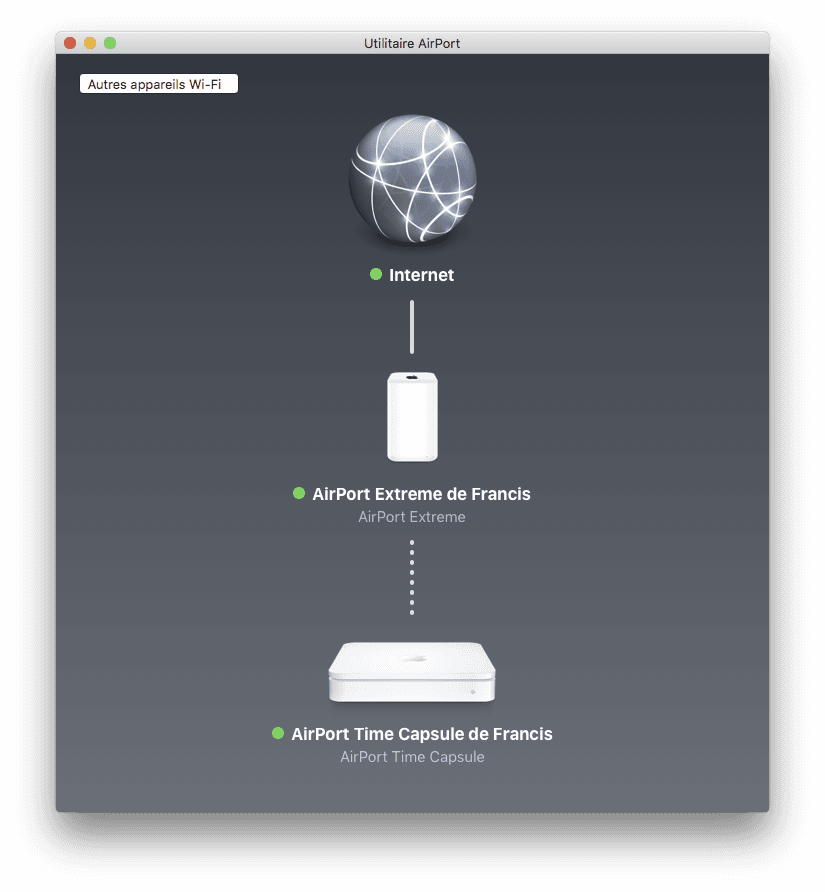
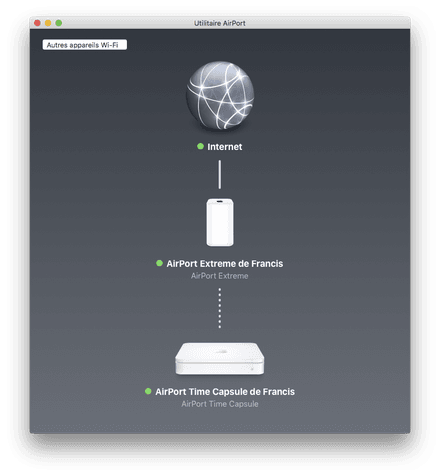
Between the Internet globe and the Time Capsule, the router (the Wi-Fi box) is missing. It is possible that the wireless network of this box is misconfigured. Not in router mode, or in "computer-to-computer" mode...
We should have the same setup as at my place, except that instead of seeing an Airport Express base station like at my place, we should see the Wi-Fi router box.
Depending on the box models, it can be in router mode or in computer-to-computer mode. For example, when I was still with Free, with the old boxes, I had to go to Free's website to enable router mode.
--
Have a Nice Day :-) - Francis
“Working group: A group of people unable to do anything by themselves who collectively decide that nothing can be done!” WCh -
He is fine as a router...
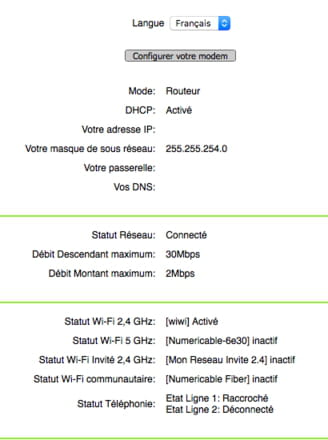
Honestly, I don't see where the problem comes from
Currently, my TC is connected to my BOX via Ethernet and
the network mode is: "create a wireless network" and it works very well
But to extend a network, I don't understand.
-How should I proceed for the configuration?
-Which network should I connect to to perform the operation?
-Should the TC be connected via Ethernet to the BOX during configuration?
If yes, to which port? (WAN port or Ethernet ports)
Thank you :) -
I don't know the Numericable box, but I see that its WiFi is activated.
The mode is "Create a wireless network"... so no existing network?
Maybe this network simply hasn't been created yet? So the network needs to be created.
Let's first forget about the Time Capsule, if no network exists yet in the apartment.
We open System Preferences on the Mac,
go to Network
activate WiFi
at the bottom of the window check the box "Show WiFi status in menu bar"
After that, we can create a network, either from System Preferences, click the Advanced button, then click the + sign to add a network...
or we exit System Preferences and go to the menu bar, on the WiFi icon, to request "Create a network"...
The Mac will detect the box's WiFi, we select it, and indicate a WPA access key... we can let the Mac choose the channel automatically, but we can also manually choose the channel.
https://forums.commentcamarche.net/forum/affich-29535166-probleme-d-ip-auto-assignee-macbook-pro#5
https://support.apple.com/fr-fr/HT201735
--
Have a nice day :-) - Francis
“Working group: A group of people unable to do anything by themselves who collectively decide that nothing can be done!” WCh-
In fact, I misspoke.
I will try to be a bit clearer.- Currently, in room 1, I have:
The BOX (with a Wi-Fi network: "WIWI")
The TC (connected to my BOX via Ethernet on the WAN port)
(it creates another network: "TCWIFI")
I can connect, with my MacBook Air, to either WIWI or TCWIFI at my choice. Both are operational
(I can of course connect from room 1 and 2 without any problem via Wi-Fi)- In room 2, I have:
a PC that does not have a Wi-Fi card but only an Ethernet port
I would like to move the TC to room 2 to be able to connect my PC via Ethernet.
For this, I need to:
-- Cancel the old TCWIFI network
-- Create an extension of the WIWI network.
What I did that does not work:
- I connected to the AirPort Utility
- on the TC, I go to "Edit"
- then in the "Wireless" tab, I choose to extend a wireless network
- in "Network Name", I indicate WIWI (the network already present on my BOX)
- in password: the password of the WIWI network -
-
-
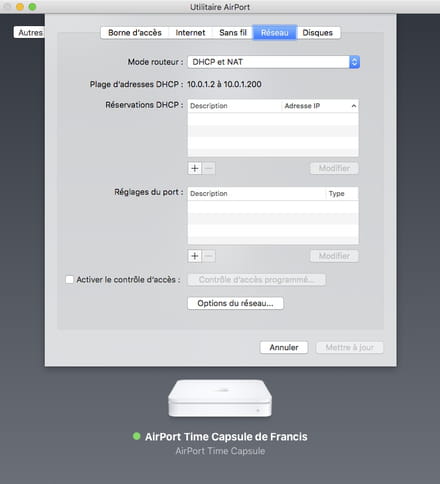
So, this is indeed the setup that works for me, but with an Airport base station instead of the Box.
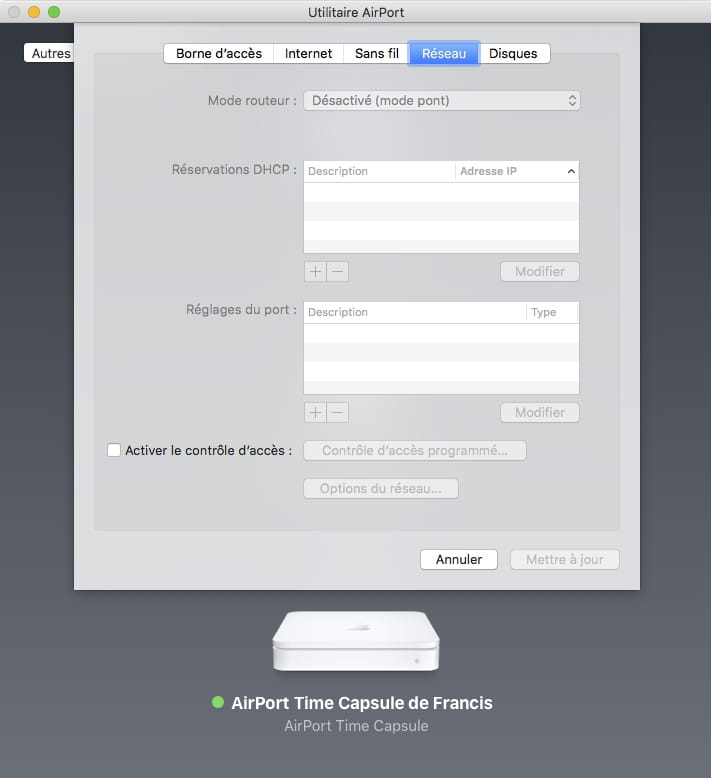
I don’t remember the tests I did during the setup; I can’t recall if router mode as I had it was necessary or not, but it’s quite possible it was. Be that as it may, my airport base station is configured in router mode "DHCP and NAT," and not just in "DHCP." I don’t know if this is also possible on the Numericable box... to be tested
--
Have a nice day :-) - Francis
“Workgroup: A group of people incapable of doing anything by themselves who decide collectively that nothing can be done!” WCh -
Okay, I will take a look.
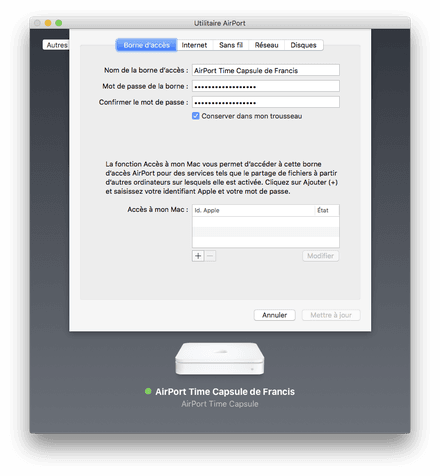
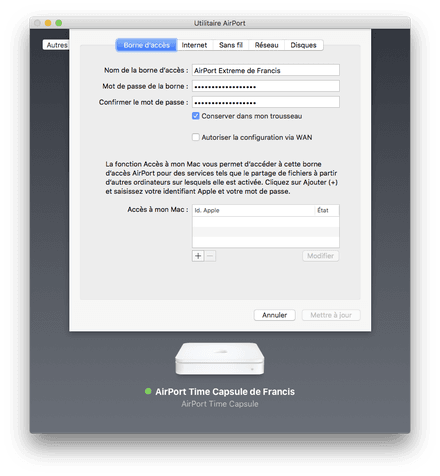
And in the "access point" tab, did you indicate anything?
--
Posted from CCM Live forum for iPhone/iPad -
Here, I am in the setup you were looking for. I moved my Mac to retest, in case I missed something. But it's running perfectly. Just make sure not to get the Ethernet port on the TC wrong; don't use the one meant for input from a box.
In Access Point, I have these 2 screens respectively
--
Have a good day :-) - Francis
“Workgroup: A group of people unable to accomplish anything on their own who collectively decide that nothing can be done!” WCh-
-
Unfortunately, I don't have a third-party WiFi router on hand to test, but I would still be surprised if the TC couldn't use a third-party WiFi network. I've never read about any restrictions in this regard. When I have the opportunity to use a third-party router (a loan, for example), I will try it out because I'm interested in the topic :)
-
-
Alright
I'll keep you updated if I have any news ;)
Have a good evening and thank you
---
In the meantime, a solution would be to place the TC in room 2 and connect it via an Ethernet cable to the Ethernet port of the box. This will run an Ethernet cable from one room to another, maybe not really great, but possible.
Then turn off the WIFI on the BOX and create a WIFI network on the TC. The Mac will be able to connect to this WIFI network or to an Ethernet port of the box or the TC. The TC is then configured in "Bridge mode". The PC will be connected directly to the TC. This is the configuration I used on a Freebox V4 when I was still subscribed to Free.
-
-
Good evening,
It's not feasible. Unless we had a 30m cable ;)
Room 2 is upstairs... Too far from room 1.
But I took note of the idea.. :)
Thank you.
--