Asus X751L stuck on startup, no access to BIOS
Solved
Leho75
Posted messages
22
Registration date
Status
Member
Last intervention
-
Leho75 Posted messages 22 Registration date Status Member Last intervention -
Leho75 Posted messages 22 Registration date Status Member Last intervention -
Hello,
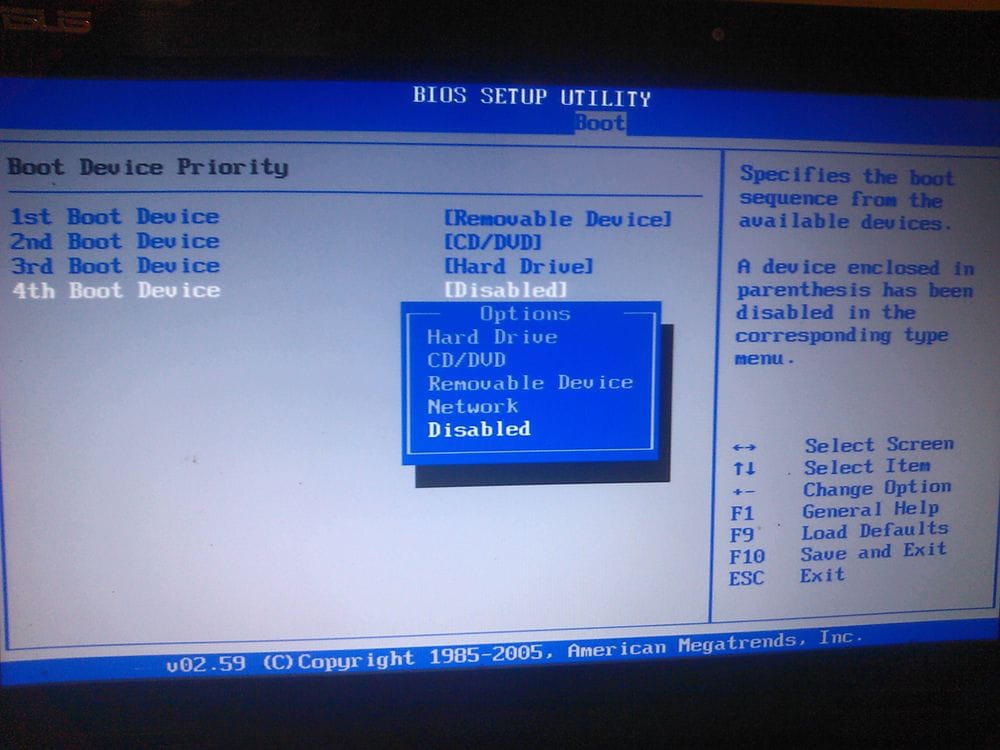
I have an old Asus X751L, it had become very slow so I wanted to do a full restore. I first tried the option to download the Windows boot software but it didn't work, so I chose the option to restore from the internal data. It took hours and now the computer boots in a loop, staying on the Asus screen with the little circle spinning, and it keeps restarting over and over. I wanted to try accessing the BIOS by pressing F12 but that didn't work either… Unless I’m not doing it right to access the BIOS because I managed to get there by cleaning the keyboard… I didn't see anything special and I asked for a default boot but it doesn't change anything. I'm completely stuck! Does anyone have any idea how to get this computer running again, which is still in good condition??? Thanks in advance to everyone!
I have an old Asus X751L, it had become very slow so I wanted to do a full restore. I first tried the option to download the Windows boot software but it didn't work, so I chose the option to restore from the internal data. It took hours and now the computer boots in a loop, staying on the Asus screen with the little circle spinning, and it keeps restarting over and over. I wanted to try accessing the BIOS by pressing F12 but that didn't work either… Unless I’m not doing it right to access the BIOS because I managed to get there by cleaning the keyboard… I didn't see anything special and I asked for a default boot but it doesn't change anything. I'm completely stuck! Does anyone have any idea how to get this computer running again, which is still in good condition??? Thanks in advance to everyone!
9 answers
-
Hello,
Restart your PC by repeatedly pressing the F2 key.
ASUS ROG G752 VSK | QuadCore Intel i7 7700HQ | 32 GB-DDR4 | 2 SSD M.2 500 GB | 2 Seagate HDD 2TB | GeForce GTX 1070M 8 GB | 17.3" Screen (120 Hz) | DirectX 12 | Windows 10 (x64) -
Thank you!
Great, it works, but now how do I start the PC in "safe mode"??? -
So to be completely frank, I’m not sure about anything. Given the age of the PC, it should be Windows 7 or 8. I’m in the BIOS, but in the "BOOT" tab, I don’t see anything related to the Windows version... I don’t even know if it’s installed correctly since the problem arose after an attempt at a full restore. I can just see that apparently my files haven’t been deleted.
-
Indeed, in the "boot" tab there is no "hard drive" or anything else... Can a system restore fry a HDD?

-
Windows 8 I think since I had to select the small "settings" wheel in the far left menu bar with restart, etc. below it.
But with the complete reference: X751LJ-TY401T I3-5005U/17.3 /4G/1T/W10/G920M/WHITE/P2
I find Windows 10
-
So, I assume the hard drive is fried/kaput and there's nothing else to do but replace it? Also, I'm not sure it's worth it because I've had this PC since early 2017 and a compatible 1TB hard drive costs around €200, and I wouldn't know how to reinstall Windows on it…
Am I mistaken?-
You will have to buy a new hard drive. The one in place is dead.
For Windows 10, a minimum of 8 GB of RAM is required, not 4 as indicated on the provided information sheet.
As a reference, on Amazon, the hard drive (or 2.5-inch HDD of 1 TB) is at... https://www.amazon.fr/Seagate-ST1000LM049-Disque-Dur-Interne/dp/B078TJ17QF/ref=psdc_430345031_t1_B07H28QRKN
We are far from the 200 euros offered.
-
-
Yes, that's true, but then I still need to install Windows, and I wouldn't know how to do that...
In any case, thank you very much for this information and your time!-
To install OS 10, you need to download the Windows 10 ISO with the tool "MediaCreationTool 21H2" (18.5 MB) that you can find here... https://www.microsoft.com/fr-fr/software-download/windows10 and follow the instructions.
-
-
Thank you very much!
If it's that simple, I might just be able to do it! -
I did a Windows 10 reboot with a USB stick and everything went perfectly.
Thank you very much!