
Conditional formatting Word
dan4400
Posted messages
434
Status
Member
-
Raymond PENTIER Posted messages 58230 Registration date Status Contributor Last intervention -
Raymond PENTIER Posted messages 58230 Registration date Status Contributor Last intervention -
Hello
I wanted to know if it is possible to do conditional formatting in Word like in Excel. This is for a mail merge and I would like, for example, all the labels from group 1 to be red, group 2 in yellow, and group 3 in green.
Awaiting your response, I send you my best regards.
Dan
I wanted to know if it is possible to do conditional formatting in Word like in Excel. This is for a mail merge and I would like, for example, all the labels from group 1 to be red, group 2 in yellow, and group 3 in green.
Awaiting your response, I send you my best regards.
Dan
3 answers
-
Hello.
There is no conditional formatting (or equivalent) in Word.
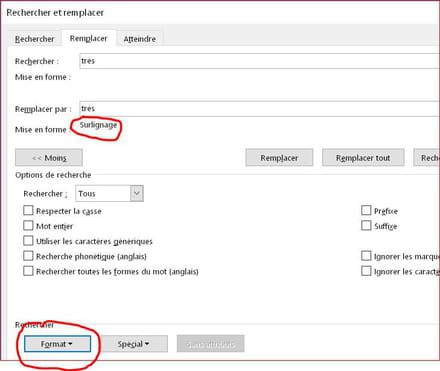
However, you can use the Find/Replace tool with the Format option to apply the colors of your choice (font color or highlighting) after the merge is complete...
--
Retirement is great!
Especially in the West Indies...
Raymond (INSA, AFPA) -
Hello
Thank you for your response, I will try. And can't we do a mail merge in Excel?
Regards. -
Hello.
I didn't quite understand your request "Can't we do a mail merge in Excel?"- Yes, you can perform a mail merge with the text from labels in Word and the data in Excel; this is actually the most recommended method; but you retrieve raw data; not their format.
- No, you can't do a mail merge with a spreadsheet alone; a word processor is required.
- You can check out our friend m@rina 's blog if you feel brave enough to tackle the conditional fields ...
- The simplest thing is still to launch 3 mail merges, one for each group.
--
Retirement is great! Especially in the Caribbean...
Raymond (INSA, AFPA)

