
Freebox mini 4K and router: problem?
fredbuzter
Posted messages
6
Status
Member
-
brupala Posted messages 111191 Registration date Status Member Last intervention -
brupala Posted messages 111191 Registration date Status Member Last intervention -
Hello everyone,
I looked at the topics on this forum but couldn't find this question.
I have a Freebox Mini 4K with fiber since last Monday. Since it is installed in the garage, I have no choice but to access it via Wi-Fi (the installer made it clear that it was my responsibility to do the work if I wanted access in the living room and thus with an Ethernet cable).
In short, Free's customer service advised me to buy a TP Link router, which I did...
The speed is very variable; right now it’s not very high (see photo) even though only my daughter is on Deezer while I am on the internet, for example.
What surprises me is that the TP Link network is active, but the old network "Freebox 4K" still appears in the list of Wi-Fi networks (even when I click on "forget").
Could this be where the problem comes from?
What would you recommend as action?
Will leaving Free for another provider solve the problem?
Sorry if my question seems silly, but I don't know much about this. I just saw in another post that testing your speed with Ookla was a good start for diagnostics.
Thank you for your help, have a good Sunday.
Frédéri
I looked at the topics on this forum but couldn't find this question.
I have a Freebox Mini 4K with fiber since last Monday. Since it is installed in the garage, I have no choice but to access it via Wi-Fi (the installer made it clear that it was my responsibility to do the work if I wanted access in the living room and thus with an Ethernet cable).
In short, Free's customer service advised me to buy a TP Link router, which I did...
The speed is very variable; right now it’s not very high (see photo) even though only my daughter is on Deezer while I am on the internet, for example.
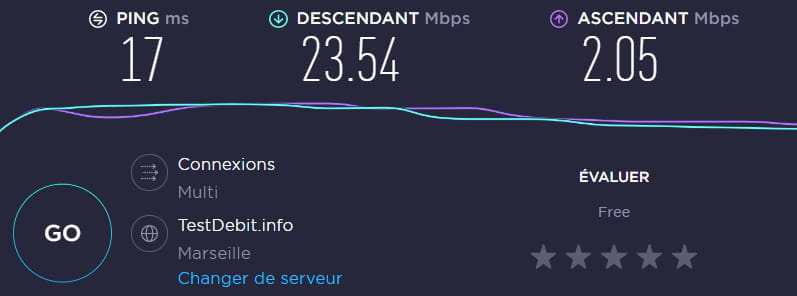
What surprises me is that the TP Link network is active, but the old network "Freebox 4K" still appears in the list of Wi-Fi networks (even when I click on "forget").
Could this be where the problem comes from?
What would you recommend as action?
Will leaving Free for another provider solve the problem?
Sorry if my question seems silly, but I don't know much about this. I just saw in another post that testing your speed with Ookla was a good start for diagnostics.
Thank you for your help, have a good Sunday.
Frédéri
4 answers
-
Hello,
First, to really test the line speed, you should connect a PC directly to the box with an Ethernet cable. That's the line speed test.
Then, is the router connected to the box? And are you using the router's Wi-Fi for your PCs? And the Wi-Fi also for the TV player?
Also, the Freebox Mini 4K has its own Wi-Fi network, so it's normal to see it. Unless you disable it in the box's settings.
--
a foreigner is a friend we haven't met yet.


