Google Chrome whole page is black
Solved
jacques16000
Posted messages
212
Status
Member
-
Togala -
Togala -
Hello everyone, I have a little issue with Google Chrome: when I open Google Chrome, the whole page is black. I can even download a wallpaper if I want, but why was my page white before like normal Google!!!!! If I use Google without Chrome, it’s normal, so it’s Chrome that’s not working!!!!! I’m attaching a screenshot that I took, and thanks in advance for your responses.

Friendship to all and have a good weekend.

Friendship to all and have a good weekend.
7 answers
-
pistouri Posted messages 19010 Registration date Status Contributor Last intervention Ambassador 8 732
Hello,
Google Chrome 74 is released with a dark theme
It is not yet available to all users, only a limited number of users on 74 will get it
If you are among these users, the Chrome browser respects your Windows theme setting and activates dark mode.
Solution 1
Right-click on the Windows Desktop
Go to the personalization line
In the left menu, select Colors
Choose your color.
Solution 2
Remove dark theme
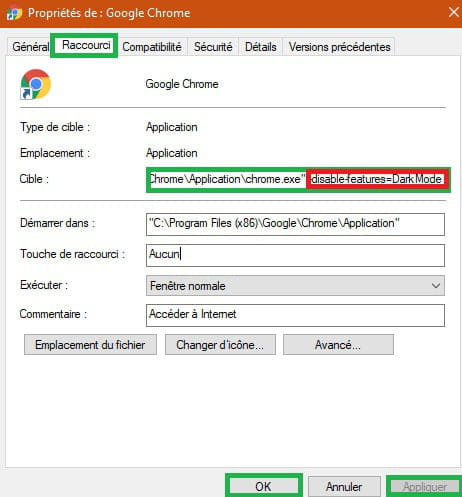
The shortcut is pinned to the taskbar
Right-click on the Google Chrome icon and then Properties
In front of Target you see
"C:\Program Files (x86)\Google\Chrome\Application\chrome.exe"
At the end of the line → Google\Chrome\Application\chrome.exe"
Make a space with the keyboard
Copy/paste
-disable-features=DarkMode
Then Apply and OK
This results in front of the Target line
"C:\Program Files (x86)\Google\Chrome\Application\chrome.exe" -disable-features=DarkMode
Space between chrome.exe" and -disable-features=DarkMode
Close the small window and restart Google Chrome
A+
--
pistouri-
-
Hello,
It's normal in your case when you open Google Chrome that it is set to Open the page
'New Tab'
It’s up to you to change it.
Go to the three dots at the top right, then click on Settings.
Scroll down to the section → On startup
Select → Open a specific page or set of pages
Add, for example, Google or the site of your choice
Google → https://www.google.fr/
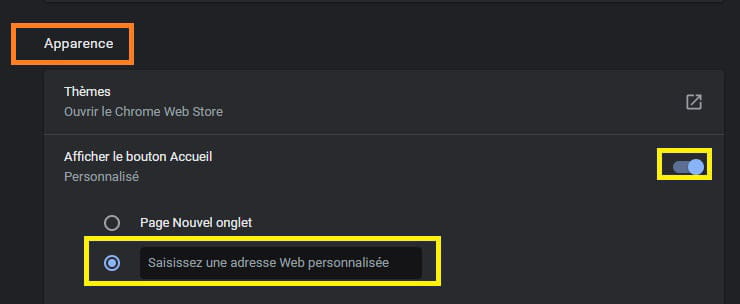
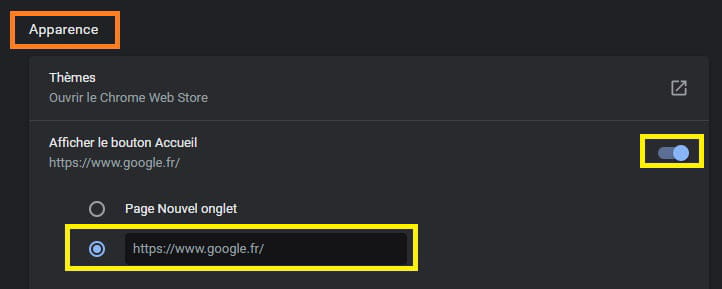
Then go to the section → Appearance
Select the box → Enter a custom web address
Enter the URL of your choice.
For example, you can put Google with a copy/paste → https://www.google.fr/
You can also check → Home button
Close Chrome to save the changes, then restart it.
See you! -
Good evening everyone. I know these questions are a bit dated, but I myself had the same problem two days ago.
Every time I logged into Google, the entire page would turn black leaving me no chance to access the settings.
I consulted all the forums without my problem being resolved. So, I installed DRIVER MAX and proceeded to update .NET FRAMEWORK.
After restarting Google, everything returned to normal.
I hope this can help some of you.
-