Computer stuck on installing Windows
Solved
Hello,
I performed a factory reset on my computer, everything went well until installing Windows, my computer gets stuck at 64%, it charges up to 88% then shuts down and restarts at 64% infinitely. I have already tried automatic repair but I lost my admin password...
I want to point out that I have neither a DVD nor a USB drive with Windows 10 on it.
I performed a factory reset on my computer, everything went well until installing Windows, my computer gets stuck at 64%, it charges up to 88% then shuts down and restarts at 64% infinitely. I have already tried automatic repair but I lost my admin password...
I want to point out that I have neither a DVD nor a USB drive with Windows 10 on it.
46 answers
-
PL453sHello,
I think the best solution is to create a Windows 10 USB stick and reinstall Windows.
For that, you need a blank USB stick of at least 4GB, a Windows 10 ISO file, and the Rufus software.
As for the ISO, I can't provide you with a download link for obvious reasons. I'll let you search for it. -
gugu01 ContributorContinuation and resolution here:
https://forums.commentcamarche.net/forum/affich-35977035-ordinateur-qui-bloque-sur-le-logo-w10-depuis-l-installation-cle-usb-bootable
--Automatic message
If there is no regular reply, I will no longer follow your discussion.
Minimum requirements for the volunteers who are helping you: Politeness, Respect... -
gugu01 ContributorHello,
You don't repair Windows 10 with a Windows 8, and even less by using a Windows 8 from another PC.
You want to reinstall, but do you know that you will lose all your data?
(by the way, probably already done)
What password are you talking about?
When is it being asked?
-----------------------
Create a Windows 10 installation USB key, for the next steps, we'll see if we repair or reinstall.
So use this software
https://download.microsoft.com/download/c/0/b/c0b2b254-54f1-42de-bfe5-82effe499ee0/MediaCreationTool1909.exe
Run it and choose "Create installation media for another PC".
Follow the prompts, it will download the ISO and properly put it on your USB drive.
To understand, you had Windows 8 originally and then upgraded to Windows 10?
You did a factory reset, but that brings you back to Windows 8 and your recovery partition seems faulty given your problems.
Note that under Windows 10 there is an "internal" option to reset Windows while keeping or not keeping your data, so we no longer use the original restoration from the PC.
--------------------
@ PL453s
For your information, this software is provided by Microsoft, and if we choose "create for another PC", we can also opt not to choose a medium and select the "create later" option.
In this case, only the ISO will be downloaded, and then if needed, you can create a key with Rufus as you mentioned.
We use Rufus if there are issues with the key made with the Microsoft software or according to the type of partition table on the PC where we want to install.-
rose2512 AuthorHello yes I know that I will lose all my data but that's okay because I've already done it with the factory reset... that's actually why I'm landing on the installing windows page where there's the bug...
The password I'm talking about is the admin password that is asked when I click on, for example, repair to an earlier date Windows when the automatic repair menu appears
——
For the Windows 10 key okay but it would take at least 12 hours to download given my very poor connection...
Is there no other way?
—
And otherwise I have Windows 10 on the pc there is no Windows 8 on this pc
It's on another computer that I have Windows 8 -
gugu01 ContributorCurrently, do you have access to Windows 10 on the PC?
Otherwise, how do you get to the recovery options?
---------------
For the password, either you set one, or you created a Microsoft account using an email address which is what you use for the login, so it's the password for that email address.
Or
You can continue without entering one if you never set one.
or
The tip given to remove passwords.
The tutorial is well explained and accurate, you might have missed a step. (or a bug occurred during the creation)
or
You need to go into the BIOS and disable something like "secure boot" that can be found in the security or boot tab.
---------------------------------
It's quite complicated to understand all this...
Creating a USB drive and reinstalling takes time.
OK, but if it takes you three times longer to tinker with a more or less good result, I don't know what's best, but anyway...
The only issue with a bad connection would be an error in the download and therefore in the creation.
------------------
As for your story about repairing with Windows 8, it's impossible and you must have made a system image or backup but couldn't extract an installation media from the PC. -
-
gugu01 Contributor<i>When I start the computer, I get to installing Windows or sometimes automatic repair when I force the shutdown.</i> <br /> <br /> If you can't get to restore in automatic repair? <br /> <br /> Find an image or take a photo and share it so we can know exactly which option you're encountering. <br /> Because it's important to guide you. <br /> <br /> To insert an image in your messages (it will be very useful) <img src='https://img-19.ccm2.net/P6brYjCa4OZltSdq0NQq4Pqcx-Y=/264x/cc61ed1d68764417ad984a064d7f2920/ccm-ugc/Capture2151.PNG' alt='' width='264' border='0' /> <br /> your image will appear as a link and then as an image after the message is validated (note that without text the image won't work)
-
rose2512 AuthorI get this when I force the shutdown of the PC:
https://www.cnetfrance.fr/i/edit/fo/2016/05/outils-demarrage-windows-04.png
or this when I start the computer without forcing a shutdown:
https://filestore.community.support.microsoft.com/api/images/8cb89859-e358-4055-ab63-70af59e2e3ac
P.S.: Sorry, I couldn’t insert the image directly; an error message appeared.
-
-
gugu01 ContributorBizarre, ce mot de passe.
----------
Faisons le point.
Tu as lancé une restauration et elle bloque vers 60 % (elle monte à 80 % puis retombe à 60).
Ce qui veut dire que ton ancienne installation est sans doute écrasée à ce stade.
Toute réparation ou restauration à une date antérieure serait donc impossible.
---------------------
Solutions
1 > Laisse tourner l'installation en cours en espérant que ça finisse par passer.
(actuellement, elle n'est pas plantée mais a des soucis à passer un cap et recommence l'étape. On croise les doigts)
2 > Sinon, crée une clé d'installation
(tu peux aussi aller chez un ami qui a une bonne connexion, le temps de prendre l'apéro, ta clé sera faite)
démarre dessus
et tu réinstalles en prenant cette option
Cela gardera les documents s'il en reste.
Si ça ne passe pas, on verra pour l'option personnalisée. -
PL453sWell then, Windows installation key! Sorry :/
-
PL453sIf you have the choice of the edition, you might as well take the pro version.
-
-
-
-
PL453sI found this, it will delay the activation by 30.
It's not much but at least it will allow the installation by unlocking the "skip" button when entering the license
Edit, with the link it works better! :)
https://www.top-password.com/blog/how-to-install-windows-10-or-8-without-product-key/ -
-
-
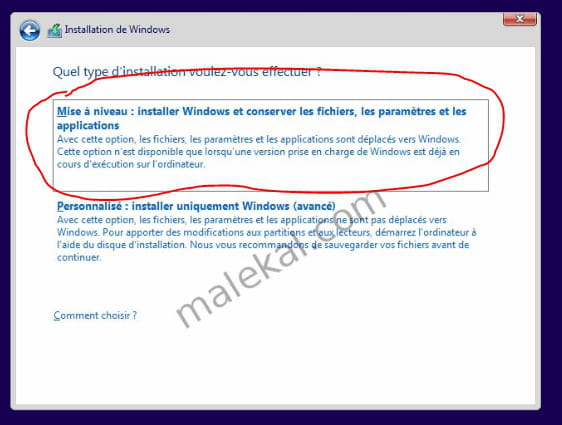
gugu01 Contributor"<i>you just need to click on validate there's no need to enter a password !!</i>" <br /> <br />I told you that earlier! <br /> <br />------------------------ <br />I'm sorry for your installation key but PL453s indicates nonsense... <br /> <br /><b>You probably had a 64-bit Windows 10 Home.<br /></b> <br />Use the software mentioned above! <br /><a href='https://download.microsoft.com/download/c/0/b/c0b2b254-54f1-42de-bfe5-82effe499ee0/MediaCreationTool1909.exe' rel='noopener noreferrer' target='_blank'>https://download.microsoft.com/download/c/0/b/c0b2b254-54f1-42de-bfe5-82effe499ee0/MediaCreationTool1909.exe</a> <br /> <br />Choose to create for another PC and follow the instructions, it will create your key <br /> <br />It will be bootable, and if you can't boot from it, we'll see what’s blocking in the BIOS options. <br /> <br />Then install and choose this option <br /><a href='https://img-19.ccm2.net/WVXBjcS1SasYFk9DmmtHtlPVdlI=/e3e1940d67d64c0b882b8cc711a1fa6f/ccm-ugc/0.PNG' class='fancy'><img src='https://img-19.ccm2.net/NgInZM3Y_RFLZQBBU_R8pKybrYE=/440x/e3e1940d67d64c0b882b8cc711a1fa6f/ccm-ugc/0.PNG' alt='' width='440' border='0' /></a> <br /> <br />No need to retrieve your activation key because the installation will detect it and activate Windows automatically, it's automatic.
-
-
-
gugu01 Contributor@PL453s@ PL453s
"If you have the choice of the edition, you might as well take the pro version"
No, we must return the same version as the original; otherwise, it will not activate and you will have to pay for a license or restart the installation with the correct version.
"Once flashed with the win10 iso, yes"
This doesn't mean much... we flash a BIOS... we mount an iso image on a USB or CD... but we don't flash with an iso.
"Do you have a key for your version?"
No need to dig out the license key because since Windows 10 has already been installed on this PC, the key is registered in the BIOS, meaning on the motherboard.
And the installation automatically finds the key and activates Windows (no key request)
"I found this, it will delay activation by 30.
It's not much, but at least it will allow installation by unlocking the "skip" button when entering the license"
Yes, for a first installation, we can skip the activation key step without entering it, and we have 30 days to activate it.
But there's no need for everything provided because it's in the basic procedure that we can skip the step.
And this doesn't concern us for the current case.
There you go... you’re starting on good things, but we sense a slight lack of mastery in the solutions you're presenting.
And sometimes you mix different things and in the end, it doesn't fit.
Don't take it badly, these are just facts. -
PL453s@gugu01I take note, I don't know enough about Windows 10 since I'm on a lower version.
However, I believe flashing an image onto a USB drive is what it's called.
-
-
rose2512 AuthorIt's good, I've downloaded Windows 10 on my USB stick, what do I do now?
-
gugu01 ContributorBasically, you need this
1 > USB HDD first
2 > secure boot option disabled

-
rose2512 AuthorIn the main menu:
System time: we don't care..
System date: we don't care...
Network boot: disabled
f12 boot menu: enabled
Touchpad: advanced
lid open resume: enabled
d2d recovery: enabled
gpt partition recovery: none
gpt partition record: no record -
rose2512 AuthorIn the security menu:
Supervisor password is: set
user password: clear
set supervisor password: enter
set user password: enter
password on boot: disabled
secure boot mode: standard
Current TPM(TCM) state: installed
Change TPM(TCM) state: enabled
Clear TPM(TCM): clear -
rose2512 AuthorIn the boot menu:
Boot mode: UEFI
Secure boot: disabled
Boot priority order:
1. USB HDD
2. USB CDROM
3. USB FDD
4. EMMC:HBG4e 32g
5. Windows boot manager
6. Windows boot ipv4
7. Windows boot ipv6 -
rose2512 AuthorIt’s all good !!!!
I changed UEFI to Legacy !! I found my USB key named USB HDD !-
gugu01 ContributorNormally, we don't switch to legacy mode because it's an emulation of old BIOS.
Your key should have booted in UEFI.
I didn't know your PC only had 32 GB of disk space, that's just...
Check this
If there's an error and it says it can't find the previous version, we'll assess the situation, because you may have a specific version of Windows 10 for this type of mini PC. -
rose2512 AuthorI don't have this window on top of it:
https://i1.wp.com/marclabs.com/wp-content/uploads/2015/11/reparer-windows-8-5.png -
gugu01 Contributor
-
-
rose2512 AuthorOnce you arrive at the Windows installation, do I click on "Install now" or "Repair the computer"?
-
rose2512 AuthorAcer A01-131-C0A6
-
gugu01 ContributorGive some photos because it will be complicated without seeing.
https://www.commentcamarche.net/infos/25913-ccm-inserer-une-image-dans-une-discussion/
You said you couldn't add any, I didn't specify that the images appear as a link when you write them and then when you confirm, they show up as images.
You also need some text; otherwise, it won't go through.
-------------------
Did you make your key with Windows 10 Home?
And with the software I provided from Microsoft?
Because it should have booted in UEFI and not legacy, hence our possible problem.-
rose2512 AuthorNot with Windows 10 with this software: https://www.microsoft.com/fr-fr/software-download/windows10
-
gugu01 Contributor@rose2512That's what I had given, so why not ...
Give a photo of this table, so I can tell you which partition to choose or delete in order for it to pass in the correct format and for you to install it.
(or name and size of all the partitions you see) -
rose2512 AuthorHere is the image
https://www.zupimages.net/viewer.php?id=18%2F27%2Fl9tb.jpg -
gugu01 Contributor
-
-
-
gugu01 ContributorA checked
1 >
Go to
All settings
Update and security
Activation tab
Check if Windows is properly indicated as activated (it may take a moment as it does it automatically via the internet)
2 >
Right click on the Windows icon in the Start menu
Choose Device Manager
Look through all the lines and let me know if any have a yellow triangle, or question or exclamation mark (alerts)
and
if there are any unknown devices.
(a screenshot would be even better for me to check)-
-
-
rose2512 Author
-
gugu01 Contributor@rose2512For the order, you go down USB and put Windows thing first.
-
gugu01 ContributorHowever, for the drivers missing in your manager, it's quite a lot, so I'm giving you a tutorial for a software that will find and install the missing drivers.
https://www.commentcamarche.net/faq/48455-mettre-a-jour-ses-pilotes-gratuitement-avec-driverscloud
(long to read but quick and simple to do)
Then check again if you no longer have any devices with alerts.
And let me know.
-------------------
Otherwise, it will be manual.
You will give me the identification number of each line like this
https://www.commentcamarche.net/faq/35597-trouver-le-numero-d-identification-d-un-peripherique
And I will go find the drivers for you one by one.
-
-
gugu01 ContributorI need to step out, see you tonight to catch up.
-
PL453sI can take over. If I understood correctly, you are at the driver installation stage via DriversCloud.
-
rose2512 AuthorYes, the installation has been completed, but I still have some ! next to certain
https://www.zupimages.net/up/18/27/hjfb.png -
-
-
-
gugu01 Contributor<i>Otherwise, I turned off my computer and when I turn it on I get "no bootable device" knowing that I changed the settings in the boot menu.</i> <br /> <br /> Just set it back to legacy to see. <br /> <br /> ---------------------------- <br /> For all the lines where there is a driver issue <br /> <br /> Give me the hardware identification number (copy/pasting will be easier for me) <br /> <br /> To find it, do it this way <br /> https://www.commentcamarche.net/faq/35597-trouver-le-numero-d-identification-d-un-peripherique
-
- 1
- 2
- 3
Next