
E.tre456.worm.windows
Solvedbazfile Posted messages 58538 Registration date Status Moderator Last intervention -
Hello,
Since yesterday a window keeps appearing telling me that my PC is infected and it asks me to analyze it, then it redirects me to purchasing an antivirus subscription.
I have e.tre456.worm.windows which would be the infection, I don’t know if I’m making myself understood, sorry
thank you for your help
6 answers
-
Hello @Corinne959.
These are nuisance notifications that you have registered in the web browser.
Two options are available to you.
- Either delete the nuisance notifications yourself, for this read this page and also this page.
Or reset the concerned browser manually or with Reset Browser.
- If it’s still the same, télécharger FRST .
Once downloaded, save FRST on the desktop then right-click FRST and choose Run as administrator which gives this:
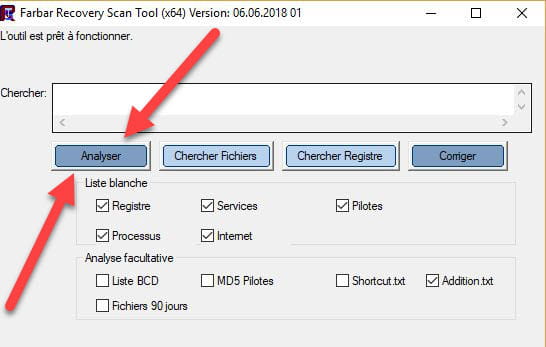

 Attendre que le message l'outil est prêt à fonctionner s'affiche puis cliquer sur Analyser.
Attention, attendre que les messages disant que l'analyse est terminée s'affichent.
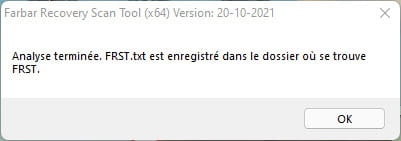

At the end of the scan, both FRST and Addition reports will be on the desktop.

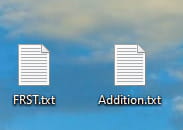

Pour information :
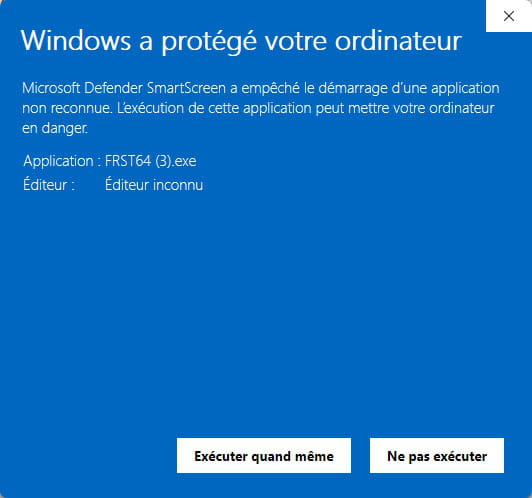
 If opening FRST triggers a Microsoft Defender alert, ignore it and click on Additional information then Run anyway, see below.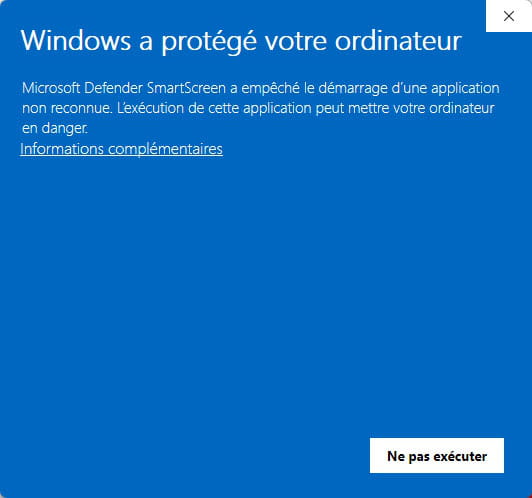


bazfile
Modérateur/Contributeur sécurité.
un bonjour, une réponse, un merci font toujours plaisir. -
Thank you for your responses, I downloaded FRST64 and scanned, I have 2 files (Addition and FRST), what do I do with them ^^
-
@Corinne959
Send the FRST and ADDITION reports to https://pjjoint.malekal.com/.
Then attach the two links generated by https://pjjoint.malekal.com/ in your reply.
-
-
here they are
https://pjjoint.malekal.com/files.php?id=20260714_i9h10p12u10s6
https://pjjoint.malekal.com/files.php?id=FRST_20260714_m11f15o12q14c8
-
Procedure to follow in the indicated order:
First uninstall with Uninstalr the two following programs:
- Pulse Browser
- WebAdvisor by McAfee
Then:
1- Open FRST as administrator; to do this, right-click on FRST and choose run as administrator
2 - Copy the entire script that is in the box below:Start:: CreateRestorePoint: CloseProcesses: HR Notifications: Default -> hxxps://calendar.google.com; hxxps://fenetre.ooreka.fr; hxxps://fr.aliexpress.com; hxxps://www.facebook.com; hxxps://www.fdj.fr; hxxps://www.kiabi.com; hxxps://www.leclercdrive.fr; hxxps://www.netflix.com; hxxps://www.newcraftday.com; hxxps://www.norauto.fr; hxxps://www.piecesauto.fr; hxxps://www.sncf-connect.com; hxxps://www.sushiwan.fr; hxxps://www.thalasseo.com; hxxps://www.thefork.fr CHR HomePage: Default -> file:///C:/Users/Corinne/Desktop/screen CHR DefaultSearchURL: Default -> hxxps://search-launch.com/?subid=bF911eV9rqHHqq5ibrqFrHiqqV1FVN19rr5Psbb9&browser=chrome&keyword={searchTerms} CHR DefaultSearchKeyword: Default -> Search Pro CHR DefaultNewTabURL: Default -> hxxps://new-tab-url.com/?subid=bF911eV9rqHHqq5ibrqFrHiqqV1FVN19rr5Psbb9&browser=chrome CHR Session Restore: Default -> est activé. CHR DefaultSearchURL: Profile 10 -> hxxps://search-launch.com/?subid=bF911eV9rqHHqq5ibrqFrHiqqV1FVN19rr5Psbb9&browser=chrome&keyword={searchTerms} CHR DefaultSearchKeyword: Profile 10 -> Search Pro CHR DefaultNewTabURL: Profile 10 -> hxxps://new-tab-url.com/?subid=bF911eV9rqHHqq5ibrqFrHiqqV1FVN19rr5Psbb9&browser=chrome Task: {0871C202-C9C6-4E92-BA53-A34946228C73} - System32\Tasks\PulseSoftware\PulseBrowserStartupS-1-5-21-2572378593-3630851785-131840762-1001 => C:\Users\Corinne\AppData\Local\PulseSoftware\PulseBrowser\Application\pulsebrowser.exe [3807856 2026-03-16] (Alabama Technology USA, LLC -> Alabama Technology USA, LLC) Task: {675C8D25-3FB1-4E9D-A64E-4C05EE0748A7} - System32\Tasks\PulseSoftware\PulseBrowserUpdater\PulseBrowserUpdaterTaskUser133.0.6943.209{F8F9ACC9-62E7-4E72-86E5-3F0DF7B71F5F} => C:\Users\Corinne\AppData\Local\PulseSoftware\PulseBrowserUpdater\133.0.6943.209\updater.exe [5352560 2026-04-17] (Alabama Technology USA, LLC -> Alabama Technology USA, LLC) HKU\S-1-5-21-2572378593-3630851785-131840762-1001\...\Run: [PulseBrowserUpdaterTaskUser133.0.6943.209] => C:\Users\Corinne\AppData\Local\PulseSoftware\PulseBrowserUpdater\133.0.6943.209\updater.exe [5352560 2026-04-17] (Alabama Technology USA, LLC -> Alabama Technology USA, LLC) HKLM\Software\...\Authentication\Credential Providers: [{C885AA15-1764-4293-B82A-0586ADD46B35}] -> Task: {077BA067-7C15-40F0-B22E-C9DC2A54B4A2} - System32\Tasks\Microsoft\Windows\Location\Notifications => %windir%\System32\LocationNotificationWindows.exe (No file) Task: {CCDFC0B8-01A3-4E74-A820-4F13F51D269E} - System32\Tasks\Microsoft\Windows\Mobile Broadband Accounts\MNO Metadata Parser => %SystemRoot%\System32\MbaeParserTask.exe (No file) Task: {03B808B2-9287-4B2F-B334-A5EA22D718F0} - System32\Tasks\Microsoft\Windows\UpdateOrchestrator\Reboot_AC => %systemroot%\system32\MusNotification.exe /RunOnAC RebootDialog (No file) Task: {4C3929DC-673A-43CB-931B-36568CF65FFE} - System32\Tasks\Microsoft\Windows\UpdateOrchestrator\Reboot_Battery => %systemroot%\system32\MusNotification.exe /RunOnBattery RebootDialog (No file) Task: {F3E6E7ED-A196-4E44-8803-55FAB3AD4E29} - System32\Tasks\Microsoft\Windows\UpdateOrchestrator\USO_UxBroker => %systemroot%\system32\MusNotification.exe (No file) U2 DriverUpdSvc.exe; no ImagePath U2 TuneupSvc.exe; no ImagePath HKLM\SOFTWARE\Policies\Mozilla\Firefox: Restriction ContextMenuHandlers5: [ACE] -> {5E2121EE-0300-11D4-8D3B-444553540000} => -> No file AlternateDataStreams: C:\Users\Corinne\Application Data:dca6b603b18d16678b2a42fb7aad4e78 [394] AlternateDataStreams: C:\Users\Corinne\AppData\Roaming:dca6b603b18d16678b2a42fb7aad4e78 [394] FirewallRules: [{30F2A9D3-97C1-4892-80FB-A07677B8FFDD}] => (Allow) C:\WINDOWS\System32\DriverStore\FileRepository\asussci2.inf_amd64_4fc38a913e0f2ea5\ASUSLinkRemote\AsusLinkRemoteAgent.exe => No file FirewallRules: [{657FEAFF-6808-4F7A-B07B-E4AEB8B1E937}] => (Allow) C:\WINDOWS\System32\DriverStore\FileRepository\asussci2.inf_amd64_4fc38a913e0f2ea5\ASUSLinkRemote\AsusLinkRemoteAgent.exe => No file FirewallRules: [UDP Query User{F5DDFB77-4A75-4704-A420-45EF144CCB2C}C:\users\corinne\appdata\local\discord\app-1.0.9013\discord.exe] => (Allow) C:\users\corinne\appdata\local\discord\app-1.0.9013\discord.exe => No file FirewallRules: [TCP Query User{63AE0C7C-0249-47CD-AAF8-3553EC2E65D6}C:\users\corinne\appdata\local\discord\app-1.0.9013\discord.exe] => (Allow) C:\users\corinne\appdata\local\discord\app-1.0.9013\discord.exe => No file FirewallRules: [UDP Query User{46189D7C-1A48-4EB9-9EE9-5B3C6D4ED0A4}C:\users\corinne\appdata\local\discord\app-1.0.9010\discord.exe] => (Allow) C:\users\corinne\appdata\local\discord\app-1.0.9010\discord.exe => No file FirewallRules: [TCP Query User{CC9EDECB-5034-4D39-9DD8-C543A29EC81F}C:\users\corinne\appdata\local\discord\app-1.0.9010\discord.exe] => (Allow) C:\users\corinne\appdata\local\discord\app-1.0.9010\discord.exe => No file FirewallRules: [{9CCC482B-E096-4C4E-8A8A-6FEE3F8754AF}] => (Allow) C:\Program Files (x86)\Steam\bin\cef\cef.win7x64\steamwebhelper.exe => No file FirewallRules: [{4B5AA1F3-612E-4F4E-8256-0D5AAF74D82E}] => (Allow) C:\Program Files (x86)\Steam\bin\cef\cef.win7x64\steamwebhelper.exe => No file FirewallRules: [TCP Query User{3B7C6856-DA0B-4BD8-908A-FC443719FFDE}C:\users\corinne\appdata\local\discord\app-1.0.9241\discord.exe] => (Block) C:\users\corinne\appdata\local\discord\app-1.0.9241\discord.exe => No file FirewallRules: [UDP Query User{2B9AA820-2B0A-4A03-BFA5-443B1226E10C}C:\users\corinne\appdata\local\discord\app-1.0.9241\discord.exe] => (Block) C:\users\corinne\appdata\local\discord\app-1.0.9241\discord.exe => No file FirewallRules: [TCP Query User{55DE3476-4772-4BA4-97FD-FC2835E80FA2}C:\users\corinne\appdata\local\discord\app-1.0.9243\discord.exe] => (Block) C:\users\corinne\appdata\local\discord\app-1.0.9243\discord.exe => No file FirewallRules: [UDP Query User{8BEAD743-915C-43D3-BB62-32D7D9378511}C:\users\corinne\appdata\local\discord\app-1.0.9243\discord.exe] => (Block) C:\users\corinne\appdata\local\discord\app-1.0.9243\discord.exe => No file End::3- Once the script is copied click on Fix, FRST automatically takes the script from the clipboard.
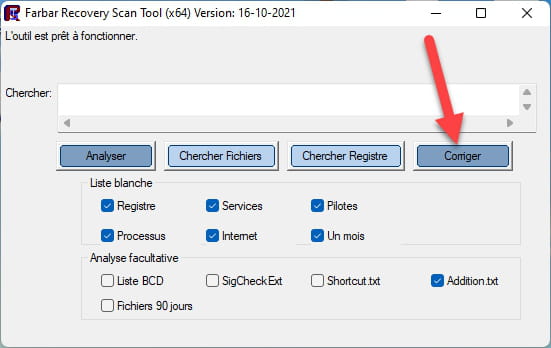

Let the correction complete; once finished you will be asked to restart your PC, do it as soon as it asks you to, see below.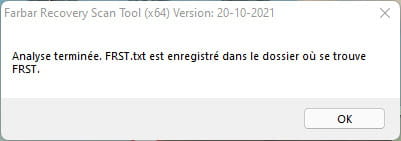
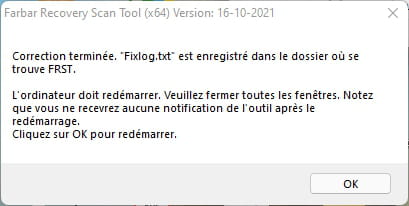

Then once your computer has restarted:
4- You will have a Fixlog file on your desktop; then send this report fixlog to https://pjjoint.malekal.com/.Then provide the link generated by https://pjjoint.malekal.com/ in your reply.
5- To finish :
- Reset Google Chrome with ResetBrowser .
- Reset Edge see this page.
6- CHECK AND TELL ME IF YOUR PROBLEM STILL EXISTS.
bazfile
Security Moderator/Contributor.
a hello, a reply, a thank you are always welcome. -
Hi there, thank you for your help, here is the Fixlog link
https://pjjoint.malekal.com/files.php?id=20260714_o15n8i13b9z13
I reset Google
-
Hello,
It is not a virus but a scam; I’m attaching a link to Malekal’s intervention on this subject.
https://forums.commentcamarche.net/forum/affich-36064238-cheval-de-troie-e-tre456-worm-windows
Good luck and have a nice day!

