Antivirus problem

fabul Posted messages 42308 Registration date Status Moderator Last intervention -
Hello, I already posted my question but it seems I was not in the right register... here it is, I installed the free Bidefender antivirus on my PC and uninstalled it with RevoUninstaller because it is constantly alerting. Since then it continues to run and prevents me from working on my PC which runs Windows 11. I reactivated Microsoft Defender but real-time protection is reportedly disabled because it is under Bidefender. Do you have a solution to propose. Thanks in advance for your answers.
Device name HP-PORT-CG
Processor AMD Ryzen 7 5825U with Radeon Graphics (2.00 GHz)
Installed RAM 16.0 GB (15.3 GB usable)
Graphics card AMD Radeon (TM) Graphics (496 MB)
Storage 184 GB of 477 GB used
Device ID E437F52C-5075-4234-80F6-A938F579B974
Product ID 00342-22525-81170-AAOEM
System type 64-bit Operating System, x64-based processor
Touch and Pen Support The touch or pen input feature is not available on this display
Edition Windows 11 Home
Version 25H2
Installed on 15/06/2026
OS build 26200.8737
Experience Pack Windows Feature Experience Pack 1000.26100.334.0
7 answers
-
Hello,
For your information, you have the option to correct at any time the chosen category and even the content (within two hours as far as I recall).
Rather than creating a duplicate, which leads to regular closures due to confusion and dispersion of answers.
Proof that being online for about fifteen years does not mean we know the forum rules well enough (or that we choose an incorrect interpretation).
A moderator will decide which topics to delete (it’s done).
For the question, if the use of Revo Uninstaller alone was not enough, perhaps use the advanced mode (see the CCM download section) to erase any trace of the old installation.
https://www.commentcamarche.net/telecharger/utilitaires/19405-revo-uninstaller/
or use the editor’s procedure:
-
Hello @moledes StatusMember.
Download FRST .
Once downloaded save FRST to the desktop then right‑click FRST and choose Run as administrator which gives this:
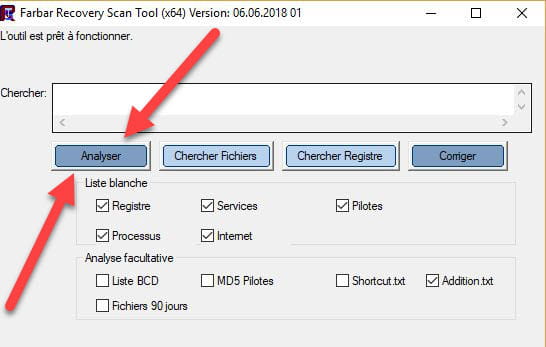

 Wait for the message the tool is ready to operate to appear then click Analyze.
Attention, wait for the messages saying that the analysis is finished to appear.
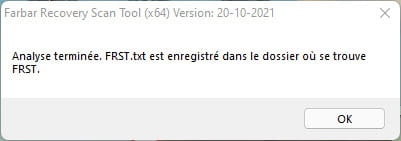
 At the end of the analysis the two reports FRST and Addition will be on the desktop.
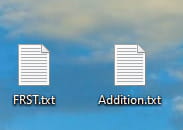
 Send the FRST and ADDITION reports tohttps://pjjoint.malekal.com/ .
Then attach the two links generated by https://pjjoint.malekal.com/ in your reply.
For information :
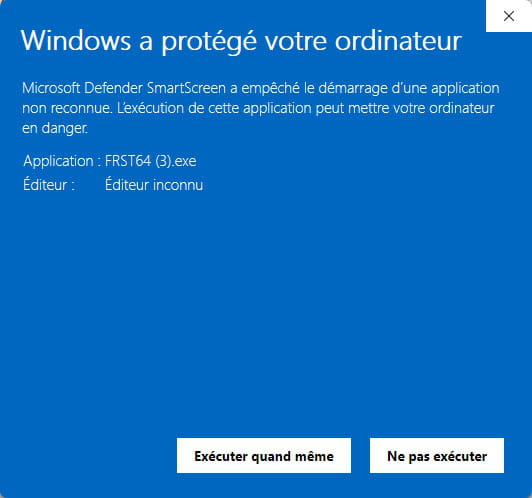
 If opening FRST triggers a Microsoft Defender alert, ignore it, click on Additional information then Run anyway, see below.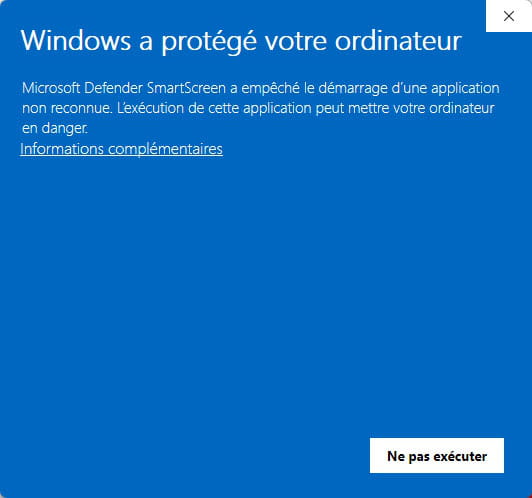


bazfile
Moderator/Security Contributor.
a hello, a reply, a thank you always makes me happy. -
Hello, thank you for your help. unfortunately I cannot download FRST; the antivirus is unable to identify the source, it blocks the download no matter what I do... do you have a solution to this problem, thank you.
-
Hi,
We can do it on the fly...
You can boot in Safe Mode (with networking support).To boot into WinRE you must go to Settings > System > Recovery > Advanced startup > Restart now...
Then in Recovery, > Troubleshoot > Advanced options > Safe Mode with Networking
If you can’t launch FRST, or need another solution
Download Reanimator
https://greatis.com/security/reanimator.html
And run an analysis > Fix Problems > Fix Malware Issues
On the Filter Set button, choose Display All
In each tab search with Ctrl+F for Bitdefender and remove anything related to BitDefender, Confirm, then Return to Finish! in the right tab, click Restart is Required to reboot Windows
But I doubt that this antivirus uses NTFS permissions protections that are irredeemable in Windows.
Download Autoruns (Run as Admin)
https://learn.microsoft.com/en-us/sysinternals/downloads/autoruns
Identify remaining BitDefender items using the Quick Filter, to create a USB Ventoy drive, with Ubuntu copied onto the Ventoy drive
https://www.ventoy.net/en/download.html
https://ubuntu.com/download/desktop
Change permissions, then delete the folders/files -
Hello, for several days now I’ve been struggling with this antivirus problem with Bidefender. Despite all the advice given, I can’t manage. Maybe because of my limited computer knowledge... as a reminder I installed the free version of Bidefender on my PC. After a few days of use I ended up uninstalling it with Revo Uninstaller because I was getting alerts and it became impossible to go online. Today it is still on my PC in online mode and continues to block everything... that’s where I stand. If you have a suggestion... otherwise I fear I’ll have to take it to a repair shop. Thanks for your help.
-
You are not familiar with Linux Ubuntu; it is like Linux, an operating system other than Windows, which has all access rights and modifications to a disk.
In Ubuntu you can delete all identifiable BitDefender files with the Autoruns program.
If I may give a hint, the PC drives are in the left column of Ubuntu.
If lack of permission prevents deleting a file, in the file's properties you can change the permissions, grant yourself full access, then go ahead and remove BitDefender.
You can download Autoruns64.exe in the Autoruns.zip archive.
https://learn.microsoft.com/en-us/sysinternals/downloads/autoruns
Extract and run Autoruns64.exe as Administrator.
Accept the terms on first startup.
In the Quick Filter box, type BitDefender (to locate the files to delete from Ubuntu).
This is also about learning how to create a bootable USB key to boot into Ubuntu.
Using a USB drive of 8GB or more, use the Ventoy program to make the key bootable.
https://www.ventoy.net/en/download.html
If the PC is old, you need to create the key in MBR mode.
If it is newer (Windows 8 or later) in GPT mode for EFI (Secure Boot Support for Ventoy depending on how the BIOS is configured).
Then you place the downloaded Ubuntu ISO file on the key,
And boot from it using the PC’s Boot Menu key. -
Thank you Fabul for your response, I will attempt to carry out your recommendations, although I have some doubts about my ability to manage on my own. Have a good evening, I will keep you informed.