Help with configuring a Wi-Fi network: Siemens
oubaxms
Posted messages
8
Status
Member
-
phil2k Posted messages 10841 Registration date Status Contributor Last intervention -
phil2k Posted messages 10841 Registration date Status Contributor Last intervention -
Hello everyone,
This is my first project in configuring a WiFi network, I need your help to make the network functional:
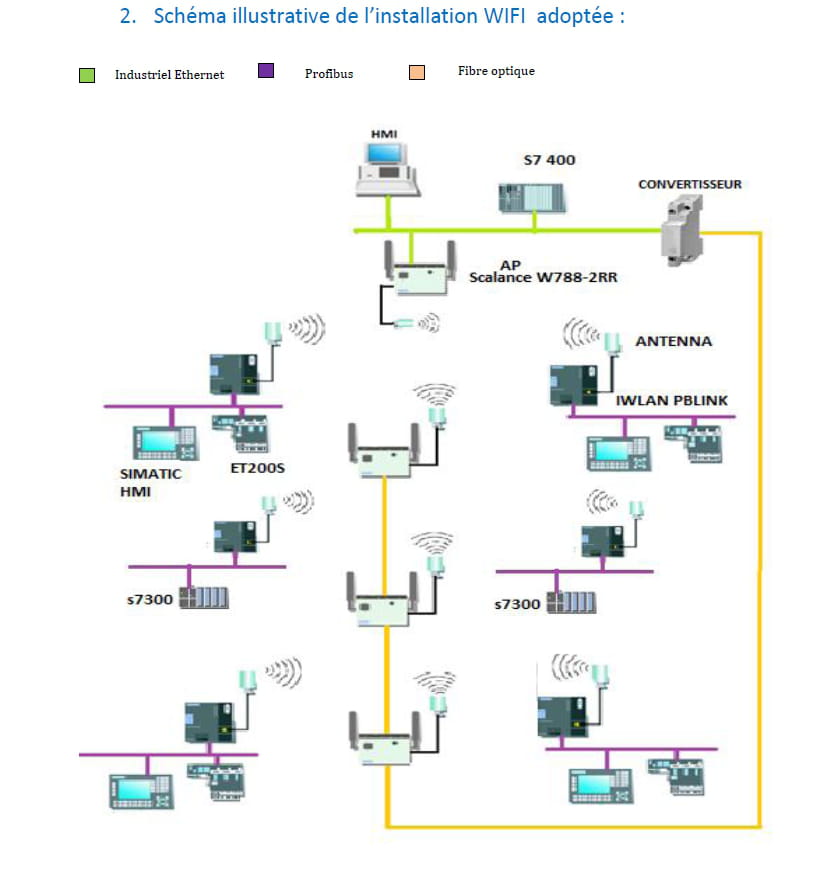
1) The network consists of three WiFi antennas, each linked to a Siemens SCALANCE W788-2RR module. Then, a SCALANCE X204-2 switch groups the three APs (Antennas).
2) I also have 6 clients moving around the coverage area.
The equipment is already installed, but clients are experiencing communication issues (Signal, Disconnection...) when changing locations.
What are your suggestions to allow clients to connect better within the coverage areas?
Thank you for any information
Configuration: Windows 7 / Chrome 51.0.2704.103
This is my first project in configuring a WiFi network, I need your help to make the network functional:
1) The network consists of three WiFi antennas, each linked to a Siemens SCALANCE W788-2RR module. Then, a SCALANCE X204-2 switch groups the three APs (Antennas).
2) I also have 6 clients moving around the coverage area.
The equipment is already installed, but clients are experiencing communication issues (Signal, Disconnection...) when changing locations.
What are your suggestions to allow clients to connect better within the coverage areas?
Thank you for any information
Configuration: Windows 7 / Chrome 51.0.2704.103
4 answers
-
Hi,
Wifi repeater?
Have you checked the issues yourself?
Because anyway, three-quarters of the time the client is talking nonsense.
So for the signal strength, I gave you a tip, then you have to see if there are enough available IP addresses on your local network (I assume it is one since the three modules are on a switch).
--
No browser offers a crystal-ball extension: post information to get help...-
Thank you Pierre,
I will leave the repeater solution as the last step, I think the correct software configuration will be the first step, right? Like IP address, channel...
Currently, all the APs are on:
2.4Ghz, Channel 8
You mentioned it could be a switch problem, I mean that the clients are connected when they are stationary. -
But what are they connected with? Via the Wi-Fi network or using an RJ45 cable?
I don't think the problem comes from the switch, but rather from the strength of the signal at first, it's one of the main causes of "Wi-Fi not working".
Then, as I mentioned towards the end, the range of available IP addresses needs to be configured.
Normally, on your modules, you have 2 IP addresses.
The first one is the local network between the 3 modules and the second one comes from the Wi-Fi.
So, in theory, you have a gateway.
And you didn't say what your clients were doing with the Wi-Fi x).
-
-
-
-
-
You have 3 Wi-Fi transmitters on the fiber. And each device also has its own transmitter.
So if I understand correctly, clients connect only to the fiber network via the 3 Wi-Fi access points?
If so, as I told you, have you checked with them about the issues? Because a problem is one thing, but what kind of problem? @ip, signal, not enough addresses, etc. -
-
-
-
Hello
According to the description you provide of the issue, there is likely a coverage problem.
It would be necessary to review the locations of the antennas, and possibly add another one to ensure better coverage of the area.
--
There are 3 types of people: those who can count and those who cannot.-
Hello Phil2k,
Thank you also for the remark
What I found using a "Wifi Analyzer" app on my phone is that all antennas operate on:
2.4 GHz and Channel 8.
While searching online:
Standard Mode
The simplest mode and often very effective.
We need several wifi access points. All access points are connected with an RJ-45 cable to the router.
It is possible to keep the Wifi from the ISP's Box.
Each access point has its IP address, its wifi network name which is different from the others and especially which is configured on a different channel. 1 or 6 or 11 if you are on 2.4 GHz with 20 MHz bands. If you have 40 MHz, you must also choose 1 or 6 or 11 as a base and then leave the upper side band or lower side band selected by the access point. Be careful to avoid overlaps.
If you are on 5 GHz, choose a free channel, there are many and it starts at 36.
Wifi clients must then connect to each SSID one by one and each time enter the password for each SSID network.
Reliable, effective, but a bit long because each client needs to be configured one by one on each SSID.
One variation is to keep the same SSID on all access points BUT each access point must be configured on a different channel.
https://lafibre.info/wifi/wifi-mode-standard-repeater-ou-wds/ -
What you indicate here concerns personal networks.
In an industrial environment, the settings must be configured so that roaming works correctly.
Therefore, there is no question of changing the IP address when moving from one antenna to another.
It is in your equipment documentation that you need to find the optimal configurations.
-
-
Look at this doc:
https://buy.wesco.com/content/automation
starting with pages 15-16
--
There are 3 kinds of people: those who can count and those who cannot.