Remove password expiration in Windows 7 Home Premium
LINALO69
Posted messages
1
Status
Member
-
Phil54 -
Phil54 -
Hello,
I'm struggling to remove this password expiration, I had the code to type in the command prompt: net accounts /maxpwage:unlimited
but it doesn't work, and just typing net accounts shows me only the options that can be modified but I don't know how to do it.
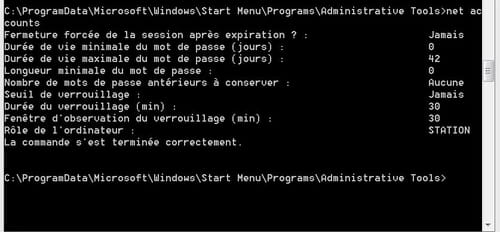
if anyone can help me please
thank you
I'm struggling to remove this password expiration, I had the code to type in the command prompt: net accounts /maxpwage:unlimited
but it doesn't work, and just typing net accounts shows me only the options that can be modified but I don't know how to do it.
if anyone can help me please
thank you
2 answers
-
My system is working; I just tested it a moment ago. CMD shows me:
C:\Windows\system32>NET ACCOUNTS /MAXPWAGE:Unlimited
The command completed successfully.

C:\Windows\system32>NET ACCOUNTS
Force logoff after expiration?: Never
Minimum password age (days): 0
Maximum password age (days): No limit
Minimum password length: 0
Number of passwords to remember: None
Lockout threshold: Never
Lockout duration (mins): 30
Lockout observation window (mins): 30
Computer role: STATION
The command completed successfully.

C:\Windows\system32>NET ACCOUNTS /MAXPWAGE:5
The command completed successfully.

C:\Windows\system32>NET ACCOUNTS
Force logoff after expiration?: Never
Minimum password age (days): 0
Maximum password age (days): 5
Minimum password length: 0
Number of passwords to remember: None
Lockout threshold: Never
Lockout duration (mins): 30
Lockout observation window (mins): 30
Computer role: STATION
The command completed successfully.

C:\Windows\system32>NET ACCOUNTS /MAXPWAGE:Unlimited
The command completed successfully.

C:\Windows\system32>NET ACCOUNTS
Force logoff after expiration?: Never
Minimum password age (days): 0
Maximum password age (days): No limit
Minimum password length: 0
Number of passwords to remember: None
Lockout threshold: Never
Lockout duration (mins): 30
Lockout observation window (mins): 30
Computer role: STATION
The command completed successfully.
N.B: You need to run CMD as an administrator
--
Search and try: you will find the solution!
Snoop and look everywhere: you will find knowledge!! -
Hello
I had the problem and what you provided helped me. I think I found the solution: check my CMD window
C:\Users\HP>net account
The syntax of this command is:

NET
 [ ACCOUNTS | COMPUTER | CONFIG | CONTINUE | FILE | GROUP | HELP |
 HELPMSG | LOCALGROUP | PAUSE | PRINT | SESSION | SHARE | START |
 STATISTICS | STOP | TIME | USE | USER | VIEW ]

C:\Users\HP>net accounts
Force logoff after expiration? : Never
Minimum password age (days) : 0
Maximum password age (days) : 42
Minimum password length : 0
Number of previous passwords to keep : None
Lockout threshold : Never
Lockout duration (min) : 30
Lockout observation window (min) : 30
Computer role : STATION
The command completed successfully.

C:\Users\HP>NET ACCOUNTS
NO} [/MINPWLEN:of
 [/MAXPWAGE:{days | UNLIMITED
 /UNIQUEPW:number /DOMAIN
I think thatNET ACCOUNTS /MAXPWAGE:UNLIMITED
will remove the password. Beware, I'm not sure!
Search and try: you will find the solution!
Sniff and look everywhere: you will find knowledge!!