Quick timesheet entry in Excel
Solved
touroul Posted messages 526 Registration date Status Member Last intervention -
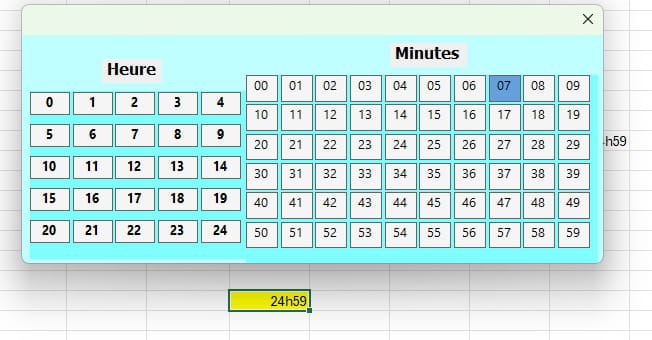
I’m looking for a simple and effective way to enter time like 8:19 into Excel cells, using the mouse.
I had in mind 3 clicks:
- first click: select a cell formatted as time
- second click: select the full hour (8) from a combobox-like table (0 to 24)
- third click: select the minutes from a combobox-like table (00 to 59)
Have you already found on this forum something similar to this?
Thanks in advance for your help!
6 answers
-
-
Hello touroul.
I completely agree with Eugene:
With your project, for your second click you will have to choose among 24 values, and for your third click you will have to search through 60 values!
It will never be as fast as typing =8:19 or =23:55
Think carefully...
Best regards
Indeed, retirement is good! Especially in the Caribbean...
Raymond (INSA, AFPA) -
Hello everyone
Try the attached workbook. It is set to enter the date in column G:
https://www.swisstransfer.com/d/eac5e54b-9fb3-4670-9bde-9f7b7ad9c1a7
Daniel
-
< p>Good evening Daniel
Thanks for this proposal, it’s already not bad.I was picturing ComboBox-type tables with all possible responses; it’s close to that.
Some think it’s futile, but try typing a time on a tablet PC: you have to bring up the keyboard and enter the time on a tiny keyboard without making mistakes.
Could someone know how to replace the dropdown lists in Danielc’s file with multi-column comboboxes?
Thanks -
Hello,
Test (you must choose the hour before the minutes):
https://www.swisstransfer.com/d/15b52462-30b1-4ba3-9afb-94bd46c9c6fd
Daniel-
Thanks Daniel
I had also come up with something similar, I used that as a base, but I wanted to avoid vertical scrolling.
It might be useful for something else perhaps. Thanks againThere is no scrolling.
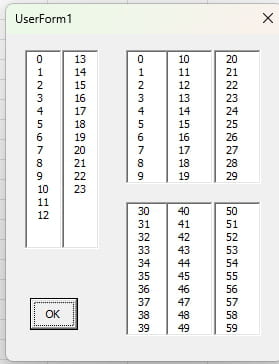
Well...
In the end, with AI and a few manual tweaks, I managed it. This is really what I wanted:
https://uploadnow.io/f/Fp2JVf2
If it can help someone ...
Thank you
-