
Excel Fields
brucine Posted messages 25304 Registration date Status Member Last intervention -
Hello,
How can I, in EXCEL, merge two or three fields into a single one, without of course losing the data.
Thanks in advance.
6 answers
-
Hello @LucienSaintPaul StatusMember
You need to concatenate the value of each cell into a 4th cell
For example: =A1&B1&C1
A+
-
Hello again and many thanks to both of you. It works perfectly!
A subsidiary question, though. The result of the concatenation appears in an extra column; if the display is correct, the cells contain the formula.
How can I make the new cells contain the result as "text" (these are surnames and first names).
Thanks again.
LM
-
I don’t follow you.
First names and last names are text.
Assuming that A1=Jean Valjean and B1=Edmond Dantès, if A2=A1 and B2=B1 are formulas, the result of C2=A2&" "&B2 is indeed the text (or standard text, it doesn’t matter) Jean Valjean Edmond Dantès if we have not done a copy-paste special of the formulas.
If I want to anticipate and copy C2 down while A3 and B3 are empty the result will not be the formula but empty; if for some reason that is not the case, it should be accompanied by a condition that displays only if (for example) ET(ESTVIDE(A4);ESTVIDE(B4)) or =SIERREUR(A4&" "&B4;" ")
-
-
I have trouble expressing myself and I apologize.
What I meant to say is that starting from data in "text" format across several columns, I obtain using a function a text result that is "displayed" even though the cell still contains the function.
How can I make the result be in "text" format?
Thank you,
-
Hello,
Copy the column containing the formulas and do a paste special "values" on it itself. By right-clicking in the column:

Daniel
-
Hello.
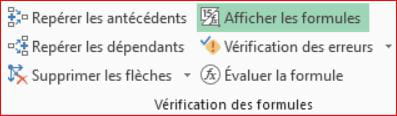
... and make sure you especially didn't accidentally activate the "Show formulas" button in the FORMULAS tab!
It’s good, retirement! Especially in the Caribbean...
Raymond (INSA, AFPA) -
Hello,
a solution without calculation functions and a simple manipulation
With an example :
A1: Jean
B1: Peuplu
A2: Jean
B2: Bon
A3: André
B3: Truc
Type in C1: Jean Peuplu
Keyboard shortcut Ctrl+E or Data tab, Flash Fill
-
Hello,
So you have nothing better to do with your life than "vote" against everything I write (that surely advances discussions even if this childish arithmetic doesn't concern me)?
I have done in <2> nothing but restate what was said in <1> which did not provoke your anger by specifying to put spaces between words, solutions that the author said were satisfactory and even if that hadn't been the case that the votes are ridiculous.
The one in <7> which contradicts the solution in <6> once the question is clarified in <5> implicitly finds your approval.
I thus understand both that the rule that is yours dictates that I alone must be targeted by these infantilisms and that you do not apply to yourself the one stating that we must not come comment or specify after the soup.
-

