
No digital and analog channels on Philips TV
Solvedbaladur13 Posted messages 47358 Registration date Status Moderator Last intervention -
Hello,
I bought a Philips Ambilight 32PHS6050/12 TV yesterday.
In the menu, I only have access to about ten streaming channels. I live in an apartment, I connected the plug to the TV and to the SFR box via HDMI ports 1 and 3 (I haven't tried 2). Knowing that my old Philips used to pick up everything...
Philips, contacted by phone, made me restart the initialization but it doesn't help at all.
I don't have anyone knowledgeable enough to help me, thank you
4 answers
-
Hello,
You said: "I connected the socket to the TV and to the SFR box via HDMI ports 1 and 3."
Which socket are you talking about?
Which device is connected to HDMI port 1?
Which device is connected to HDMI port 3?
Where is the building's antenna socket connected?What model of SFR TV box (player) do you have?
Very difficult to catch a black cat in a dark room.
Especially when it's not there...-
The TV was provided to me without any cable; so I connected the cable (with red ends) that I had from the old TV, which I connected 1/ to the box and 2/ to the HDMI3 port; it didn't work, so I tried HDMI1 and the same thing happened.
Last night I had to revert to the old TV as a workaround and I have all the channels on it.
Box: FIX ONT ALT LAB
The antenna is on the roof of the building.
-
-
FIX ONT ALT LAB is not the boxTV but the terminal for fiber.
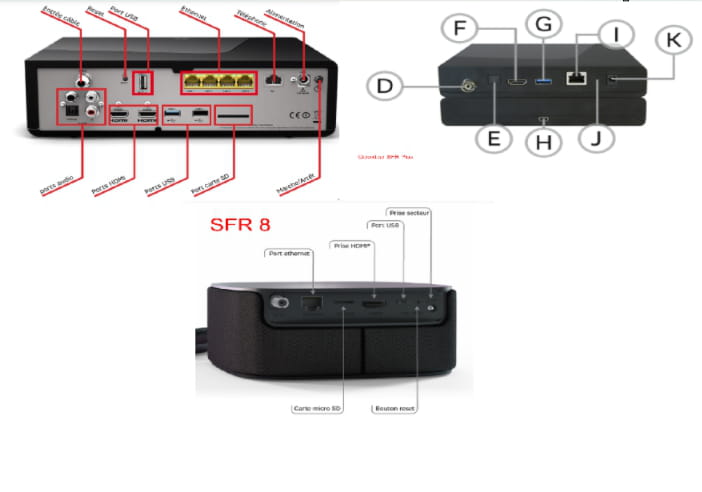
Which one of the models below is yours?
SFR THD 4K (top left) - SFR decoder plus (top right)
Very difficult to catch a black cat in a dark room.
Especially when it's not there... -
Hello
Just in case
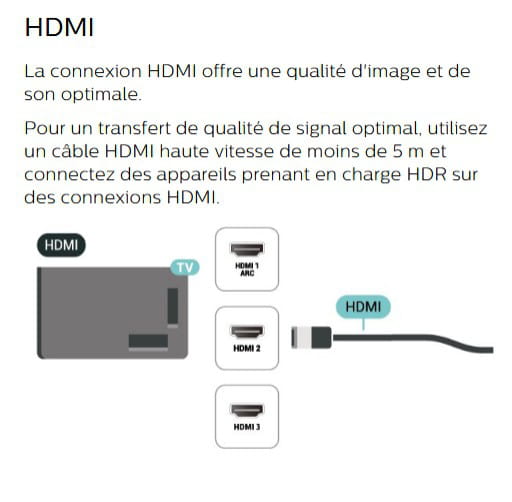
- check if the old HDMI cable is compatible as indicated in this manual page 12
- and connect it to the HDMI 2 port
-
With the television remote, are you sure you're selecting the correct HDMI input by pressing the "Sources" button?
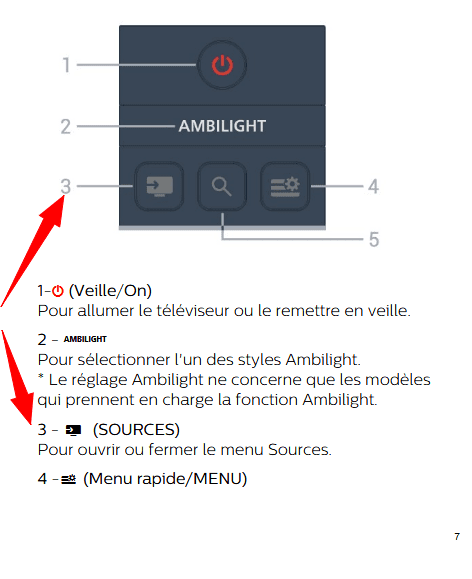
And by selecting the HDMI input where the SFR decoder is connected, you have no image? Is the decoder working properly?
It's very difficult to catch a black cat in a dark room.
Especially when it's not there...-
Everything is in motion; I have the picture, but I only have about ten free streaming channels that don’t interest me, that’s all... I tried calling the store where I bought it again, and they directed me to Philips. I wonder if Yclic might be right and if my old HDMI cable (it's about 10 years old) isn’t the problem. In my latest attempts, the TV is connected to the router and the router is connected to the internet, but no satellite or digital channels have been found.
Isn't it with the boxtv remote that you change your channels?
EDIT: To do it with the television remote, you would need to enable the HDMI CEC function, see manual on page 41 paragraph HDMI CEC Connection - EasyLink

