
Screen resolution issue after reinstalling W11 25H2
Solved
Rems 69 Posted messages 378 Registration date Status Security Contributor Last intervention -
Hello everyone.......
I have a desktop PC running Windows 10 that was originally not compatible with Windows 11, but I installed it anyway via Rufus a long time ago and I've had no issues with Windows 11 up to now.
For various reasons, I've reinstalled Windows 11 several times without data loss on the same PC using Rufus, and everything went very well!
Yesterday, I wanted to reinstall Windows 11, the installation went normally, but I lost screen resolution (1920x1080) and I couldn't restore it because it's no longer listed in the display settings, leaving me with a resolution of 1280x1024
The drivers for the AMD Radeon HD5450 graphics card (which is old) are up to date, and as of now, the mystery remains. The only solution I found was to downgrade to the previous version, which is actually the same (Windows 11 25H2 updated), and everything goes back to normal... no resolution issues
I went to the AMD Radeon website to check for updates and attempted to reinstall the latest version of this graphics card, and I saw a message saying "Unable to load the AMD Radeon HD5450 detection driver... Please contact AMD... something like that....
For your information, I recreated my Rufus USB stick to put the Windows 11 25H2 ISO, thinking that might be the issue, but no!
I reinstalled Windows 11 twice and still encountered this screen resolution issue at the end of the installation, which seemed much longer than usual.
If anyone has an idea on how to solve this problem, it would be welcome (Currently, I have "returned" to my old Windows 11 25H2 version, which works very well)
Thanks in advance
Best regards
21 answers
- 1
- 2
-
Hello jmarion3,
Either you change the graphics card for a slightly more powerful model that is still compatible with the motherboard and the rest of the hardware in the PC, but no more than that, or you stick with the version that works with your old one.
-
Hello,
There are no officially updated drivers, ATI only provides them up to Windows 10.
That said, I'm not quite sure about the process, which downgrade are you referring to? The PC was previously on 25H2 with its latest updates, in which case if we reinstall with a 25H2 ISO, it's the original one without any updates?
I then assume that reinstalling Windows over itself would have retained a conflict in the system files and that we would need to format after backing up the data, then copy it back and reinstall the programs?
Unless, of course, a 25H2 update affected system files, I've seen references here and there to a Direct X incompatibility.
-
-
Hello everyone and thank you for the feedback....
@Didi .......This PC is old but still works very well and for the use I make of it, I don't want to change these components, especially since I'm not convinced that changing the graphics card will solve the problem because it works very well with the same OS installed (25H2) before reinstallation via Rufus
As mentioned earlier, I have reinstalled W11 several times without any compatibility problems.....However, it may be that this version 25H2 does not accept being reinstalled with this model AMD Radeon HD5450 because it's the first time I’m doing it
Thank you
@brucine StatusMember ► That's correct... there is no W11 driver for AMD, but this PC with the same card has always worked well with W10 drivers under W11 across all versions up to this latest 25H2....but no, if I reinstall this one, hence my comment above that this new version may no longer be compatible if we reinstall it via Rufus or others because I attempted 2 methods and the result is identical .....
When I say "rolled back to the previous version", in fact, it’s the term used by Microsoft, meaning to return to the previous OS... which is exactly the same for me and works very well with this same graphics card .....
I relatively often reinstall W11 on this PC because it is used to test various applications, and it's the first time such a "problem" has occurred
I haven’t attempted to do a clean install and reinstall everything because I'm not at all certain of the result.... but if it’s the last solution, I will have no choice but to go through it.... Usually, a reinstallation without data loss took about 1.5 hours, but this time it’s almost double ???
For now, everything is working very well, but I can no longer repair otherwise the screen resolution is not correct and enforces 1280x1024 as there are no other choices...
Thanks to everyone
Regards
-
Hello
I also have two PCs with incompatible processors by default, one with an old Nvidia card, but with Nvidia there are no issues, the drivers are still updated for many older models and anyway, it works even if it's no longer updated by Nvidia.
On the other hand, AMD is a different story, on that point, I agree with Didi, I have my second PC (these are client loan PCs) with a HD5770; I manage to get by, although it's no longer updated with W11, I'm also on 25H2 because older AMDs are a hassle. I used the same method as you, upgrading the system version while keeping data and software, it's this last option that saves the day with AMD drivers, Windows automatically switches to compatibility mode, which is not the case when doing a clean install, the solution consists of forcing it via command lines, I tried once and couldn't manage it with an old HD4850... (personally, I make images and if needed, I restore from one of those images, it's quick and at least I don't have this issue)
I think the explanation for your problem lies somewhere around that.
-
Hello,
Try Driver Booster 13 Pro in a Giveaway
https://tickgiveaway.com/iobit-driver-booster-pro-license-key-free/
https://techno360.in/driver-booster-13-pro-free-6-month-license/
(Disable scheduled tasks after each use)
Then you can clean (Disconnected devices) with (USB key residues, etc.)
Then save the drivers with packages that extract with 7-Zip all at the same time with ".\"
After that, you can integrate the drivers into the ISO with NTLite -
Hello flo88... nice to "see" you again
Thank you for the feedback and the explanations....
This PC is old but still works very well, and I don't want to invest in new components if it means replacing other components as well if they're not compatible... otherwise I might as well buy another recent machine, and for what I do with this PC, it's not worth it......
I will follow your advice, namely to create an image and restore from it if needed
Have a nice Sunday and thanks again
Best regards
-
@fabul StatusModerator
Hello fabul ....Thank you for your support!
It's done and everything was up to date except for the driver of my network card which is now okay
I had already checked the drivers of this machine and everything was fine, but each new software still finds updates
Thanks again and have a nice Sunday
Regards
-
Hello jmarion3,
Currently, what is the date and version of the driver?
Example image: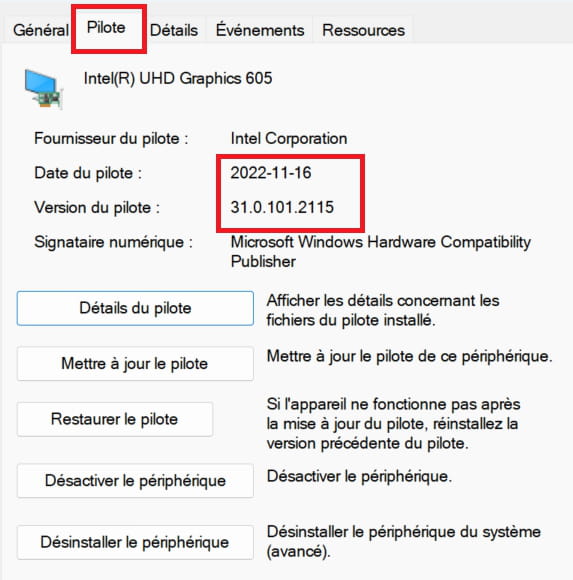
-
Hello kaneagle .........
Thank you for your support!
In principle, I have the latest AMD Radeon HD5450 driver, the one from W10, but it works under W11.
I just noticed that the Restore Driver button is grayed out ....?
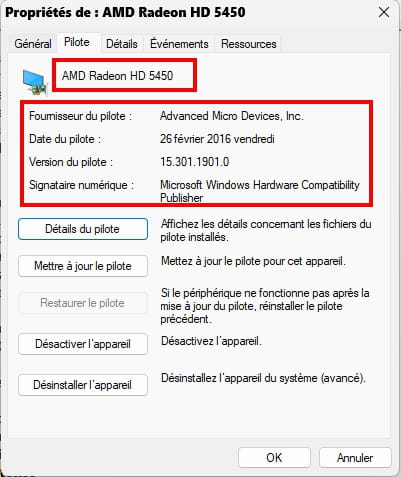
A+
Cheers
-
Right-click on the map
Properties
Details tab
In Property, select --> Hardware Identification Numbers
Post this number in your next message.
Example image:
-
Hello Jmarion,
You didn't click on the right line for the device ID
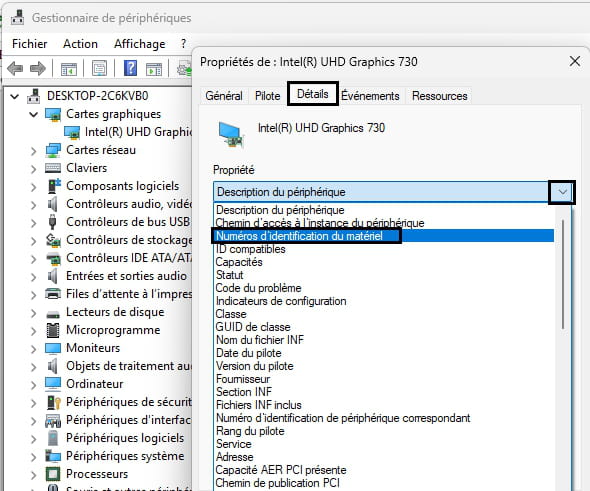
To post the ID, right-click on it ==> copy
In your reply, right-click ==> paste
@+
-
Re......for my good image
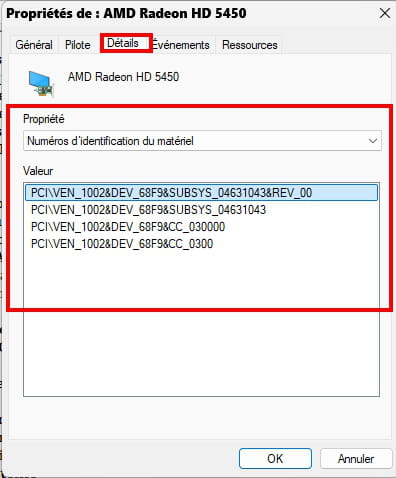
-
Indeed, this is the latest version of the driver.
I have no idea where the problem regarding the screen resolution comes from.Maybe format and do a clean installation of Windows 11?
It's entirely up to you to make this decision.
-
Re......
I think it's cooked.....
I have another identical PC to this one but with a different yet older AMD Radeon card since I bought both PCs at the same time, and I really want to do the same operation, namely reinstall W11 25H2 to see if the problem occurs again.
I will let you know a bit later.
Thanks again to everyone ► You’re all nice...
Best regards
Re
Are you chasing trouble?!?
Backup the drivers before reinstalling
They are located in C:\Windows\System32\DriverStore\FileRepository
But I know at least three programs that back up the most important drivers more or less well.
Driver Magician Free
DriverStore Explorer
IOBit, as already mentioned, I prefer IOBit, but the second one has some potential, more than Driver Magician Free, it seems to me.
-
@kaneagle StatusModerator
"Maybe format and do a clean reinstall of Windows 11?"
It's up to you to make that decision."
Indeed, that's a solution, but reinstalling everything is a bit "annoying" for me since everything is working well right now as I reverted to version 25H2 installed before the reinstall.
I will do it if a reinstall goes well on the twin brother of this PC.
Personal opinion ► I think Microsoft has allies to make us change our PCs.
See message above
-
-
Hi Jmarion,
Have you tested this installation method for W11 on a "non-compatible" PC? ==> click here
Catch you later
-
@billmaxime StatusContributor
Thanks .......I haven't tried this method but with 2 others and issues ► At the point I'm at, I'm going to try the one you're suggesting ...but I'm afraid I already know the result......
What's frustrating is that the reinstallation takes quite a bit of time, you think everything is fine, and at the last restart of the PC ► The resolution is no longer correct and there's nothing at all to modify it in the W11 settings
See you+
-
-
-
re
as Flo88 explains, it’s not easy with AMD ==> click here
personally, I don't know what the "hardware" in the PC can do or not for the drivers etc...
@+
-
Hi Jmarion,
I don't think that the installation via Windows Server will change anything, as AMD drivers have their limits for W11.
See you,
-
@billmaxime StatusContributor .....► I totally agree with you, the thing is new because there were no issues with version 24H2 as I did it often on my 2 incompatible PCs and there was no problem.... and this is the first time I'm doing this on a W11 25H2 ► and it's not working anymore
I'm going to do as flo88 suggested earlier, namely to make system images and restore from those images.....
I'm going to make one last attempt with the method you recommend above, but I don't have much hope
In conclusion, AMD and Microsoft ► in the same boat!
Catch you later for the result, probably by the end of the day
Thanks again to everyone
-
-
re
ok
@+
-
Hello,
I might have the solution (or at least a lead to try):
Go to Settings, Windows Update, Advanced options, Recovery, Advanced startup, click on "Restart now".
The PC will restart,
After restarting, you will find yourself on a blue background screen. At the top of the screen, it says "Choose an option", click on Troubleshoot.
A new page will show up, click on "Advanced options", then click on "Startup Settings", and finally on Restart.
The PC will restart again,
it will display a bunch of options, we are only interested in one:
Click on number 7.
It will restart normally.
Try reinstalling your display driver and let me know if you still have your error message.
See you later
-
Hello or good evening Rems69
Thank you for your help...
I have tried everything including what you suggested and it doesn't work... I have not received and have never had an error message, the installation goes normally but seems a bit long compared to previous times ► The problem happens at the last restart of the PC after all the updates ► W11 25H2 loses its screen resolution and it is impossible to fix this because W11 settings no longer allow it...
I didn't want to do it but since I'm a bit stubborn, I'm reinstalling everything to start over with W10 because this PC is not compatible with W11 and then I will reinstall W11 via my Rufus USB key to force the installation of W11, and if it fails once again (lost screen resolution) that will confirm that W11 25H2 and AMD Radeon HD5450 do not get along well and there’s no point in insisting in that case and I will restore my previously made system image and that's it ...... I won't reinstall W11 anymore but I will regularly make system images just in case I want to restore
The follow-up in a few hours
Thanks again and A
Best regards
Hello,
Messages on CCM arrive with a few days delay on my end!
µsoft regularly deploys patches for AMD processors via Windows update!
Check with the motherboard manufacturer to see if a patch is available for a BIOS update for your motherboard.
For the upgrade to W11, try this tool (I've already tried it hundreds of times): MediaCreationTool.bat.
Keep me posted if necessary ;-)
See you+
Hello Rems69......
Thanks for your message... actually everything is well resolved and everything is up to date, even the graphics card drivers that are from JC, but the main thing is that it works very well.... I haven't found a fix for the motherboard.
I completely reinstalled W10 and then upgraded to W11 via Rufus with the MediaCreationTool ISO because this PC is old, then I reinstalled my main applications and the machine is perfect now....Have a nice day
Best regards
-
-
Good evening,
Try disabling fast startup, without conviction of course...
Driver not suitable, recent version appears to be fine in the manager.
-
Hello everyone......
Well, it's done and everything is fine...
This PC being incompatible with W11, I reinstalled W10 by removing all previously installed programs, and once that was finished, I installed W11 25H2 via my USB drive made in Rufus, and everything is perfect ► The screen resolution is finally restored!
I think there was a little issue with one or more files that were preventing a clean reinstallation ......
Now all I have to do is reinstall my favorite applications after having a little nap anyway!
I thank everyone who responded to my call, you are all very nice.......I hesitated for a long time about reinstalling everything, it's done and I don't regret it as I have a new, flawless PC!
I'm going to mark the topic as resolved and once again thank you all....!
Sincerely








- 1
- 2