
No scrollbar option in View
LynxDetermine41 Posted messages 13 Registration date Status Member Last intervention -
Hello dear helpful troubleshooters
So today I'm here for a problem that used to be resolved with a simple restart of the machine, but unfortunately that's not the case this time.
Here’s the thing: in Libre Office Writer, my horizontal scroll bar has disappeared. On the forums, I see messages from people who have had this issue, but the problem is that all the responses either direct you to the "View ==> Scroll Bar" menu, where you can restore the desired bar, or to the Tools ==> Options ==> View menu, where there is also a line concerning scroll bars.
However: no matter how much I scrutinize both of these pathways, neither contains the lifesaving line "Scroll Bars". In the View menu in particular, which is the solution most often given to people who ask the question, I absolutely do not see "Scroll Bar" written anywhere.
I always update my Libre Office versions whenever prompted, and regarding Windows, if it's important for you to respond, I am on PC, Windows 10, version 22H2, and I also always update it whenever requested.
There you go. So if someone can tell me where the Scroll Bars option is hiding, it would be greatly appreciated, because as things stand, since I write on a file zoomed to 110%, if I want to see the right edge of my page and check where, for example, a photo that I insert into my text file is located, I have to do a Preview, then go back, and that annoys me. I would like to specify that I have checked if the bar returns in non-zoomed view of my file, but no, I still only see the vertical bar.
As always, thank you!
Whoviana
5 answers
-
Hello
try purging the profile
Close Open Office or Libre Office
press the WINDOWS key (a flag) and R (simultaneously).
-Then, type %appdata%
-Look for the OpenOffice or libreoffice folder
-Rename it to OldOpenOffice or Oldlibreoffice-
Hello, I’m sorry for seeming rude by not responding: in fact, I replied almost in real time (as was your response too, in real time), and my reply... has disappeared; apparently. So, first of all, I renew my thanks, Yclik, and my concern about a manipulation that seems, to the ignorant that I am, to want to make me revert to an old version (if that's indeed what "oldopenoffice" means).
I hope this time my comment won’t disappear, and if not, I think perhaps someone might have another idea?...
Thanks again for responding so quickly
-
So I don’t know what’s happening: I don’t see any of the messages sent (by me) or received (from you), except for my initial question and the very first response that mentioned old Libre Office. That’s why I didn’t see my first thank yous! And so I don’t see my apology message either. I don’t understand, usually I have the complete discussion thread......
Fortunately, Thunderbird gives me the details of the CCM messages, which allows me to answer your question regarding my version: since I systematically update without worrying about the numbers, I don’t remember, but in the meantime, this evening (before reading your response) I uninstalled Libre Office and reinstalled it, and now I know that the version is called 25.8.1.1.
As a result, following this reinstallation, I found my horizontal bar BUT the problem is only half solved because in the drop-down menu View, at the top of the page, I still have no line regarding the Scroll Bar. What version do you have? I’d really like to have the same one! :-)
I won’t reply tonight because I’m shutting down my computer, I’ll check your response tomorrow or another day when Thunderbird notifies me :-)
Thanks anyway, and good night
-
-
Hello,
Yet, she is still there!
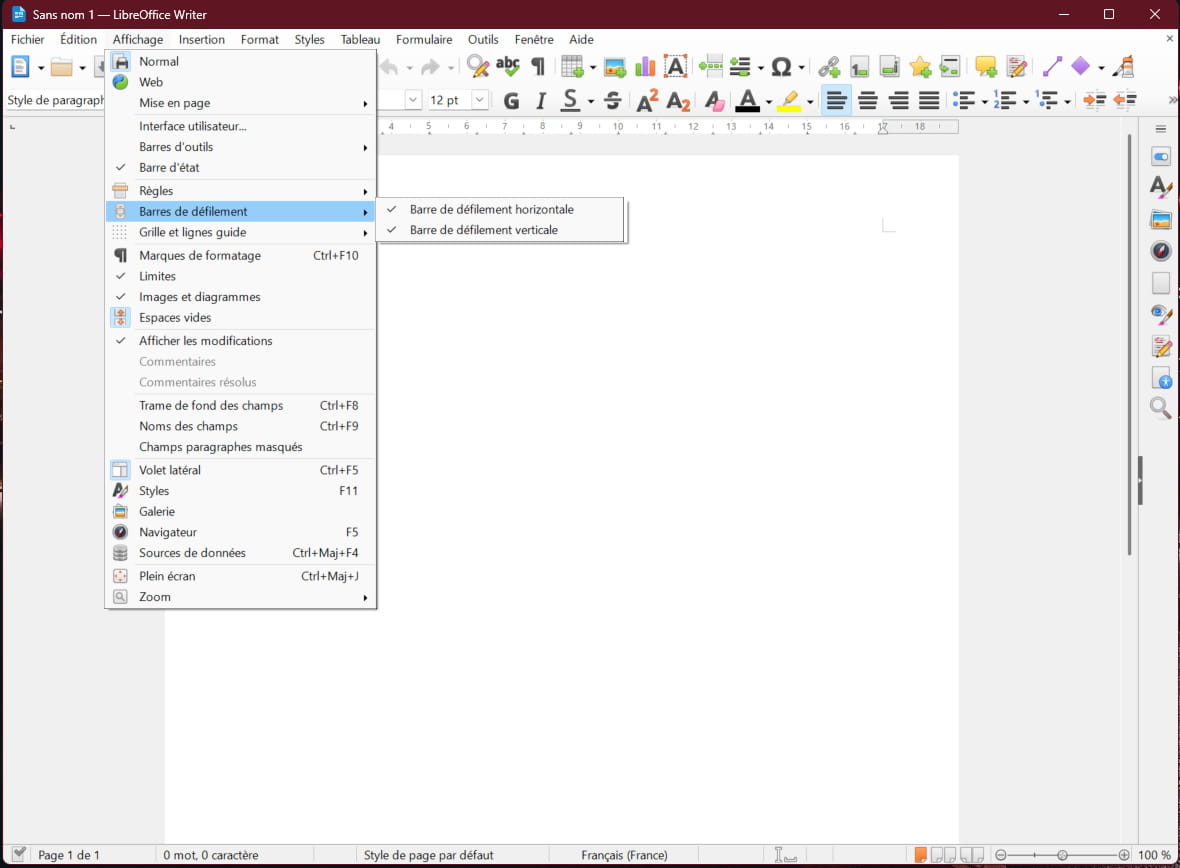
Version 25.8.1.1
-
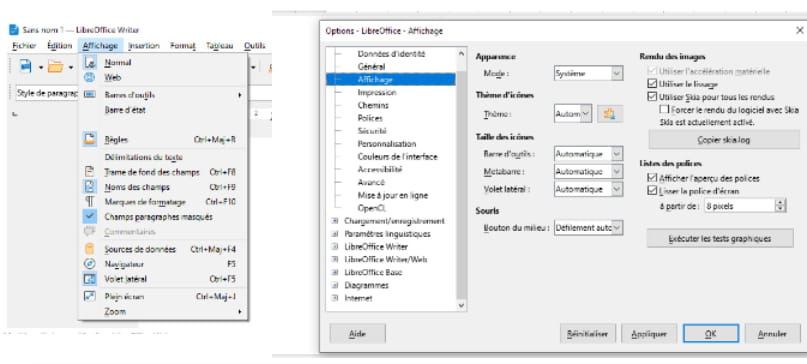
Yes but not at my place :-(
-
What is your version?
Because I don't have the same menus at all in the View tab and in the options!!!!
Try reinstalling!!
-
Here, the entire thread has come back :-) It's better this way!!! :-)
So, there's some news that I'm sharing here in case it's helpful (because it saved me): I was offered to integrate the Scroll Bars command into my toolbar. To do this, you need to go to View ==> Toolbars ==> Standard ==> Customize, and there, in the options provided in the left window, select Horizontal Toolbar, check the corresponding box in the right window, do the same with Vertical Toolbar, confirm everything by clicking OK, and then, miracle, you find the scroll bar symbols (double horizontal arrow and double vertical arrow) on the standard toolbar.
I hope that with this, I'll have a solution in case my horizontal bar disappears again, because as I told you, unfortunately the Scroll Bars option does not appear in the dropdown menu View on my Libre Office.
In any case, Yclick and you Diablo, it's really nice of you to come and suggest solutions. Thank you very much.
Have a great weekend, thanks again!
PS: Just for your information, I have been frequenting this friendly forum for years, and while I was recognized as a Whovian for a few years, for the past 2 years I don't know what's happening, I am never recognized and have had to re-register several times, Whoviana, then Whovi, it works once and then I'm never recognized. So I'm fed up, now I go through Google, which makes me Lynx something, unknown, but it's still me!

