
SOS my printer scans everything in PDF
SolvedWhovi Posted messages 18 Registration date Status Membre Last intervention -
Hello,
The issue concerns my HP Envy 4500 printer.
Here it is: while organizing my folders the other day, I was struck by the abundance of PDF icons on my files, even though I rarely use this format. I found it very, very strange, and now I just understood where it comes from:
I just scanned a text document, and indeed it ends up as a PDF in my documents on my PC.
This is a nightmare, as I do a lot of scanning for text documents that I then edit, and with this PDF format I cannot modify the document that gets saved (I don't have Adobe or anything else, and I don't want it since if I make 3 PDFs in a year, that's plenty).
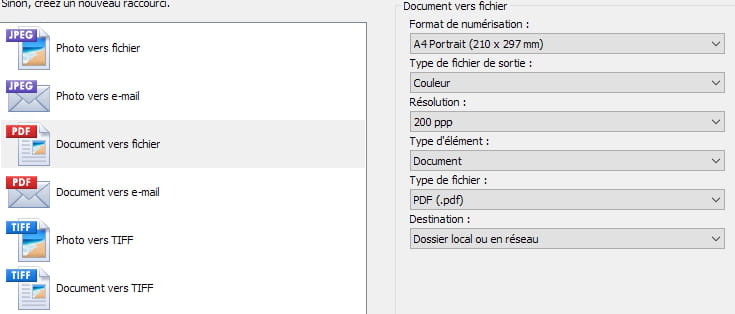
I looked carefully at the print launch page: the option to scan a document is called "document to file" and there is the PDF icon, which wasn't there before. In the area where you can choose the format, color, resolution, type of item, etc., I check the "file type" line, there is indeed a dropdown menu, but... it doesn't show anything, it only has "PDF format".
Can you please help me? If yes, a huge thank you because this issue really bothers me a lot in my work.
Last element that may help you: on my HP printing page, the word PDF is clearly indicated in white on a red cartridge, but on my files, it is a logo with an orange A on a white background, like Adobe, and not only does it now appear, but it has also replaced my PDFs from previous years: everything is now with this A logo.
Maybe I checked an Adobe page one day to see, but by what right do they shove their stuff at me (if it is indeed them)? This is a crazy story. Thank you for your help.

Best regards
Whovi
PS: I'm adding this PS to let you know not to be surprised if I don't get back to you before tomorrow evening (Thursday) as I will be on the road tomorrow. Thanks again!
4 réponses

Hello,
You wrote:
when I scanned a document, it appeared as a LibreOffice text page, on which I could intervene directly
This suggests that there is optical character recognition, since a printer scanner always provides an image, saved in JPG, PDF, or another format; but it remains an image that cannot be easily modified.
A search on the Internet shows that there is software HP Scan or HP Universal Scan that can be installed to benefit from OCR.
You probably need to reinstall this software.
See this page: https://support.hp.com/fr-fr/document/ish_6106426-6349918-16
What one understands well is clearly expressed,
And the words to say it come easily.
(Boileau)
Hello,
I don't understand the context.
Scanning is necessarily in pdf format or image format, your software offers tiff in addition, which is a remnant of old fax formats.
It labels what comes out in jpeg format as photo and what comes out in pdf format as file, which doesn’t make much sense, as I might very well want to make an image of text or a pdf file of an image.
A number of scanning software has a default setting; when the desired setting is established, scanning automatically happens in the selected format without asking anything.
Furthermore, it seems in your case that the File setting allows choosing the file type (jpeg instead of pdf) but we don't really see the point.
Finally, we don't know what you mean by text scanning; if this text is typed in a software on the PC, it is useless; if it is handwritten or typed on a typewriter, the output will necessarily be jpeg or pdf. A jpeg format is even harder to modify, and in both cases, you need to go through OCR character recognition, which is usually less effective unless it’s professional OCR software.
Pdf files are much easier to modify, opening in Word or LibreOffice or converting online, even saving back as pdf after modification.
They have the software icon that opens them by default, Adobe Reader if you have it installed and if that’s your choice, which is not the lightest; alternatively, we can use a very lightweight pdf viewer like Sumatra, or even none, deciding that it’s the browser that opens pdf by default.
Hello. I have a bit of time to respond. So what I wanted to say is that suddenly all my pdf icons (which used to be a red rectangle with "pdf" written in white) have turned into a sort of loop like an A, orangeish, and at the same time, the text documents that I scan, when I open them, are in pdf, whereas before when I scanned a document, it appeared as a LibreOffice text page, which I could edit directly.
It’s this "before and after" that I can't explain.
Oops, I have to run now, I will respond more fully tonight, but for now, thank you for that very enlightening answer.
Because apparently you had chosen to open these PDFs by default with LibreOffice (Draw?), whose icon I assume, and to re-save them as PDFs once the modifications were made.
If for one reason or another these PDFs were opened by default by a PDF viewer other than Acrobat Reader, we can restore the default choice of that other viewer.
In any case, the process is the same: right-click on one of these documents, open with, choose another application. If the one we want (another PDF viewer, browser, LibreOffice...) is there, make that choice and confirm by clicking Always.
Otherwise, scroll down with the right scroll bar all the way to the bottom, choose an application on your PC, browse to the executable of the application in question and confirm.
In my opinion, it's not a good idea for LibreOffice to be the default for PDFs; it's better for it to be a PDF viewer or the browser for when you simply want to view, and you can always modify by right-clicking, opening with LibreOffice, but this time not Always.
Hello
Excuse me for taking a few days to thank you. The problem is resolved, I found "my previous viewing".
First of all, after checking that the orange A was the Adobe icon, I went into my programs and uninstalled Adobe (which I didn't think I had installed! Maybe I tried a trial version one day?.... That said, someone worked on my computer last month and might have installed Adobe).
What bothered me about this Adobe was that my PDFs appeared zoomed in on the screen, somewhat blurry (it reminded me of what Fastone capture does when you capture text: it treats it like a photo, the font size is enlarged, it's blurry). Plus, due to this zooming, I only had a (very large) part of the top of the page, and on the left side of the page, a wide column telling me everything I could do with Adobe (which I really don’t care about!). In short, it was impossible to comfortably read my (rare) PDF documents, whereas before it was so simple, like a Writer or Word page.
Well: once Adobe was removed from my programs, despite that removal, my PDF files still appeared with that orange A icon and continued to open in an ugly and unreadable way.
So I went into the settings application / default applications / pdf / and there I saw that Adobe was still there, set as default. I removed it from there too and... wonderful, I got my previous configuration back, with my pages displayed clearly, fully readable like a text page, and I can copy-paste the parts of the text that interest me to rework them. (I expressed myself poorly, I apologize, I reread what I wrote and of course, I wasn't reworking the text directly in the PDF; I was copy-pasting it. And my title wasn't good either, which is unusual for me because I always pay attention to my titles...).

Regarding the question "why would you want to edit a PDF if you have the document on your PC?". No, precisely: this case arises because I do not have the document as a text file on my PC (otherwise, I obviously wouldn't need to scan it, except to send it to someone who asks for a PDF send).
So I found my little universe back, I'm happy, and I thank you very much for your responses. It was very interesting to read and very well explained. I also learned complementary things with Pierr'10. In short, thank you both.
I mark it as Resolved
Emsi
Good weekend, I don't know about you, but in (Brittany), it feels like the Sahara, we are not used to it :-) !!!
Hello,
I could be mistaken, but it seems to me that the previous interpretation is not that it is a handwritten text and that Whovi did indeed choose a PDF output format, but rather that she had previously decided that the default software for opening these PDFs is Libre Office Draw (thus with its icon) for editing purposes, and then, following another action, she assigned this default opening to Acrobat Reader. It's often enough to open a document with it, and the software will claim this default opening that we comply with without paying attention.