
Google Maps does not recognize my current location [PC]
vegansound Posted messages 134 Registration date Status Member Last intervention -
Hello,
I moved a few weeks ago, and Google Maps still shows my "current location" as the old address. No matter how much I click the location button on the bottom right, it doesn't update. In my settings, I have the new address.
There seems to be a GPS location issue that I can't resolve, even after searching, particularly on the Google help forum.
Everything works fine on Android, but it just doesn't want to on Windows.
Thank you for your help.
5 answers
-
Hello,
Google Maps always shows my "current location" as the old addressCan you update the app?
-
Firefox is up to date; it's my main browser. I think it's the app you're talking about because Google Maps is a website, not an app (just to remind you, my problem is on a computer, not mobile).
I tested it with Chrome to see if the issue was with FF, but it tells me "Your exact location could not be determined."
-
-
Hello
"Google Maps always shows my 'current location' as the old address,"
yes, that's what you say.
Google records information to geolocate people as accurately as possible in an "estimated" profile; if it assumes that the current assessment is incorrect, it reverts to a previous address that it deems more accurate. It is probably not yet aware of your move, and the current address seems less certain to it than the old address, which is reproduced in many places.
You may have disabled location services on your device either through restrictive settings, for example in your browser, etc., or have not given your consent to be geolocated.
A phone includes GPS, not a computer. Various sites and programs like Google Maps or others request your consent to geolocate you by other means; you may need to update the address on many sites or programs. Visit your building, your street, your neighborhood, the city, stores, hotels, restaurants, bars, cinemas, town hall, post office, convenience stores, newsstands...
-
Hello,
Google does not save anything except, when applicable, a certain number of favorite addresses that we have saved in our account.
Like any site that uses geolocation, Google Maps simply asks the browser (in this case Firefox) for permission to access the location, provided of course that the Windows geolocation service is not disabled.
This geolocation does not rely on the place where I live, but on where my IP is located.
For me, it indicates varying locations all several kilometers away from my home (which can be seen in the bar at the very bottom of any Google search) and there is nothing we can do about it.
I get the same (incorrect) result whenever I use anything based on my geolocation, for example asking Mappy for directions while specifying my starting position. -
We may perhaps have (though this is not the case for me) this type of problem in so-called CGNAT Internet subscriptions where, to cope with the exhaustion of IPV4 addresses, up to 4 users can share the same IPV4 IP.
If the router is a mixed IPV4 and IPV6 model, the problem will not exist if we can enforce IPV6 mode only (provided that all the websites we connect to support IPV6). -
Sorry for the delayed response.
@.eric :
- "Yes, you're the one saying that.". Well, I mean, I’m the one noticing it anyway. I open the site, I end up on the wrong geolocated address, that's a fact, not just an opinion. And no matter how many times I click on the target symbol, no, it stays on the old location.
I can possibly understand that it might take some time for the site to realize that I've moved, but it’s been over 20 days now. In my opinion, the problem doesn’t come from that. It’s probably related to the IP or something else. And even, a time for an adaptation to a device that stays at a fixed point 24/7?? It’s not the fact that I roam from side to side that’s going to change anything when it stays at home. And if you’re saying that to let mobile Maps communicate the information to desktop Maps, I’m not convinced. It’s been 20 days since I’ve been moving around in my new city, it hasn’t changed anything.
- "You probably disabled geolocation on your device either through restrictive settings, for example, browser, etc. or you haven’t given your consent to be geolocated."
I don't think so, but just to be sure, can you remind me how to do that, please?
@brucine :
- "We might also have this type of problem in CGNAT Internet subscriptions where, to counter the exhaustion of IPv4 addresses, up to 4 users can share the same IPv4 IP.
If the Box is mixed IPv4 and IPv6, the problem will not exist if we can impose IPv6 mode only (provided the sites we connect to all support IPv6)."
You're speaking another language to me, I’m not a computer expert. I have a Freebox Ultra, and after checking, it integrates both IPv4 and IPv6, and IPv6 is enabled by default.
I quote the site where I found this information: "By default, all Freeboxes have their IPv6 connectivity enabled. They therefore have two addresses (IPv4 and IPv6) that can communicate with devices connected to the modem's network."
https://www.echosdunet.net/free/aide/adresse-ip -
-
-
-
Hello,
My problem is still not resolved, but there has been a development. For several days now, it hasn't detected where I am at all, whereas before it indicated my old address. Now I get the message "Your exact location could not be determined." Maybe in the coming weeks it will finally detect me, but that's not certain and it could still take a while... -
Hello everyone,
I’m back a year after my last message because my problem still hasn’t been solved; in fact, it has worsened.
For several months now, Google Maps places me in Besançon even though I’m in Paris. I’ve tried asking for help here, with Google, read various posts online to resolve this, but after 15,000 methods tested and failed, I’m giving up.
So, rather than solve the problem, I wanted to know if there are GPS devices I can connect to my desktop PC tower, just like for Maps on mobile, that would still work 100%. Even if I move 20,000 times, Maps wouldn’t have to retrain itself to my new position from my searches or routes.
I don’t know if this is the cause of my bug, but a few months ago I also switched to a fixed IPv4 stack with my Freebox. I roughly understood that with this feature we share the same IP with other Free subscribers, because the number of IPv4s is limited, so you have to share (?). It could be that one of these people is located in Besançon? If so, it’s silly that others take their geolocation location...
So in short, a sort of GPS beacon would be more useful and quicker to fix my problem, I think. If it exists, how to choose the model? Is it in USB key form?
Thanks for your responses.-
Hello,
After checking just now in Google's bottom search banner, I only live about 15 km from home, it can go up to 150 at times but never in my locality.
So there isn’t too many other solutions in a mapping application than not to let it automatically search for the starting location but to specify it, or, if you search, I’m just making something up, a store, to specify a locality and where Google (for example) will propose to extend to neighboring areas.
For Full Stack it’s the opposite; unlike an IPv4 shared between up to 4 users, it is unique.
You can find USB GPS dongles in stores, some at very affordable prices; I don’t know their reliability, they are said to be more performant when they are paired (I think that’s the case on sailboats) with an antenna.
I’m not sure Windows localization is based on that; in other words, localization does not just go through the software integrated into that dongle.
As demonstrated in <13> and once GPS coordinates are obtained by an external means, no matter how I enter them into software using Google Maps the Windows location, I’ll still get it wrong. -
Hello brucine, thanks for your reply.
"in the lower strip of the Google search bar", where do you see that? I can’t find it. It’s crazy not to have a specific site; how can we organize transportation if the site locates us at 15 or 150 km away in your case, 329 km in mine, from our home. I’m fed up with always manually entering my position in the search bar.
Already, I don’t see a blue dot locating me on the site, which is problematic. Then I also don’t see the location icon in my taskbar. And I’m using Firefox, and in the permissions for location, I don’t see the Google Maps URL saved. I only see google.com (and it’s set to "allow"), but I don’t know if that’s the same for Maps or if Maps must have its own URL.
Perhaps fixing these two points that don’t display could help move toward resolving my issue? -
Hello, If I search for anything, Google at the bottom tells me where I live; this is neither true in reality nor in Google, which merely approaches it, since if I open Google Maps I live this time in La Farlède, which is a suburb (primarily known for its prison, where I do not reside either). Open Google Maps now, if I right-click on a point on the map (for the example I decided I live at Boulanger Toulon la Garde), I get GPS coordinates that I can enter into an application that asks for the location (note, they are in decimal mode; if the application in question only knows sexagesimal mode, you need to convert). Firefox only knows a list of locations (Settings, Permissions and data) after answering a request from a site (allow or block) or if you did it manually, and you can of course modify it; if you did not block or answer the location request from a site, there is nothing, we normally do not need it for Google and Maps unless perhaps this permission is requested by a third-party site, I personally have none. This localization is the result of Windows settings by enabling the one that corresponds in services.msc. On the browser side, it's transparent unless you use a script manager directly or indirectly through the effect of a VPN or a third-party security software that interferes with what it should not. On Google you must allow google.com and/or fr, on Google Maps in addition gstatic.com.
-
Hello,
Regarding your first screenshot, I see it says "Arrondissement de Besançon - D'après votre appareil - Mettre à jour ma position". This already indicates that it relates to my device and not my IP, like you. Maybe a clue to my problem? And when I click on each link (device and position), both ask me to update my position, but both still think I’m in Besançon.
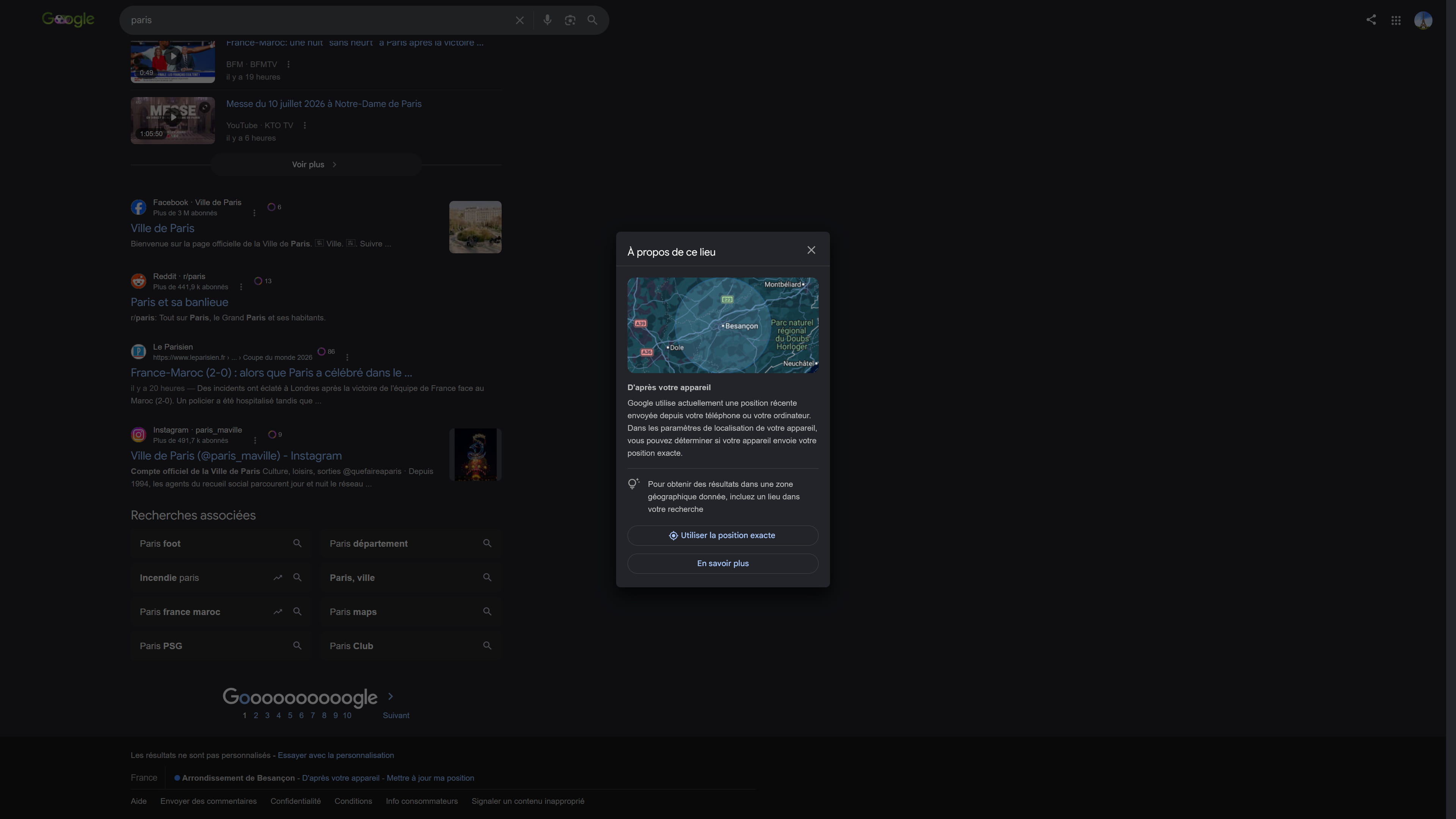
I don’t understand your point about the "GPS coordinates" afterwards. I right-click on my city, copy the coordinates, and paste them into the site you had previously given (https://coordinates-converter.com), but of course it will find my city, yet it won’t find me “by itself.” I could enter any coordinates.
If by any chance I declined the access request to my coordinates, there must be a way, a place to modify this? How do I access it in FF? It might not be useful, but checking and/or changing it might have an impact on my location. In any case, in the Windows "Location" settings section, everything seems well configured. I even enabled "Allow apps to access your location", but despite what they say, I don’t see the icon in the taskbar, neither visible nor hidden.
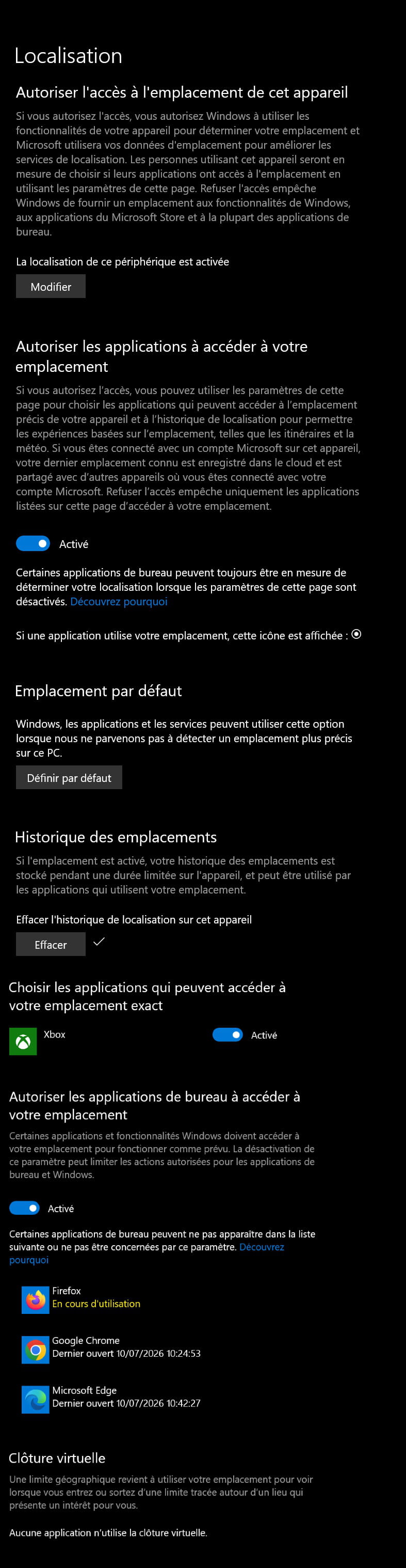
And regarding permissions, google.com is indeed allowed. And I don’t know what gstatic.com is, because it’s a dead site (404. That’s an error.).Despite the text, there is no other way to locate in Google than the IP and that is where the problem lies; gstatic.com is not a URL address but an integrated Javascript on the site, here Google Maps.
If we have refused location permission to a website in Firefox (for example Cdiscount, I don’t see how it could concern it) it only has consequences for that site and you can modify it by allowing or removing for the same site as indicated in <18>.
It is possible that Firefox keeps all or part of this data in cache or history, I personally set in Settings and Privacy to clear all history on close.
The permission of desktop applications has nothing to do with it, as its name indicates it does not concern a site but only a local application that could request location, for example, I’m making something up, Windows camera or in the case that interests us perhaps Xbox.
Cheating by “calculating” the GPS coordinates of one’s residence obviously does not correct the automatic erroneous location but allows entering the correct coordinates into the application that asks for them.
To go back to yesterday’s example, suppose I want to make a route in Mappy (this morning, I live in Nice if I accept My Location, about 150 km) and for the example, I do not want to enter my real address down to the kilometer in Start.
By deciding as yesterday in Google Maps that I live in Boulanger Toulon La Garde, right-click on this point, right-click on the GPS coordinates, copy, paste into the Start area of Mappy: now I am good, I depart from La Garde and not from Nice.
I can obviously avoid reproducing this manipulation each time by copying the GPS coordinates in question into a text file from which later I will simply cut and paste.Hello
If you found that in the Windows settings you just had to set "allow geolocation," and respond "allow geolocation" to all the sites and programs that ask, that's pretty much all you need to do; you can't do more than put your new address everywhere you can, modifying it where you still see the old address.
I can present you with a person officially deceased and buried over 11 years ago, but there is still a judge who says in one place, no, there is no document proving their death in such a file, a file that no one is allowed to request what it contains or to suggest completing what is missing, except for this judge who doesn't do it.
So don't ask me more, I just know that there is no GPS on my computer, while there is one on the phone.
And my computer changes its address when the ISP gives me a new IP, and it can take more or less time to find out where it lives depending on my searches in the engines or the sites I visit.
For settings in a recent Windows, one of the settings is indicated here:
https://support.microsoft.com/fr-fr/windows/service-d-emplacement-et-confidentialit%C3%A9-dans-windows-3a8eee0a-5b0b-dc07-eede-2a5ca1c49088
But you can set limits, we'll explain that here:
https://www.moncoach365.academy/blog/localisation-quand-windows-sait-ou-tu-es-et-comment-lui-dire-stop
Google, you gave it permissions or instructions not to use certain information; Microsoft did the same, but you may not have left the same instructions; it's the same with Facebook with other settings, in each application you can modify its access or not to geolocation and in your browser as well.
Not to mention each site to which you have said or allowed at some point that it could or could not use information, or that your address is in such a place, I can't guess.
But it's not enough to just tell it to geolocate; if your old address is in Google Maps' servers, you need to find a way to put the new one in; it's up to them, they don’t confide anything about you to me.
The phone and Android simply look right away at its GPS, that's it.
-
Hey, it's really a hassle all this. Thanks for your reply. It's crazy that it's not as simple as it should be. There should be an option to set the new location right away if you don't want to wait.
I checked my settings, and "location" is indeed checked. And strangely, when I want to bring up the location icon in my taskbar, even though it's checked, it doesn't appear. I cleared the trip history, we'll see if that helps.
I'll keep this topic open in case someone has a solution. I'll mark it as resolved when that happens one day...
Thanks to both of you, ++.Hello,
The gloubi-boulga in <10> changes nothing about reality.
If I left my postal address on any merchant site, it is not clear how Google Maps (for example) could extract it or how the site in question located me; if any site located me via my IP, the result is the same and approximate.
Demonstration by absurdity, let's ask here for my GPS coordinates (inevitably also based on my IP):
https://coordinates-converter.com/fr/decimal/51.000000,10.000000?karte=OpenStreetMap&zoom=8
Let's enter these coordinates into Google Maps; I live in a municipality that is not mine and in a No Man's Land behind a shopping center, I know the area, where no one lives except maybe a subterranean communication relay from my operator.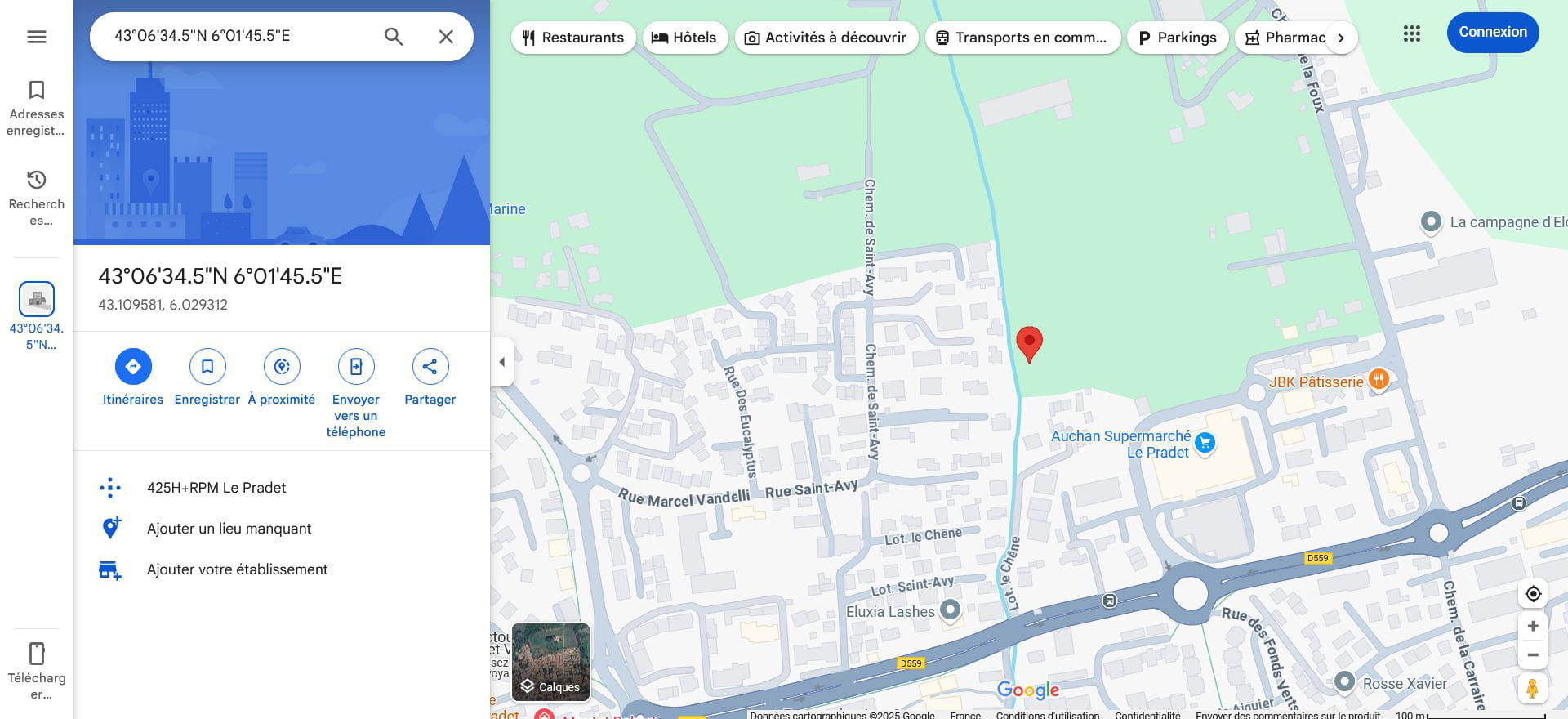
Depending on the day or the length of the cow's tail, it can be in 3 or 4 neighboring municipalities, very rarely mine, never to the south since there's only the sea, but why never to the east either?
The IP has been determined approximately according to the one that my operator or its relays provide, you can be stubborn all you want, you can't do anything except in the case I mentioned (CGNAT, even shared IP among up to 4 users) where to simplify, the approximation is 4 times larger.
-

