
PC taking a long time to boot up
Solvedjeannets Posted messages 28412 Registration date Status Contributor Last intervention -
Hello,
Since I plugged my computer back in, when I start it, it gets stuck for 10 minutes on the motherboard screen with no way to access the BIOS or any other available options. (my keyboard, which normally lights up, only turns on after 5 minutes)
After 10 minutes, my PC starts with a scan and repair of the C: drive.
What should I do because this is really inconvenient.
Regards, thank you
15 answers
-
Hello,
You should know that my desktop computer (WINDOWS 10) gets stuck for 10 minutes on the motherboard screen before it starts up.
I've tried several things to address this issue.
I removed the CMOS battery (put it back in, of course), disabled fast startup, and turned off all services other than Microsoft at startup.
But now my PC's screens are unresponsive, the lights just blink, having detected the source, but as if there was nothing to display at all.
My keyboard and mouse also lights up.
I've already waited 30 minutes without any response from the screens. I also want to specify that the screens are properly connected and display a message when nothing is detected, unlike the current situation.
Thank you.
-
jeannets Posted messages 28412 Registration date Status Contributor Last intervention Ambassadeur 6 607
Yes, it's a bit of a "tautology"... I too try to do it myself... but that doesn't stop me from starting with a tour of the forums... and reaching certain limits; I'm forced to go through the manufacturers' circuit...
Often, the initial text needs to be catchy... and the reader's perseverance shows a willingness and also cooperation to find and provide additional information... to help the volunteer help you...
To go further, without seeing the machine or taking measurements or tests, it's up to you to see and share your perspective...
-- For example, the CMOS battery... if it is too low, replacing it on the motherboard will still leave it too low... QED. You need to put in a new one, or be able to measure its voltage and confirm that it's good before replacing it...
-- The BIOS displays even if there is no Windows in it... you can remove your hard drive and the BIOS will still display... unless the graphics card only works with Windows... The keyboard lights remain... which have a meaning...
-- We still don't know the brand and model of this PC...?
-- "I reconnected it", what does that mean?? That it had been on the shelves, in the basement, for 6 years...
These are questions that remain unanswered; and that could lead you to a repair shop... nonetheless.
-
jeannets Posted messages 28412 Registration date Status Contributor Last intervention Ambassadeur 6 607
There you go, I marked it as resolved (even if it's not true)
Everyone is free to solve their issues in the way they find most rational.
You chose your solution, it will allow you to experience the ups and downs of the new things.
We will always be open.
-
jeannets Posted messages 28412 Registration date Status Contributor Last intervention Ambassadeur 6 607
Hello,
Your disk does seem to have a problem (defects), which is probably the cause of your issues.
The brand, model, and age of this computer... wouldn't hurt to know..!!
Test your disk
+++ HD_tune test disk
So download HD_tune here https://www.hdtune.com/files/hdtune_255.exe and install it on your PC... Run the tests "Benchmark... Health... Error Scan" one after the other, take a screenshot of each window... the floppy disk icon is there for that... and post these images on the site "cjoint.com" without forgetting to paste the link of each one here..
Be careful, the last one can be very long (all night) depending on the disk capacity -
Hello,
If the disk is OK
Try to access the recovery options > Advanced Startup
Then Troubleshoot > Advanced options maybe? > System Restore
Choose a different restore point... -
Hello.
For your information:
https://forums.commentcamarche.net/forum/affich-37988777-ecran-qui-ne-trouve-rien-a-afficher
bazfile
Moderator/Security Contributor.
a hello, a response, a thank you are always appreciated.-
-
@Vsanoo StatusMember .
This is an evolution of the problem; the issue remains the same, which is why it is advisable to stick to the initial post where you have a better chance of getting responses.
Since you can no longer access Windows remotely without having the PC in hand, I don't think anyone will be able to give you an accurate diagnosis. The best option for you would be to take it to a repair shop.
You might also try a LiveCD/USB that allows you to access an OS and perform some checks:https://www.malekal.com/malekal-live-cd-reparer-depanner-pc-windows/
https://www.malekal.com/creer-live-cd-malekal-depanner-ordinateur/
-
Already tried and nothing works. I have no way to access the BIOS or WINDOWS.
The worst part is that I can't even see if the graphics card is the problem since I have no video output on my motherboard... I'm lost and desperate, I don't see what more I can do and a repair shop would be too expensive for me.
Is there any way to reset everything?
-
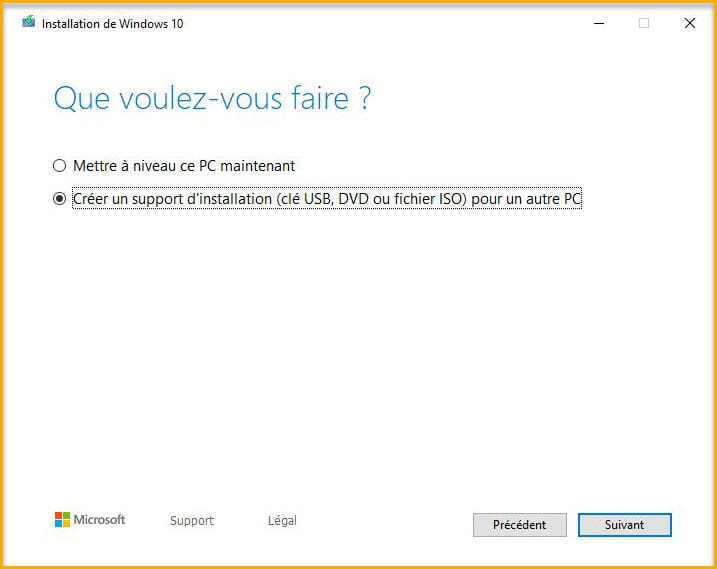
Try reinstalling Windows 10; if the issue is hardware-related, the installation won't start. If the installation fails, you'll need to take it to a technician who can examine the PC closely and see exactly what's wrong.
To install Windows 10:
Create a Windows 10 installation media, connect a USB drive with a minimum of 8 GB to your PC, download this Microsoft tool, open the tool, and then create your USB drive containing Windows 10.
Once your USB is created, connect it to your PC, boot from the USB drive, and install Windows 10.
See this page.
-
-
-
jeannets Posted messages 28412 Registration date Status Contributor Last intervention Ambassadeur 6 607
Have you put a new battery on the CMOS..? Maybe you should start there, you can find them in supermarkets, it's a "CR2032" or equivalent.
The graphics card...!!! is not the heart of the PC, you shouldn't rely on that.
The BIOS might be starting..?? it doesn't make music or a beep to let everyone know... it's in a memory and makes no noise... Just because the screen stays black... I'm going to give you a rough method... and you will respond with the results...
+++ Minimum boot of a PC +++
The motherboard is equipped with a BIOS... you received a manual with the motherboard... It explains how to access the BIOS (Generally, it's the Delete key immediately upon powering on and before the end of the logo) you have to be quick...
For now, I am not talking about Windows... the goal is to get the PC to work, not Windows, that will come later.
So if accessing the BIOS doesn't yield anything, you need to disconnect everything from your setup... leaving only the motherboard (with its processor and one RAM stick) connected to its power supply and the power button of the case... And the wired keyboard, that's it...
No graphics card, no hard drive or SSD, no CD/DVD drive, no monitor.
Power on the PC while closely watching the keyboard lights... They should briefly light up, even all three, then one... and then you play with the Num Lock and/or Caps Lock key... the lights should change state with each press of the key...So, what do you see..? do those keyboard lights respond or not..?
What model is this PC..??
-
jeannets Posted messages 28412 Registration date Status Contributor Last intervention Ambassadeur 6 607
In this case, it is the brand ++ the model of the motherboard that serves as references for the PC
-
jeannets Posted messages 28412 Registration date Status Contributor Last intervention Ambassadeur 6 607
OK... that's not a good sign at all...
We can deduce that your motherboard isn't working... Or the microprocessor...
Haven't you dismantled something, like the processor, a RAM stick for example... or forgotten to reconnect a connector...? Or maybe accidentally unplugged it during a cleaning for instance...
Is the ATX_12v connector properly connected and is each pin pushed all the way in...?
-- You can put in four memory sticks, how many do you have...?
-- You could leave just one in place, then retest... and then try swapping that memory with another...
-- If nothing positive comes out of this, you'll have to consider changing the motherboard and/or the processor... that's what's shaping up on the horizon...
-
Hello, first of all
I have already tried with one and two RAM sticks, I tested them in another PC and they work very well.
Next, the power supply is properly connected to the motherboard, also to the CPU.
And I think the motherboard is working because the LEDs on it light up (after that, I don't know if that really means anything)
Do you have anything else to suggest as a test?
-
jeannets Posted messages 28412 Registration date Status Contributor Last intervention Ambassadeur 6 607
We can try to find the flaw, on the motherboard for example, even if it has already been seen...
-- Testing the RAM sticks on another PC is a good start, but it doesn't prove that they work on yours... Different processor... Different frequencies... Different timing settings...
-- The power supply of the motherboard is also questionable... everything may be well connected... The measured voltage may be good... There is also the voltage regulation to consider... One must also look at the "Ripple" or residual voltage variation... It's quite complex and it prevents a computer from functioning properly...
-- The LEDs being lit is not a good sign... generally, there are four of them... and when everything is fine, they are off... which ones are lit, is there a small abbreviation written on the motherboard..? But I can't locate these LEDs on your motherboard; where are they then..?
-- And there's still the BIOS that I would reflash anyway... which is doable, if I read it correctly;
Here is your motherboard, in English.. https://download1.gigabyte.com/Files/Manual/mb_manual_ga-990x-gaming-sli_e.pdf?v=57a224c545bdf811adaae4e2a8e17ac5
-
When I said LED, I was simply referring to the light on the motherboard and not the LEDs that indicate a problem or not.
To be honest, I think it’s more of a software issue because before everything stopped working, I had set it up for a Windows clean boot, and apparently it didn’t like that; I had also removed the CMOS battery for a few hours.
The problem is that if it’s software-related and Windows has crashed, why can’t I access the BIOS? After all, we shouldn’t forget the original problem, which was that I was stuck for 10 minutes on the motherboard screen with no possibility of accessing the BIOS.
Because I didn’t touch anything inside my PC between before and after the problem.
After that, I can’t claim what I’m saying, and I’m just speculating...
The thing is, how can I fix a software issue without a screen?
-
jeannets Posted messages 28412 Registration date Status Contributor Last intervention Ambassadeur 6 607
Yes, there was confusion about the LEDs so it's a misunderstanding... a shot for nothing.
-- Your "Clean Boot" may have messed everything up in Windows... but I didn't know that at the beginning. This shows that description matters.
-- Even with Windows crashed, you should be able to access the BIOS... I think it's the manipulation that's not right or not fast enough...
You cannot access the BIOS from Windows. This access is only possible by using the wired keyboard key "Delete" right after powering on and before the end of the Gigabyte logo, you have to tap the key... even with the hard drive unplugged.
But you need a screen to see that...
-- I suggest installing a simple graphics card, around €50 as a rescue... https://www.cdiscount.com/informatique/cartes-graphiques/fydun-carte-graphique-ddr5-accessoires-de-reseau-d/f-10767-fyd7016693077673.html?idOffre=2310557542#mpos=0|mp&sw=96d99dc939e484b568e90aad96611ef55f158294190c25446bf73b602dc2dcf356bb2f7ade84e6163294700528d2f2727802c19c6461509d1512ce03a4df938443451f7e784d92c4b67f79e929e52cdfb10ca4e3f863d22e04fca402fdc59c5669e35d70aa5acdf10086952d7e61a7fa2e33d42748ec21770a67266b24727bd2
Otherwise, because yours doesn't work without Windows, I suppose... and with that, your BIOS should display... If the problem is really software, as you say.
That's it for now, try to get the BIOS display...
If it works, the next step will be to create a special bootable USB stick to start the PC on a pseudo Windows.
_________________________________________________________________________________
Here is the latest version of the BIOS for your motherboard... No need to touch it if it's the same... otherwise, it's to be done as a last resort.
https://www.gigabyte.com/Motherboard/GA-990X-Gaming-SLI-rev-10/support#support-dl-bios
BIOS version F1 from Feb 1, 2016
-
jeannets Posted messages 28412 Registration date Status Contributor Last intervention Ambassadeur 6 607
I cannot know, as I do not know the other one...
But the one I propose is simple, has the three connectors used with common screens... and is not very expensive... there you go
There are certainly others...
Maybe you could borrow one for the time of these tests..? depending on your knowledge.
-
jeannets Posted messages 28412 Registration date Status Contributor Last intervention Ambassadeur 6 607
Yes, that's a good initiative... but it should also be tested the other way around... It's a double exchange, and also a double test.
It should also be checked if it properly displays the BIOS (with the Delete key on startup)
After that, yes, we can consider that the board is good.
______________________
I'd like to provide some clarifications on the clear CMOS (page 19 of the manual)
-- turn off the PC, unplug it before clearing the CMOS
-- The clear CMOS is done by shorting the two pins marked CLR_CMOS on the motherboard, in the corner below the battery... with a screwdriver, for about 2 or 3 seconds...
You then need to restart the computer to see the result...
-
Hello, thank you for your clarifications, but I had already successfully cleared the CMOS by following the motherboard manual.
I think I'm going to stop here, it may seem silly, but let's not forget that my PC is old and not brand new. And if it's to change a component, given its age, everything would need to be redone.
So I'm going to sell what works and build myself a new generation PC.
Thank you for your time and generosity.
I'm not sure how to close the forum without marking it as resolved.
Have a good evening.
-



