
Existing folder but non-existent when trying to delete it
SolvedVayne -
Hello,
I have 2 folders on my computer that won't delete!
One is empty and the other one is full, and I can read the files in it!
When I try to delete them, Windows tells me they don't exist!
I can't boot in safe mode with the F4 key because it opens Samsung recovery!
What should I do?
3 answers
-
Hello,
Try renaming it through the 7-Zip interface, and then delete it.
https://www.7-zip.org/download.html
This should work in the case of a "Nonexistent" folder/file. -
Hello,
How to delete an untraceable file or folder in Windows 10?
In the screenshot below, you can see an example of the error message "Item not found" that Windows 10 sometimes displays when you want to delete a file. No matter what action you take, this error message "item not found. It no longer exists in... Please verify its current location and try again" will appear, and Windows will refuse to delete this file or folder.
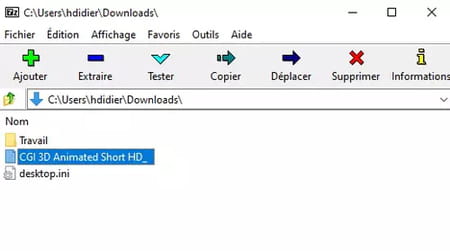
However, you can easily delete this untraceable item without typing a single command line and without going into Windows Safe Mode. The trick is to bypass the Windows 10 Explorer and use a file compression and archiving software, like 7-Zip or WinRAR. If you don’t have any file compression software installed on your computer, you can download one for free by visiting our selection.
- Open your compression and archiving software.
- Once in the software interface, navigate through your PC folders to find the file you want to delete.
- Click on the name of the "untraceable" file to select it, then click on Delete.
-
Thank you very much fabul and spiralio!
Just a small clarification, I could only delete them after renaming them! Winrar told me: "folder name too long" even though they were only 5 letters, but thanks again!

