
Black screen "Error IRQL NOT_LESS_OR_EQUAL" Qcaman10x64.sys
brucine Posted messages 25286 Registration date Status Member Last intervention -
Hello everyone!
I have a pretty strange problem with my computer (Thomson PC running Windows 11). At a little over 2 months apart (July 20 and yesterday August 25), it suddenly stopped with an error message "ERROR IRQL NOT_LESS_OR_EQUAL" and a note "Elements failed: "Qcaman10x64.sys"."
I did some research and the problem apparently seems related to a failure of my Qualcomm Atheros Wi-Fi driver. I was told to update or reinstall it. The update via Device Manager did nothing (it apparently is up to date). Regarding the reinstallation, I’m offered to uninstall it and restart the computer which would automatically reinstall the driver, but I’m afraid to do this because I fear the reinstallation might not happen and then there would be no Wi-Fi. Moreover, how could the computer reinstall a Wi-Fi driver... when there’s no Internet connection to download it?
I also tried repairing the system files with the command "sfc /scannow" as I was told, but nothing was found. This problem worries me because I will take online exams in a training program next year and I’m afraid it will crash in the middle of the test, as the exam is monitored with webcam, etc., and I think they don’t joke about connectivity problems... Can this problem be solved without changing hardware?
Driver reference: Qualcomm Atheros QCA9377 Wireless Network Adapter
Thanks in advance and have a good day everyone!
Aliciou
1 answer
-
Good evening,
The error
IRQL_NOT_LESS_OR_EQUALwith the fileqcaman10x64.sysis typically related to a faulty or incompatible driver.Update or uninstall this driver via Device Manager or use the memory diagnostic tool to check the RAM.
-
Hello,
As the author said, this does not seem to concern RAM but the Wifi driver.
I had a perhaps comparable problem a few years ago (with a graphics driver) where Windows updated it to an incompatible version; the first moral is that you should never allow third-party driver updates in Windows Update settings.
The problem is that Thomson does not excel at providing a support site containing these drivers, that’s where to look first, and in any case uninstalling it and letting it reinstall is useless because Windows Update will load the same one and it’s impossible without Wi-Fi if there isn’t an Ethernet connection or another computer.
The driver in question is somewhat generic; there are probably dozens of different versions for all brands of PCs that use it.
We might perhaps back up in another folder the current driver, which we know works more or less, then try to find a functional one; the issue is that searching by the driver name plus Thomson yields nothing.
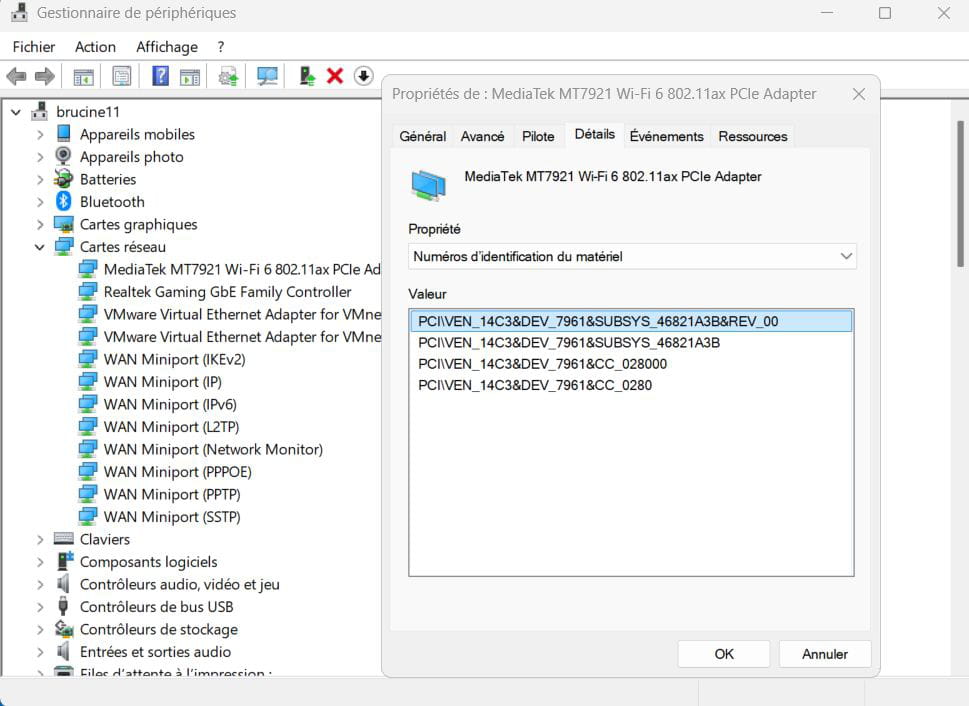
Or search for the device identification in Device Manager and perform this search on the obtained string.
-
