Open photos ._DSC vs DSC
Solved
Whoviana
Posted messages
47
Registration date
Status
Member
Last intervention
-
The Braveheart Posted messages 4377 Registration date Status Contributor Last intervention -
The Braveheart Posted messages 4377 Registration date Status Contributor Last intervention -
Hello,
Some friends downloaded a series of photos onto a USB stick for me.
One series is viewable: I see the photos as thumbnails when I open my USB stick and if I click on a specific photo, it appears on the screen.
However, another series shows (for the thumbnails) as files with a rounded upper right corner, with a blue square in the center, containing what looks like 2 "mountains" (like the placeholders for photos when creating a digital album or book). The properties indicate them as JPEGs like the others, and they open with Photo like the others, except that when I click on one of these "photos," I receive the message: "it seems we can't open this file" ("it seems"... it always makes me laugh when I read that: why not just say "we can't"!).
The names of the photos that won't open start with ._DSC
The names of the photos that open start with DSC (so without the dot and the dash).
I thought it could be two versions of the same files in a different format, but the numbers don't match at all.
I am on Windows 10.
I looked here and there, and it seems that this DSC (with or without the dot and dash) is a Nikon specific feature, but I understood that it does not really concern the images themselves, but rather information about these images...
Otherwise, help, if each camera brand starts to have its own file extensions that require downloading opening programs to read photos, depending on who gave us these photos, we're not going to get out of this mess during vacations!!!
Anyway, what is this ._DSC: are these files photos or info text (which I don't need)?
If they are indeed photos (which I think), is there no way to change the extension so that "they can be opened"?
Thank you very much!
Configuration: Windows / Firefox 90.0
Some friends downloaded a series of photos onto a USB stick for me.
One series is viewable: I see the photos as thumbnails when I open my USB stick and if I click on a specific photo, it appears on the screen.
However, another series shows (for the thumbnails) as files with a rounded upper right corner, with a blue square in the center, containing what looks like 2 "mountains" (like the placeholders for photos when creating a digital album or book). The properties indicate them as JPEGs like the others, and they open with Photo like the others, except that when I click on one of these "photos," I receive the message: "it seems we can't open this file" ("it seems"... it always makes me laugh when I read that: why not just say "we can't"!).
The names of the photos that won't open start with ._DSC
The names of the photos that open start with DSC (so without the dot and the dash).
I thought it could be two versions of the same files in a different format, but the numbers don't match at all.
I am on Windows 10.
I looked here and there, and it seems that this DSC (with or without the dot and dash) is a Nikon specific feature, but I understood that it does not really concern the images themselves, but rather information about these images...
Otherwise, help, if each camera brand starts to have its own file extensions that require downloading opening programs to read photos, depending on who gave us these photos, we're not going to get out of this mess during vacations!!!
Anyway, what is this ._DSC: are these files photos or info text (which I don't need)?
If they are indeed photos (which I think), is there no way to change the extension so that "they can be opened"?
Thank you very much!
Configuration: Windows / Firefox 90.0
5 answers
-
Hello,
The files starting with DSC are snapshots taken with a Nikon camera.
Having 3 Nikon cameras myself, my shots look like this:

Do you have this type of "DSC..."?
Have a great day.
The Braveheart
--
"I fear the day that technology will surpass our human interaction. The World will have a generation of Idiots." (Albert EINSTEIN) -
Re,
If you remove the ._ and you have DSC04676 instead of ._DSC04676, what does it give?
The symbol next to the file, the mountains... it means they are read by the photo program of Windows 10, have you tried another program like FastStone Image Viewer or XnView?
Have a good afternoon.
The Braveheart.
"I fear the day that technology will surpass our human interaction.
The World will have a generation of Idiots." (Albert EINSTEIN) -
Hello and thank you for taking the time to reply to me.
No, the presentation is as I indicated in my message, that is to say, 2 different titles (whether I'm in list view or icon view):
- a series of 18 files that start with ._DSC (a prefix, then)
- a series of about thirty files that start with DSC (without the dot and the dash 8)
What I can add to my initial message is that, in "list" mode,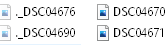 the symbol for the files that start with ._DSC is less "bold" than the symbol for the names of the files that simply start with DSC.
-
I'm sorry for the delay in my response, I was away.
So, to start, I tried a lot of things, like removing the prefix, or replacing it with a simple DSC (without the dot and the dash), and I also tried "open with," but that didn't lead me to programs that could open photos (it took me to Firefox, iTunes, and that kind of stuff).
And then I go back to "open with," and there... another trick from the elf, that's for sure, or maybe you're sending good vibes long distance... I see programs I had never seen before, including Fastone viewer (I've always had Fastone on my desktop, but only the "capture" function, which I use a lot, I didn't realize I had access to viewer).
So... TADAM... hold on tight: all 18 ._DSC files open the same and only photo!!!!!! (which photo is the first in the "readable" series).
The mystery is thus solved, thanks to you. Unexplained but resolved.
Next time I have this kind of files, I won't stress about it: I'll know it's one (and only one!) of the readable photos.
It's still funny that the same file is present 18 times with hence 18 different references, which are not even all continuous (it starts at ._DSC04676 and goes up to 05172, passing through 04693, in short, no "logic"!!!
There you go. THANK YOU SO MUCH, the braveheart !!!! -
Good evening,
Please note that Capture and Viewer are two different software from Faststone, at least to my knowledge.
I'm happy if I could help you. I will mark the topic as resolved.
Have a good evening.
The Braveheart.
--
"I fear the day that technology will surpass our human interaction.
The World will have a generation of Idiots." (Albert EINSTEIN)