Problem with abbreviated numbers
Solved
Hello,
I programmed my phone with speed dial numbers, but when I press the key for one of the saved numbers to call the person, nothing happens... just a beep like when the line is busy...
Thank you for the response
Configuration: Windows / Chrome 91.0.4472.114
I programmed my phone with speed dial numbers, but when I press the key for one of the saved numbers to call the person, nothing happens... just a beep like when the line is busy...
Thank you for the response
Configuration: Windows / Chrome 91.0.4472.114
6 answers
-
ModeratorHello,
It would be good to provide the exact make and model of the phone so that someone who knows it can respond about its functioning.
--
A stranger is a friend we haven't met yet. -
Thank you for this request for clarification, which can indeed be very useful.
It's a Panasonic 6821. -
ModeratorHello,
When you press one of the keys 1 to 6 where you previously saved a number, does that number display on the screen?
--
It's very difficult to catch a black cat in a dark room.
Especially when it's not there... -
Hello
yes the number is displayed but below it says PAUSE-
-
@baladur13I have no tone, and after a while I hear a beep as if the line is busy.
-
-
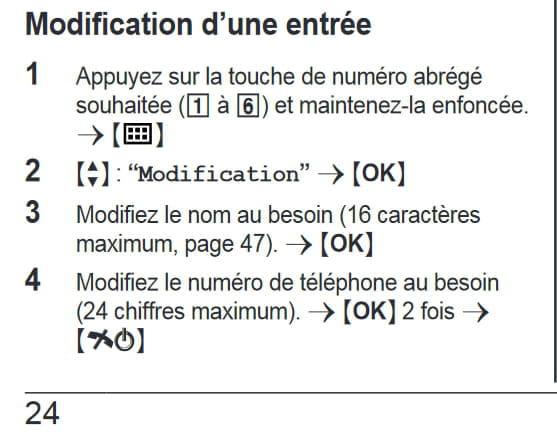
ModeratorAre you sure you didn't press one of the keys 1 to 6 for too long?
Because, in that case, you are entering a conversation that allows you to modify the assignment of the number associated with that key
Excerpt from the manual on page 24
--
It's very difficult to catch a black cat in a dark room.
Especially when it's not there...-
-
Moderator@baladur13Why use my nickname instead of yours, Lili???
-
@baladur13Excuse me, a misunderstanding on my part.. I didn't know how to correct it when I realized it
I'm not used to speaking on forums
Thanks again for your help -
Moderator@liliYou're welcome.
Glad I could help you.
-
-
I made a mistake earlier.. When I press the speed dial number, the digit appears instead of the phone number
However, when I check the list of speed dial numbers, everything is fine.