
Unable to attach a scanned document to my email.
Solved
Chelsea17
Posted messages
75
Registration date
Status
Member
Last intervention
-
Chelsea17 Posted messages 75 Registration date Status Member Last intervention -
Chelsea17 Posted messages 75 Registration date Status Member Last intervention -
Hello,
I usually have no problem scanning a document, retrieving it from my documents to send it as an attachment, but today nothing works. When I retrieve the mail from "my documents," it appears on the email to send as a black square with PDF, yet on my printer, I specified PDF format. I am 74 years old, I do my best, but sometimes !!!!! Thank you, if someone could help me in "not very technical terms," I would be delighted ... Thank you again to anyone who can give me an answer.
I usually have no problem scanning a document, retrieving it from my documents to send it as an attachment, but today nothing works. When I retrieve the mail from "my documents," it appears on the email to send as a black square with PDF, yet on my printer, I specified PDF format. I am 74 years old, I do my best, but sometimes !!!!! Thank you, if someone could help me in "not very technical terms," I would be delighted ... Thank you again to anyone who can give me an answer.
10 answers
-
Hello Madmyke,
Thank you for getting back to me. When I go into the file explorer where my scanned document is located, I click on open and my document is indeed there. However, when it arrives as an attachment in the email I want to send... there is a black square with PDF written on it and inside the same square it says scanned with a cross next to it to remove it if I wish. That's all I can tell you.
Thanks again. -
Hello
Does your PDF scanner and saved on the PC open normally when double-clicked? (outside of any email program, that is.)
best regards -
In your response, you mentioned "scanned and saved"; what do you mean by "saved"? ...Usually, I scan, go to the file explorer, and attach the document ...No problem, but this time I can't.
-
So the problem is with the email, and which email program or online email service are you using?
-
Hello,
I use Orange and the person I want to send the email to is on Gmail. -
I just tried to attach a photo, it's fine, but I tried to attach a document and none of the files in the "documents" section of the file explorer work. I don't know if it could be Adobe Acrobat Reader DC? JUST A THOUGHT!!!!!!
-
So an online messaging service (Orange?)
But... in the sent items of your messaging service, do you have the email with the attachment or is the issue already at the moment of creating the email to send?
If it's an online messaging service (I don't have Orange), is it through your browser, Edge? Firefox? Chrome? -
I use Firefox. When I write or send an email, everything is fine. It's when I want to retrieve the document that I encounter an issue; when I click on my document, what appears as an attachment is a black square with "PDF" written in the middle and nothing else. The document I retrieve does not display.
-
It's complicated to follow, so if you send an email with an attached file, even a PDF, everything is fine, but what does "The document I'm retrieving does not display" mean?
Does it not display where?
If you go to sent items, your email is there with an attached file?
If you open it, does it open normally?
If I understand you, everything is fine and everything works except for a potential "preview" in the browser?
So not blocking, just not quite functional..
If so, what is your version of Firefox?
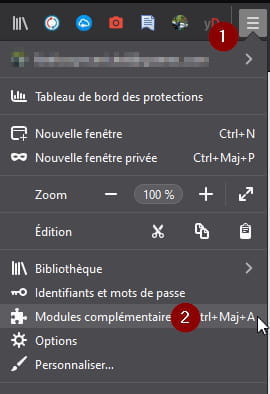
See if there is any Firefox add-on that might be causing the issue (you can easily disable/enable them one by one to test)
 .
.
-
Hello,
Thank you for your great patience, but everything is back to normal. It would take too long to explain it to you and you would think I'm "slow-witted" if you knew how I got trapped....Thanks again and sorry for wasting your time.
Lizzy-
You would take me for a "dimwit"
So know that I would never take anyone for a dimwit :-)
For me, there are those who know and those who don't know yet. No shame in that.
However, without a solution, this post isn't worth much, even if the resolution seems "obvious." If you provided the explanation, someone else who is not familiar with computers might recognize it and thus be helped.
-
