
Asus X206H notebook sound card drivers
Solved
jpfda
Posted messages
10
Status
Member
-
kaneagle Posted messages 86288 Registration date Status Moderator Last intervention -
kaneagle Posted messages 86288 Registration date Status Moderator Last intervention -
Hello everyone, after reinstalling Windows 10, which could no longer update due to lack of hard drive space (32 GB), I have no sound, no touchpad, and the mini SD card reader no longer recognizes it.
I went to the Asus support site, but I can't find anything!
Can someone please help me?
I've spent hours on this....
Thank you
I went to the Asus support site, but I can't find anything!
Can someone please help me?
I've spent hours on this....
Thank you
21 answers
- 1
- 2
Next
-
Download and install --> 7Zip 64 bits
Right-click on the driver --> SOCPackage_CHT_Intel_Win10_64_VER105.zip
Select --> 7Zip
Choose --> extract to "SOCPackage_CHT_Intel_Win10_64_VER105\"
Go to Device Manager
Right-click on the device
Update driver
Browse my computer for drivers
Browse
Go to the extracted driver folder --> SOCPackage_CHT_Intel_Win10_64_VER105
Folder --> 105
Folder --> 3807
Select the folder --> Drivers
OK, next
Restart.
Do the same for the other devices.
--
Human beings are at their best when things are at their worst. -
-
Hello.
You can search for a driver by its identifier. See here: https://www.malekal.com/rechercher-pilote-peripherique-inconnu-identifiant/
Best regards -
Hello,
Try this driver --> Intel
Unzip the driver
Go to the unzipped driver folder --> SOCPackage_CHT_Intel_Win10_64_VER105
Folder --> 105
Folder --> 3807
Run the setup.exe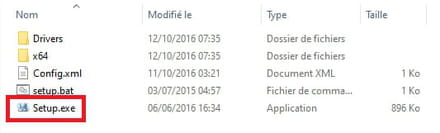
--
Humans are at their best when things are at their worst. -
Hello,
Thank you very much for your help, but the driver is not working...
An error is occurring... -
an error occurred ...
What is the error?
--
Human beings are at their best when things are at their worst. -
-
Press Windows + R
Type --> winver and OK
What is the version?
Example image:
Also, is Windows 10 32 or 64 bits?
--
Human beings are at their best when things are at their worst. -
-
Windows Key + X
Device Manager
Do you have a section --> other devices?
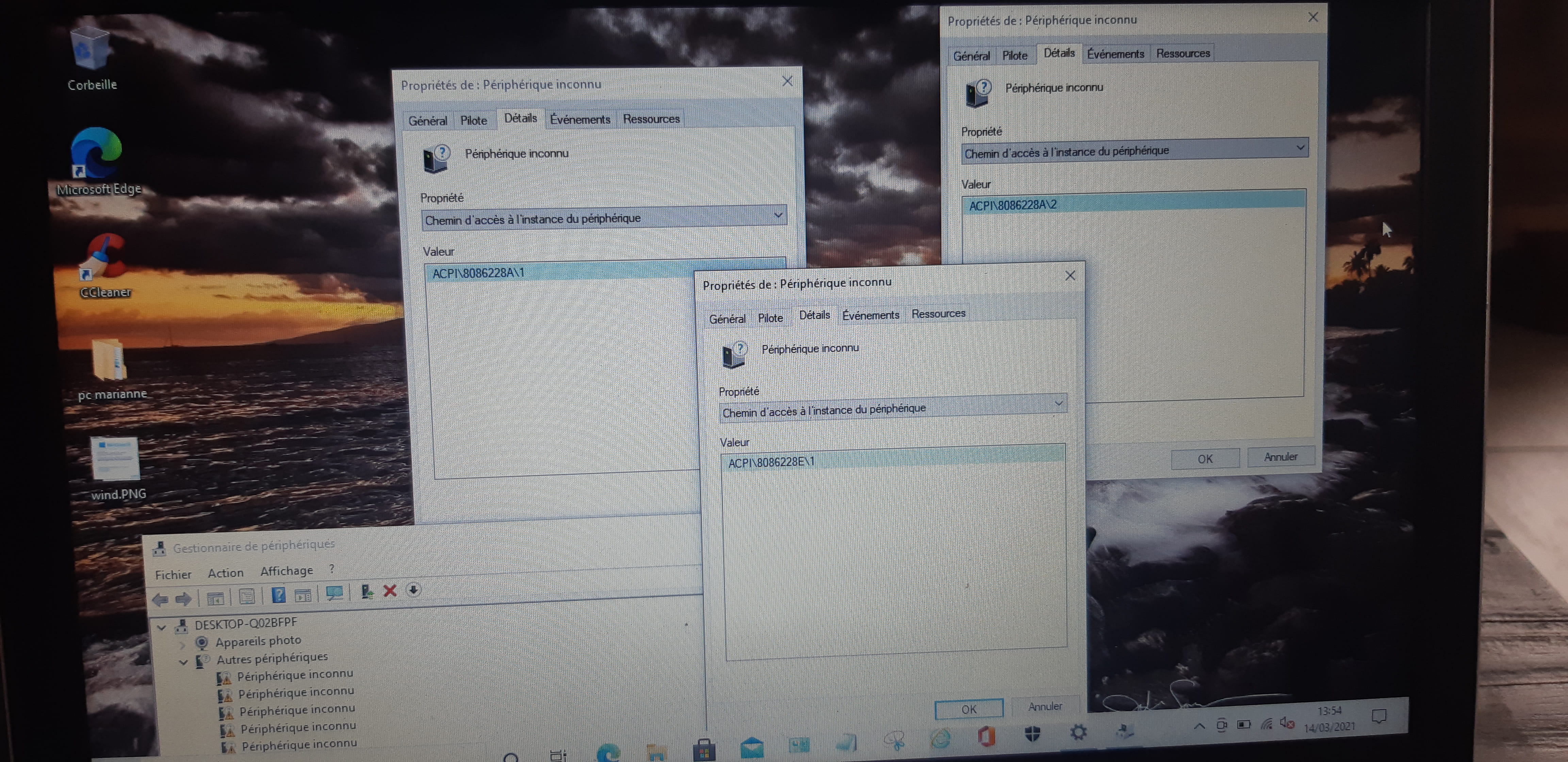
If so, please provide the hardware IDs of the problematic devices
Check this out --> Find a device's hardware ID
Post the IDs in your next message.
Is Windows 10 32-bit or 64-bit?
--
Human beings are at their best when things are at their worst. -
-
Identification number of unknown device peripherals?
To start, give the first 4.
--
Human beings are at their best when things are at their worst. -
-
-
Hello, thank you very much;
It's not working!
If I uninstall the Connexant L25... I no longer have the "video and game controller"
A message tells me that the best driver is already installed.. -
Go to Device Manager
Right-click on the device --> ACPI\8086228A
Update driver
Browse my computer for drivers
Choose from a list of drivers...
Have Disk
Browse
Go to the folder of the unzipped driver --> SOCPackage_CHT_Intel_Win10_64_VER105
Folder --> 105
Folder --> 3807
Folder --> Drivers
Folder --> UART
Select the file --> iauarte.inf and OK.
Restart.
--
Human beings are at their best when things are at their worst. -
-
Following this new manipulation.
There is one less "unknown device"... -
Go to Windows Update and check for updates.
--
Human beings are at their best when things are at their worst. -
Thank you, but I have done it several times...
I don't know what to do anymore...



- 1
- 2
Next