Aukey br08 and Philips ph805bk
Solved
Leika2015
Posted messages
7
Status
Member
-
Couros -
Couros -
Good evening everyone, I have just registered on this forum that I frequently visit. I must admit this time I haven't found the solution to my problem! I'm turning to you hoping that you could help me solve my issue?
Thanks in advance for your assistance.
Issue: I recently ordered a Bluetooth device to connect to my Philips TV either via jack, RCA, or coaxial, all so I could use my Philips ph805bk Bluetooth headset. I can't seem to pair them. The Aukey is flashing but doesn't detect anything, and the headset just says pairing and nothing else.
I tried connecting my iPhone to the Aukey, and that works fine, so I don't understand why it doesn't recognize my headset. It’s true that there’s no display to pair it, but still...
Have I forgotten a step, or should I do something else? I'm a bit lost here!
Thank you for any feedback, have a good evening, and I look forward to hearing from you.
Patrick,
Thanks in advance for your assistance.
Issue: I recently ordered a Bluetooth device to connect to my Philips TV either via jack, RCA, or coaxial, all so I could use my Philips ph805bk Bluetooth headset. I can't seem to pair them. The Aukey is flashing but doesn't detect anything, and the headset just says pairing and nothing else.
I tried connecting my iPhone to the Aukey, and that works fine, so I don't understand why it doesn't recognize my headset. It’s true that there’s no display to pair it, but still...
Have I forgotten a step, or should I do something else? I'm a bit lost here!
Thank you for any feedback, have a good evening, and I look forward to hearing from you.
Patrick,
4 answers
-
Hello,
Silly question but you never know...
Is the Aukay set up as a receiver (RX) or transmitter (TX)?
Which audio output is it connected to on the TV?
It's very hard to catch a black cat in a dark room.
Especially when it's not there... -
Hello Baladur, actually I tested all the RX and TX outputs, I swapped everything around while resetting the Bluetooth each time. I did this for the Jack, RCA audio output, and Optical, it doesn't change anything at all. I don't understand!
-
The Aukay must be in TX transmitter mode... the headset being the receiver.
So it's in this configuration that it must be paired with the headset...
Then what is the model of this Philips television, as not all audio outputs are necessarily in service.
The optical output, among others, must be configured in the sound menu of the television.
-
-
Baladur13,
Here is what you asked me for:
Model: Philips 43PUS6503/12
Serial: FZ1A1821033879
I tried what you told me, but it doesn't work!
Looking forward to hearing from you,
Patrick-
Ok
The television only has two types of audio output...
- The headphone output (3.5mm jack)
- The optical output.
The RCA connectors are inputs
Were you able to pair the headphones with the Bluetooth transmitter?
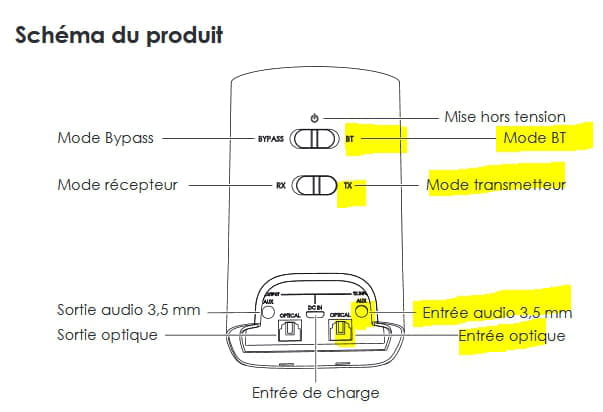
You need to be on BT, on TX the connector to use (optical or jack) is on the right
see https://www.amazon.fr/AUKEY-Recepteur-Adaptateur-Connexions-Ordinateur/dp/B07L4GP3LH?ref=dp_vse_ibvc0
and
https://images.aukey.com/en/downloads/20190521170903-BR-O8_User_Manual.pdf -
I've redone all the manipulations again, right and left, with the optical or the jack input, nothing works! I tried the box on my mini chain and it doesn't work either! However, I can connect my AirPods but I don't receive any sound! I've also checked the TV settings, especially for the sound and output mode, nothing interesting, the usual multichannel stuff, Dolby, and... nothing that suggests activating a coax! Only one input on the TV! I wonder if it's a codec issue or 5th generation Bluetooth? Although my TV is only two years old. SBC and APTX, I don't really know what they correspond to, but those are the two standards I have on the Aukey box. Looking forward to hearing from you.
-
-
-
Hello Baladur13, thank you for your help and all the wise advice. I finally found out where the problem was.
For some devices, you first need to activate pairing and then the headset. What happened here is that you had to first initiate the pairing of the headset, wait 2 or 3 seconds, and then initiate the pairing of the Aukey, and everything falls into place. Thanks again for your help, baladur13.
-
-
Hello,
I'm following up on this post regarding my little issue, which is that pairing works... that's good... but never on the first try.
Let me explain, I use it with two headsets, both of which have already functioned simultaneously with the BR-08, so I know it works. The problem is that sometimes, nothing is recognized, it's super random and after about ten attempts I give up because I had planned my evening to watch a movie and not to fiddle with the BT of each of my devices. (At least it's my partner who's getting impatient :-/)
- I've already tried to delete all the devices that the BR-08 had registered (long press 7 sec on BT button)
So to summarize my problem, I would like a systematic result, either it works or it doesn't (and in that case, I abandon what doesn't work), but not a hit or miss for the same action.
Is there a specific order of steps to follow?
Equipment: Sony WH-1000XM3 headset and Padear Mini X3.