Take control of my PC
Solved
TINTIN
-
kaumune Posted messages 22605 Registration date Status Contributor Last intervention -
kaumune Posted messages 22605 Registration date Status Contributor Last intervention -
Bonjour, je cherche où se trouve la fonction pour empêcher l'accès à distance à mon PC lorsque je ne l'ai pas décidé.
12 answers
-
Hello,
Normally, remote access cannot be done without your knowledge since you must invite this trusted person to authenticate and connect.
Now, if you really want to disable this remote access, here’s the method:
1) Open the Control Panel
2) In the left pane, click on "System Protection"
3) Click on the "Remote" tab
4) Uncheck "Allow remote assistance connections to this computer"
Have a nice day and be careful. -
-
In the search area to the right of the "Start" button, simply type "pann" (without the quotation marks) and then click on "Control Panel" at the top of the box that opens.
You will have access to the Control Panel window. -
-
the start button is completely on the right side of the taskbar (black bar at the bottom of the screen) then type in the search area on the right "pann" and follow the procedure described above.
Look at the image on the side
-
I started well, but I don't have the magnifying glass, just options to stop, restart, settings, image, document.
On the right, there's G on the black bar, hidden icons, network internet access, volume, time. -
-
Hello,
At the bottom of TeamViewer, there is a green dot. Ready to secure connection.
If you have a green dot on TeamViewer, it means it's launching automatically at Windows startup. It's up to you to configure it to prevent this startup.
For now, I'm not mentioning TeamViewer because your initial request was simply to disable remote control, no more, no less.
I did start it, but I don’t have the magnifying glass
Simply because it’s hidden. To make it appear, right-click on the taskbar and then click on "Search". Click on "Show search icon".
Have a good day. -
Hello, since I don't master it too well, I ask questions as I notice things and I try to understand what you're telling me.
I will try what you tell me.-
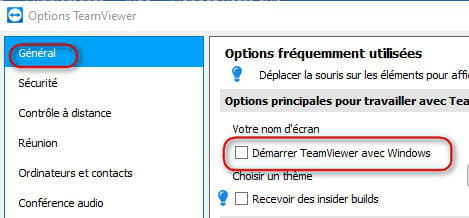
When you have the Teamviewer icon at the bottom right, right-click on it === and click (left) on Show Teamviewer
A window opens
you click on Add-ons === Options === and you uncheck Start Teamviewer with Windows

-
-
-
-
You have a green dot if Teamviewer is launched
Did it start by itself?
Yes, we can take control if Teamviewer is running
Send us a screenshot
How to take a screenshot
-
-
-
Hello Tintin,
If the problem persists after a restart while Teamviewer is disabled, I think the best way to prevent someone from taking control of your computer is to completely uninstall the program.
Teamviewer is not necessary unless you want a trusted person to access your computer. At that moment, you can always download and install it on the PC.
To properly uninstall Teamviewer, go to this link; everything is well explained.
https://www.malekal.com/revo-uninstaller-desinstaller-application-facilement/
Have a good day.-
Why uninstall it, he might need it
It’s better to see why it launches automatically even though the Start Teamviewer with Windows box is unchecked. (If that’s the case, check with a screenshot)
A shortcut stuck in the Startup for example
Check by typing in Run (Windows key + R key)
shell:startup and shell:common startup
If a Teamviewer shortcut is found in one of the (or both) opened folders, delete it
He can also simply delete the password for unattended access
Whoever wants to connect will then have to ask him for the password

-
-
-
You already said that yesterday
https://forums.commentcamarche.net/forum/affich-36569359-prendre-la-main-sur-mon-pc#15
Where is the requested screenshot?
You did not answer the question from 5:41 PM
https://forums.commentcamarche.net/forum/affich-36569359-prendre-la-main-sur-mon-pc#19
Also give us the same one that I posted yesterday at 8:55 AM -
-
-
hi
I can't upload the screenshot yet, I'm not a member.
Post your screenshot via Cjoint --> click here
@+
--
the radiation level is higher at the employment office than in Chernobyl