PC locked "Repair error 0xc0000225"
Solved
NMoo
-
NMoo -
NMoo -
Hello,
Following an update, my computer only boots to the "Repair" screen with error 0xc0000225.
It offers several possible commands (F1 for the repair environment, F8 for restart settings, and Escape for Aptio setup utility), but only the Escape command works, the others just "flash" the screen.
I need your help, I'm clueless about computers...
I've seen several topics on this subject, but none of the solutions are feasible since no commands work except Escape.
Thank you very much
Configuration: Android / Chrome 78.0.3904.108
Following an update, my computer only boots to the "Repair" screen with error 0xc0000225.
It offers several possible commands (F1 for the repair environment, F8 for restart settings, and Escape for Aptio setup utility), but only the Escape command works, the others just "flash" the screen.
I need your help, I'm clueless about computers...
I've seen several topics on this subject, but none of the solutions are feasible since no commands work except Escape.
Thank you very much
Configuration: Android / Chrome 78.0.3904.108
5 answers
-
Hello.
Create a USB key (8 GB) using the Microsoft tool:
https://www.microsoft.com/fr-fr/software-download//windows10
Or through this tutorial:
https://www.malekal.com/windows-10-media-creation-tool/
Once the USB key is ready, insert it into the faulty PC (turned off), go into the BIOS
to set it as the first boot option (First Boot)
Disconnect all USB devices except for the keyboard, mouse, and Windows key.
The system will boot from the latter, in the language selection window click on Next -> Repair your computer -> Troubleshoot
-> Advanced options -> Command Prompt, then type
bootrec /fixmbr (press Enter)
bootrec /fixboot (press Enter)
bootrec /rebuildbcd (press Enter)
exit (press Enter)
restart into Windows 10.
If you do not know how to access the BIOS, please provide the brand and model of the faulty PC. -
-
Hello,
I think you are about to reinstall Windows 10.
The idea is to create a Windows 10 installation USB drive and boot the computer from it to reinstall Windows without formatting, so you keep your data.
Since the computer is crashed, you need to create this from another functional computer.
To create the USB drive:
You need a USB drive with at least 8 GB.- Create a USB drive with Media Creation Tool: Download and create a Windows 10 USB drive with Media Creation Tool
- Boot from it by changing the boot sequence and selecting the USB drive or DVD: How to boot the computer from USB drive
If the USB drive doesn't work, try making another one with Rufus: how to download Rufus.
Download the ISO file, for example, with Adguard: Download Windows ISO
Run Rufus and then specify the path to the ISO file
In partition scheme, choose GPT.
For more details, refer to this tutorial for details: how to create a Windows installation USB drive
The Windows 10 installer should then start:
Follow this tutorial that explains how to install Windows 10: how to install Windows 10.
All the steps are given from A to Z with advice at the end to secure Windows 10.- Let yourself be guided to install Windows 10.
- Choose customize (not upgrade)
- During the partition phase, select the main partition and click next.
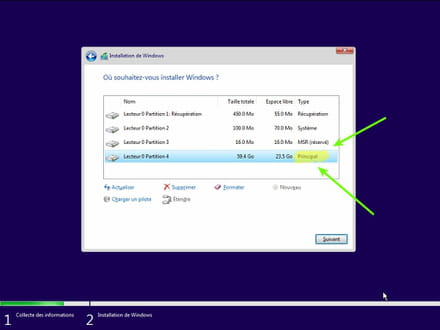
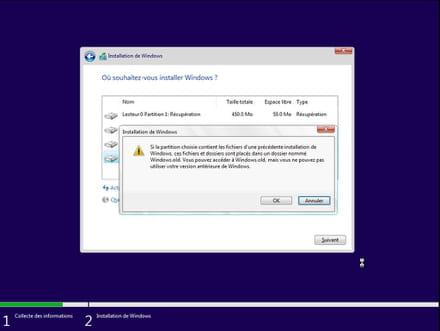
- The installer will tell you that Windows is already present and will offer to move it.
- Follow the Windows installation procedure using the tutorial above.
Just don’t format.
Your user data will be copied to the Windows.old folder.
Once Windows is installed, I recommend following these tips to properly configure and use Windows: Tips after reinstalling Windows.
-
Hello.
You can attempt a system restore to a date prior to the issue. Or check the other options in the attached tutorial ==>
https://www.malekal.com/resoudre-erreur-0xc0000225-windows-10/
See you later . . .
--
" Patience leads to success, haste leads to nothing " -
I thank you all immensely, I managed, after a long ordeal, to recover everything without losing any data!
Fortunately, you were there, and so quickly! Thank you for what you do to help people like me who don't know anything about it at all.
Thank you, and happy holidays to you ????