Set up the PC to start scanning.
Hello.
I just upgraded from Vista to W10 and I'm having issues pretty much everywhere, including with the scan.
I have a Canon MG5753 printer, Pixma type, and the scan refuses to work at all.
I can't use it (see title above) and the manuals or Canon Quick Menu are of no help.
Any information on getting this configuration up and running again will be highly appreciated. Best regards, Tusekoi
I just upgraded from Vista to W10 and I'm having issues pretty much everywhere, including with the scan.
I have a Canon MG5753 printer, Pixma type, and the scan refuses to work at all.
I can't use it (see title above) and the manuals or Canon Quick Menu are of no help.
Any information on getting this configuration up and running again will be highly appreciated. Best regards, Tusekoi
3 answers
-
ModeratorHello,
I think your issue is the one I responded to here:
https://forums.commentcamarche.net/forum/affich-34708545-probleme-numerisation-canon-mg550
See message number 8
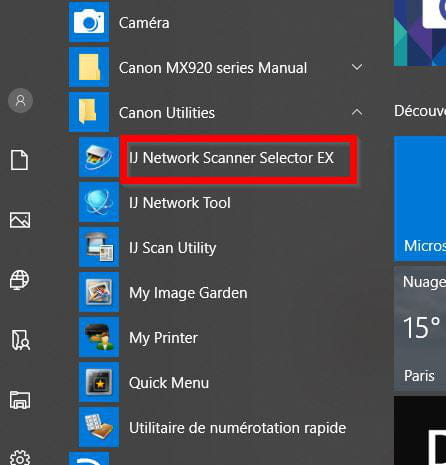
It might be simpler to launch IJ Network scanner selector EX from the Start menu (under Canon utilities) if it is present.
And then check that it launches on Windows startup:
Right-click on the taskbar to open Task Manager. Then check in the Startup tab that the status of IJ Network scanner selector EX is "Enabled"-
Hello Pierr10.
I did try to find this:
C:\Program Files (x86)\Canon\IJ Scan Utility\SCANUTILITY.EXE
but it doesn't exist.
I did look for 'canon utilities' but couldn't find any either. Hence my message despite your message 8.
As for the cnmnstt.exe function, I don't know where to put it?
In the bottom bar? But [the white bar] sends me online, not to open this program!
Where should I enter this famous exe?
Thank you for your response and for your quickness on the previous one.
Best regards, Tusékoi -
Moderator@tusekoiGood evening,
I wasn’t very clear. Let me provide more details:
1) To find Canon Utilities, click left on the Start button and look for it in the list of applications:

2) To launch cnmnstt.exe directly, right-click on the Start button:
From the list, select Run:
Click on Run and in the small window that opens, type the command cnmnstt.exe and confirm.
In the small window that opens, the printer should be present. Close the window without making any changes.
And then check in the task manager that IJ Network scanner selector EX is launching at startup.
-