Editing an Excel table in a Word document
Solved
Hello,
I'm explaining my problem:
I have an Excel table in my Word document. I would like to add a row to this table. The problem is that no matter what I do, when I try to modify this table, it automatically opens Excel (when I want to stay in Word). I've tried double-clicking, right-clicking on the table -> object worksheet -> edit, but nothing works... And as a result, when I add a row in Excel, the number of rows in my table in Word remains the same as before, so the last row gets truncated...
I think this might be due to a Word setting like "automatically open worksheets in Excel," but I can't find how to resolve this issue...
Thank you in advance,
Maxime
I'm explaining my problem:
I have an Excel table in my Word document. I would like to add a row to this table. The problem is that no matter what I do, when I try to modify this table, it automatically opens Excel (when I want to stay in Word). I've tried double-clicking, right-clicking on the table -> object worksheet -> edit, but nothing works... And as a result, when I add a row in Excel, the number of rows in my table in Word remains the same as before, so the last row gets truncated...
I think this might be due to a Word setting like "automatically open worksheets in Excel," but I can't find how to resolve this issue...
Thank you in advance,
Maxime
8 answers
-
Thank you, Raymond, for your response, but I think you misunderstood the question.
To explain step by step what I'm doing:
Blank Word365 file
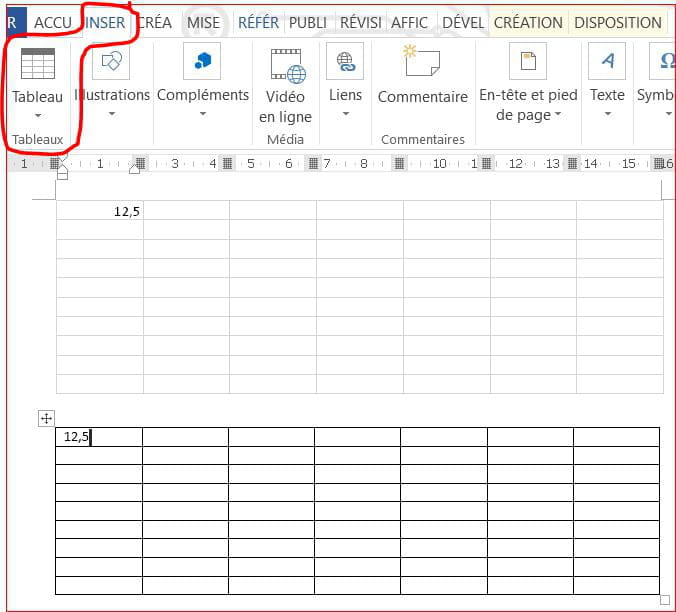
Insert a table in Excel spreadsheet format
A table with 7 columns and 10 rows appears on the Word sheet.
The Excel application launches simultaneously.
I can only fill in those 7 columns and 10 rows. Any additional row is truncated.
In the Word file, changes to this table are treated like an image file because I can stretch or shrink it as well as crop it, but I cannot add rows or columns.
Previously, with earlier versions of Word, by double-clicking on this same table, the column names and row numbers would appear on the same file (Excel was not launched), allowing me to add and delete rows or columns and modify everything. For example, when inserting a row, the last row was not truncated.
What surprises me is that a friend who has the same version of Word and Excel as me, on the same file, can perform the operation I used to do before.
It’s certainly a matter of Word or Excel settings, but I can't see where to make the change.