Windows folder larger than 200GB
Solved
Emeliine13
-
dagnan -
dagnan -
Hello,
I realize that I only have 24GB of free space left on my computer, Windows 10. However, I have absolutely nothing on this computer; I only use it to take my classes. So there is no reason for there to be so little space. Looking at the size of the folders on my hard drive (C:), I see that the Windows folder takes up over 200GB! During a disk cleanup, I noticed that these were temporary files, but they do not get deleted even after cleaning. Not even with CCleaner.
How is this possible? How can I free up all this space?
Thank you in advance for your responses.
I realize that I only have 24GB of free space left on my computer, Windows 10. However, I have absolutely nothing on this computer; I only use it to take my classes. So there is no reason for there to be so little space. Looking at the size of the folders on my hard drive (C:), I see that the Windows folder takes up over 200GB! During a disk cleanup, I noticed that these were temporary files, but they do not get deleted even after cleaning. Not even with CCleaner.
How is this possible? How can I free up all this space?
Thank you in advance for your responses.
6 answers
-
Hello,
To free up disk space, you can start with a Windows cleanup:
Windows key + R
Type cleanmgr
Perform the cleanup.
Then, follow this tutorial: how to free up disk space on Windows
From the link, use WindirStat to visualize what is taking up abnormal disk space and clean it up accordingly.
Try to determine what is taking up abnormal disk space with WindirStat.
It is important to use the WindirStat program to see what might be taking up space, feel free to upload a screenshot if needed.
-
-
-
-
Look there to delete the CBS.log file: https://www.malekal.com/cbs-log-prend-de-place-disque-dossier-windows/
and:
Generate the Windows Update log: https://www.malekal.com/recuperer-windowsupdate-log/
it will be found on your desktop
send it to https://pjjoint.malekal.com
Give the link here. -
On the command prompt I have:
C:\Windows\system32>sc stop TrustedInstaller
[SC] ControlService failed(s) 1052 :
The requested command is not valid for this service.
C:\Windows\system32>del /F /Q %windir%\Logs\CBS\CBS.log
C:\Windows\Logs\CBS\CBS.log
The process cannot access the file because it is being used by another process.
C:\Windows\system32>sc start TrustedInstaller
[SC] StartService failed(s) 1056 :
An instance of the service is already running. -
-
-
Hello,
You know you can also go to your files, then to This PC or Computer, then select your C drive, click on the Windows folder, then on Software Distribution, then click on Download, and there you have all your temporary files. Now throw everything in the recycle bin and empty your recycle bin. I hope this answer helps you, Best regards, Aymane Berrabah. -
Hello,
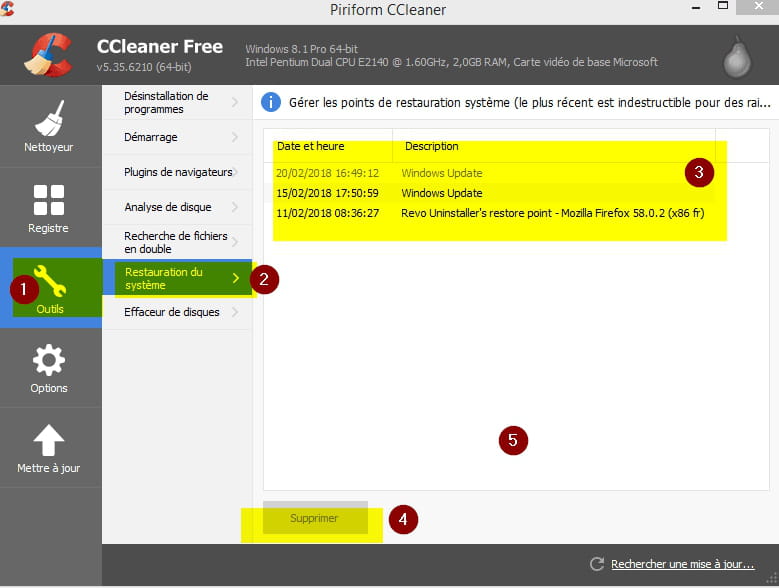
Otherwise, you could delete the restore points with CCleaner; this solution allows you to free up a lot of space...
---
-
-
-
In the solution proposed by Malekal_morte (whom I salute by the way), there are actually two steps; after the first one, you need to click on "Clean up system files." The first step doesn't delete much:
https://forums.cnetfrance.fr/tutoriels-windows-10/481907-windows-10-voir-ce-qui-prend-de-la-place-et-gagner-de-l-espace-sur-le-disque-dur -
-
-
Well, download this software:
https://www.01net.com/outils/telecharger/windows/Utilitaire/systeme/fiches/tele133636.html
https://www.01net.com/outils/telecharger/windows/Utilitaire/systeme/fiches/postele133636.html
Once it has searched for unused files, you will need to click on "Delete" ...
-- -
Hello,
What software did you use?
AdwCleaner can clean temporary files..
Also check the installed applications to see if you can uninstall any.