PC reset and deleted applications.
Solved
Missratatine
Posted messages
44
Status
Member
-
pistouri Posted messages 19010 Registration date Status Contributor Last intervention -
pistouri Posted messages 19010 Registration date Status Contributor Last intervention -
Hello
I updated to W10. The update went well and it restarted my PC, and then surprise: a file named "Deleted Applications" appeared and now there’s nothing on my computer: no videos, no photos, no Avast, no CCleaner, no Adobe, no Open Office, no Skype, no folders, no applications, in short nothing, and a PC that’s slow with a black screen on startup (about 5/7 minutes to get to the desktop and then about 10 minutes to open my files and folders, which are all empty by the way). Sometimes it freezes and I have to turn it off because I can’t access the task manager. I also can't access safe mode, it freezes and nothing happens.
This PC was working perfectly under W10 before this update,
I had a VHS file because I’m putting old VHS tapes onto an external hard drive and the VHS file has disappeared but I can’t see it in deleted applications; however, I still have the same free space on my external hard drive, suggesting that my files are still there but I can't see them.
I didn’t touch anything during the W10 update.
This update reset my PC without me asking.
I also cannot perform a restore to an earlier point, I have none left! No restore date; it seems as if I’ve never done any while I regularly do it.
Has anyone had this problem and can help me recover my videos? They are old VHS tapes and I'm not sure I can get them back?
The rest I can reinstall by downloading, and I had backed up my documents on Open Office to a USB drive. Only my VHS were not yet backed up because I need to buy an external hard drive to store my VHS, but my VHS folder was indeed well saved.
Thank you all if you can help me.
I updated to W10. The update went well and it restarted my PC, and then surprise: a file named "Deleted Applications" appeared and now there’s nothing on my computer: no videos, no photos, no Avast, no CCleaner, no Adobe, no Open Office, no Skype, no folders, no applications, in short nothing, and a PC that’s slow with a black screen on startup (about 5/7 minutes to get to the desktop and then about 10 minutes to open my files and folders, which are all empty by the way). Sometimes it freezes and I have to turn it off because I can’t access the task manager. I also can't access safe mode, it freezes and nothing happens.
This PC was working perfectly under W10 before this update,
I had a VHS file because I’m putting old VHS tapes onto an external hard drive and the VHS file has disappeared but I can’t see it in deleted applications; however, I still have the same free space on my external hard drive, suggesting that my files are still there but I can't see them.
I didn’t touch anything during the W10 update.
This update reset my PC without me asking.
I also cannot perform a restore to an earlier point, I have none left! No restore date; it seems as if I’ve never done any while I regularly do it.
Has anyone had this problem and can help me recover my videos? They are old VHS tapes and I'm not sure I can get them back?
The rest I can reinstall by downloading, and I had backed up my documents on Open Office to a USB drive. Only my VHS were not yet backed up because I need to buy an external hard drive to store my VHS, but my VHS folder was indeed well saved.
Thank you all if you can help me.
9 answers
-
pistouri Posted messages 19010 Registration date Status Contributor Last intervention Ambassador 8 729
Hello,
Open the icon CE-PC on the Desktop

Go to → Local Disk (C)
You should see a folder Windows.old
- This Windows.old folder contains old files and personal folders
Open it
Go to the Users folder
Browse the Documents, Videos, Images folders, in short the folders in Explorer where you placed your
videos
Logically, it’s the Videos folder
If you see them, copy and paste them to an external drive (USB stick for example)
Important
The Windows.old folder will be kept for 10 days and then will be deleted, so don’t waste time
Tutorial Recover files from the Windows.old folder → here
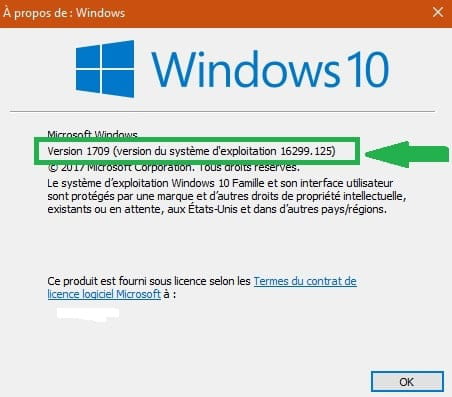
Do you remember the proposed update?
It should be the upgrade from version 1609 to version 1709 for example
In the Cortana search box (or right-click on the Start button and then Search)
Type → winver
Run the command and note the installed version of Windows

++
screwdriver-
Hello
Thank you for your quick response.
I tried to do as you indicated, but the problem is that as soon as I click, the PC freezes.
My file explorer also freezes and then "does not respond." I finally managed to get it to display after leaving it alone for about 10 minutes. I clicked on my PC, and then it froze again. I waited a long time to finally gain access to the folders, but there was no windows.old file, and I couldn't perform a search because it freezes.
Anyway, as soon as I click on a file, it freezes. There's also no way to insert a CD or a USB cable.
I feel like the issue is that my file explorer is unresponsive and causing my PC to freeze.
I also noticed that "Library" has disappeared, and I think my files are in there. I tried to restore the libraries display, but it freezes.
I also observe that when I turn on my PC, I have no trouble accessing the welcome screen and entering the password; it's afterward that things go wrong: black screen, then a desktop that takes a long time to load, and then I can't click on anything, either right or left click.
I was wondering if I removed my hard drive and connected it to an external reader on another PC, do you think I would be able to unlock everything since I don't know how to access my files?
I don't know what update was made because the update started when I shut down the PC. It went without a hitch.
And is it normal that I didn't see the windows.old folder?
Thanks for your help, see you soon.
-