
LibreOffice Calc: Unable to assign a macro to a button
SolvedFantoche1 Posted messages 12 Registration date Status Member Last intervention -
Hello
I created a management file with several sheets. Sheet 1 is the input. Creating a Save button does not allow assigning the macro to automatically fill the other sheets.
The macro works when I edit it and press F5.
But when I create the button and then Tools > Events > Run Action... then I click on Macro... everything closes.
I completely uninstalled LO and reinstalled the latest version from the official site. I’m on Windows 10 CG Nvidia 940MX.
Thanks for your advice
6 answers
-
Hello
1) Is macro security indeed disabled?
Tools > Options > LibreOffice > Security > Macro security: Medium mode
if yes, save the document and reopen
2) Is the form drafting mode properly disabled (form control toolbar wrench icon)
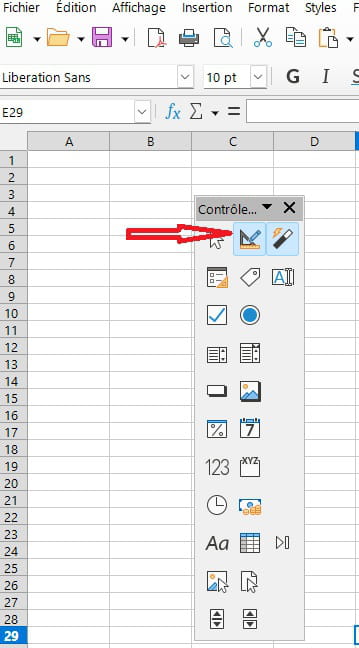
-
Hello
An example of the file would be very handy
Best regards
-
From a blank Calc file... Create a button... Right-click... Controls... Events... Run action... And when clicking on Macro everything closes. It is not possible to access the window to choose the macro. A simple Macro "Msgbox Bonjour!"... works fine from the macro editor... But it is not possible to assign it to a button or a rectangle...
-
-
Hello
Attempt a profile purge
Close Libre Office
press the WINDOWS key (a flag) and R (simultaneously).
-Then type %appdata%
-Find the libreoffice folder
-Rename it Oldlibreoffice -
I’m back to share the research result. With the help of ChatGPT I found a lead. The file pythonloader.py is the culprit. I renamed this file by adding .bak... Then I tested again and everything works fine. The basic macros I had created work with the Save button... which wasn’t the case before.
By leaving .bak on the file, I can continue to progress in my Calc file... the basic macros are functional. But I won’t be able to use complex macros since they would rely on Python. Best regards.
-
hello
great
where is pythonloader.py located?
-
Sorry, I’m back with one final update. The origin of the problem is none other than the antivirus.
In the end, it was Malwarebytes that detected LibreOffice using a system command "cmd" and, for safety, it closed LibreOffice. LO works perfectly without renaming any file. I just unchecked LO among the applications protected by the antivirus.


