Base system device driver not installed
Solved
rotilega
Posted messages
11
Status
Member
-
kaneagle Posted messages 86295 Registration date Status Moderator Last intervention -
kaneagle Posted messages 86295 Registration date Status Moderator Last intervention -
Hello
I tried to reinstall my basic system devices: PCI\VEN_1180&DEV_0843&SUBSYS_18771043&REV_12
and PCI\VEN_1180&DEV_0843&SUBSYS_18771043&REV_12 by following Destrio5's instructions on the forum of how it works by installing 7 zip and http://download.sony-europe.com/PUB/VAIO/Original/Memory_Card_Reader_Writer_Driver_Ricoh_MS_6.3X64_I_6.3.0.61.zip
But I can’t find the folder to proceed.
If someone could help me, please?
My PC is an Asus
Asustek Computer Inc Asus Notebook Windows 7 32bit
processor Intel(r) Core(tm) Duo
Thank you.
I tried to reinstall my basic system devices: PCI\VEN_1180&DEV_0843&SUBSYS_18771043&REV_12
and PCI\VEN_1180&DEV_0843&SUBSYS_18771043&REV_12 by following Destrio5's instructions on the forum of how it works by installing 7 zip and http://download.sony-europe.com/PUB/VAIO/Original/Memory_Card_Reader_Writer_Driver_Ricoh_MS_6.3X64_I_6.3.0.61.zip
But I can’t find the folder to proceed.
If someone could help me, please?
My PC is an Asus
Asustek Computer Inc Asus Notebook Windows 7 32bit
processor Intel(r) Core(tm) Duo
Thank you.
10 answers
-
Hello,
Download this driver --> Ricoh
and place it in your documents.
Right-click on --> sp46999.exe
Choose --> 7Zip
Select --> extract to sp46999
Go to Device Manager
Right-click on the device in question
Update driver
Search for a driver on my computer
Browse
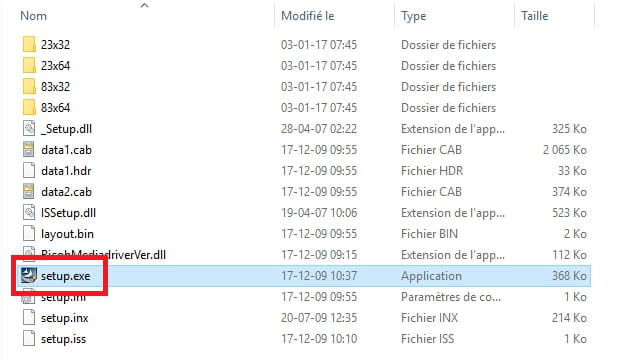
Navigate to the extracted driver folder --> sp46999
Select the folder --> 83x32
OK, Next
Restart
--
Human beings are at their best when things are at their worst.